
If you're spending more time fixing billing mistakes than submitting clean claims, your workflows aren’t working. They’re costing you.
Not just in denied revenue, in time, morale, and trust.
You’ve got smart people doing repetitive, error-prone work across disconnected systems.
Data gets missed.
Codes get copied wrong.
And your team spends the afternoon in a payer portal trying to figure out why something got rejected.
The problem usually isn’t the people.
It’s the process.
And the fix doesn’t have to be a new billing platform or a 9-month IT project.
Sometimes, it’s as simple as removing friction with a tool that knows exactly where the breakdown happens and stops it before it hits your bottom line.
Let’s talk about how to stop putting out fires and start building billing workflows that don’t break in the first place.
What Is a “Broken” Workflow in Medical Billing?
A broken billing workflow doesn’t always look dramatic. It often looks like business as usual:
Resubmitting claims for the third time
Manually copying codes into spreadsheets
Calling payers for status updates your system should’ve caught
But if the same tasks are getting repeated, escalated, or delayed over and over again, you’re not just dealing with admin work.
You’re dealing with workflow failure.
Defining a Broken Workflow
A broken billing workflow is any process that:
Relies too heavily on manual steps
Creates unnecessary delays
Produces avoidable errors
Can’t scale without hiring more people
In other words, if your team is drowning in “busywork just to keep things moving,” the system isn’t working, even if you're getting by.
Common Problem Areas in Medical Billing
Here’s where most billing workflows fall apart:
Copy-pasting between systems: From EHR to billing portal to denial log, every manual touchpoint increases risk.
Manual claim submissions: Especially when different payers require different formats.
Inconsistent documentation: Missing attachments or mismatched codes cause rejections that could’ve been avoided.
Slow authorization handoffs: Prior auths that don’t get attached correctly, or at all.
Delayed patient billing: Because statements are still manually generated or corrected.
None of these are one-off problems. They’re signs that your workflows are duct-taped together.
And the tape is wearing thin.
How Broken Workflows Impact Healthcare Organizations
Broken billing workflows don’t just create more admin work. They create real business problems.
Ones that cost you time, revenue, and reputation.
Here’s how the ripple effects hit your organization from every direction.
Financial Loss
Denied claims. Delayed payments. Missed charges.
It all adds up fast.
A recent study by the American Hospital Association found that administrative complexity, including billing issues, costs the healthcare system over $39 billion annually.
And that doesn’t even include the downstream impact of delayed reimbursements on cash flow.
Every time your team has to resubmit a claim or correct an error, that’s time and money down the drain.
Compliance Risks
When documentation doesn’t match codes, or when claims are pushed through with missing fields just to meet a deadline, your org opens itself up to scrutiny.
A mismatched modifier or a “close-enough” diagnosis code might not seem like a big deal… until you’re dealing with an audit.
Poor workflows aren’t just inefficient. They’re non-compliant by default.
Staff Burnout
This one hits hardest.
Your billing team didn’t sign up to do the same three tasks 300 times a day.
When workflows are broken, they carry the burden, fixing errors, chasing down missing data, and constantly playing catch-up.
Burnout shows up in:
Higher turnover
Lower productivity
Growing resentment for tasks that should be automated
You can’t scale your team if your team is constantly trying not to drown.
Poor Patient Experience
Every error behind the scenes eventually reaches the patient:
Incorrect bills
Unexpected charges
Delayed coverage
Confusing statements that lead to phone calls and frustration
Your revenue cycle isn’t just a financial system. It’s a trust system.
When it breaks, patients notice.
Spotting Broken Workflows in Your Billing Process
Before you can fix a workflow, you have to see where it’s breaking. That means zooming in on the friction.
The repetitive tasks, the small errors, the constant “we’ll just fix it later” workarounds.
Here’s how to spot the weak links before they turn into major problems.
Look for High-Denial Patterns
If you’re seeing the same claim types or payer rejections over and over, you’re not dealing with bad luck. You’re dealing with a broken process.
Questions to ask:
Are certain CPT codes regularly denied?
Are modifiers frequently missing or incorrect?
Are certain payers requiring more rework than others?
Use denial tracking to pinpoint which part of the claim lifecycle is consistently off track.
Track Manual Workload
Start documenting the work no one talks about. The “invisible” steps that waste the most time:
Copy-pasting from EHR to billing system
Manually uploading documentation
Re-entering patient info across portals
If your team is doing the same thing more than once, that’s not efficiency. That’s friction.
Check Time-to-Bill and Time-to-Pay
Long gaps between the patient visit and the final payment are a sign that workflows are jammed.
Ask:
How long does it take to submit a claim after a visit?
How many of those claims get returned for correction?
How long does it take to get paid after submission?
If the clock’s ticking and nothing’s moving, your workflows are stuck in slow motion.
Review Communication Gaps
If your team is using spreadsheets, shared inboxes, or Slack messages to track claim status, you’re relying on manual memory, not process.
This kind of shadow workflow usually means:
Missed follow-ups
Lost documentation
No audit trail when something goes wrong
And that’s not just inefficient. It’s risky.
Once you know what’s broken, you can start fixing it with the help of automation built to reduce admin friction, not add to it.
How AI Can Help You Fix Medical Billing Workflows
You don’t need a new billing system.
You need to stop wasting time inside the one you already have.
That’s where AI comes in. Not to replace your team, but to remove the friction that’s costing them hours and your organization real revenue.
Here’s how healthcare billing teams are using AI assistants to fix what’s broken.
Eliminate Repetitive Tasks with Automation
If your billing team is still:
Copying patient info into payer portals
Re-typing CPT codes from the EHR into a claim form
Manually updating denial logs...
...then you’ve got AI-sized gaps in your workflow.
AI assistants like Magical can:
Autofill fields across systems
Trigger tasks with a single shortcut
Standardize inputs to reduce error rates
It’s the fastest way to cut the busywork and boost consistency, without changing your billing platform.
Improve Accuracy with Smart Suggestions
Most billing errors aren’t intentional.
They’re the result of humans rushing to meet deadlines across multiple systems that don’t talk to each other.
AI assistants reduce those errors by:
Validating field entries in real time
Surfacing context-specific suggestions (e.g., diagnosis-code pairings)
Auto-inserting correct formatting or payer-specific requirements
Fewer mistakes = fewer denials = faster cash flow.
Streamline Cross-System Communication
One of the biggest reasons billing workflows fall apart? The left hand doesn’t know what the right hand is doing.
AI assistants can create smoother handoffs between:
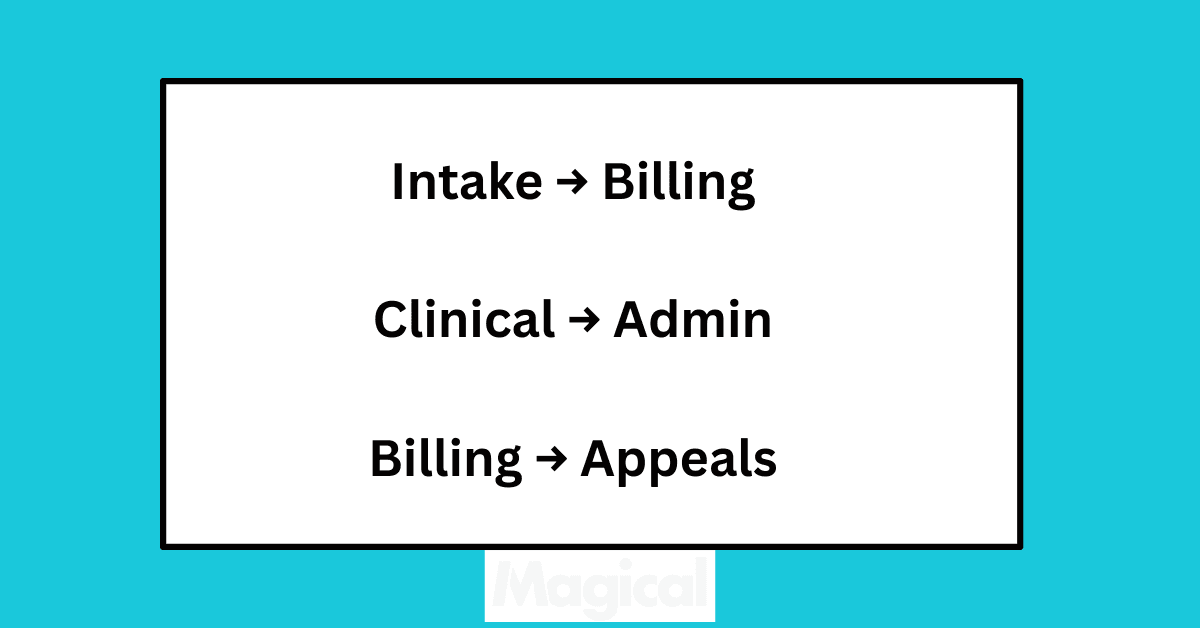
By automating the movement of data (not just the entry of it), AI removes lag time, miscommunication, and duplicated effort across teams.
Enable Proactive Denial Prevention
Don’t wait for the rejection letter to find out something went wrong.
With AI handling front-end claim validation, you can:
Flag incomplete or inaccurate claims before submission
Catch missing modifiers or mismatched codes
Identify repeat issues across specific payers or procedures
And unlike post-submission audits, AI surfaces these issues in real time, before they hurt your revenue cycle.
Case Study Highlight: WebPT Fixes Workflow Friction with Magical
WebPT’s billing team isn’t small, but even with experience and training, they were struggling with the same thing many healthcare orgs deal with: a high volume of repetitive billing tasks across disconnected systems.
They were:
Copy-pasting patient data between EHR and payer portals
Manually fixing claim formatting issues
Spending hours every week on administrative rework
Small mistakes were leading to big delays, and the team was spending more time fixing errors than moving claims forward.
That’s when they brought in Magical.
Without changing platforms or touching PHI, Magical helped WebPT:
Automate copy-paste work across claims workflows
Reduce human error by standardizing repetitive inputs
Cut down processing time for high-volume billing tasks
Result: A smoother, faster workflow with less friction and a 90% reduction in claim-related copy/paste errors.
More importantly, their admin team had time to focus on actual problem-solving instead of constantly cleaning up preventable issues.
Magical didn’t just streamline billing. It gave the team breathing room.
Before vs. After Workflow with Magical AI Assistant
Here’s what a typical billing workflow looks like before AI and what it transforms into after adding a lightweight assistant like Magical.
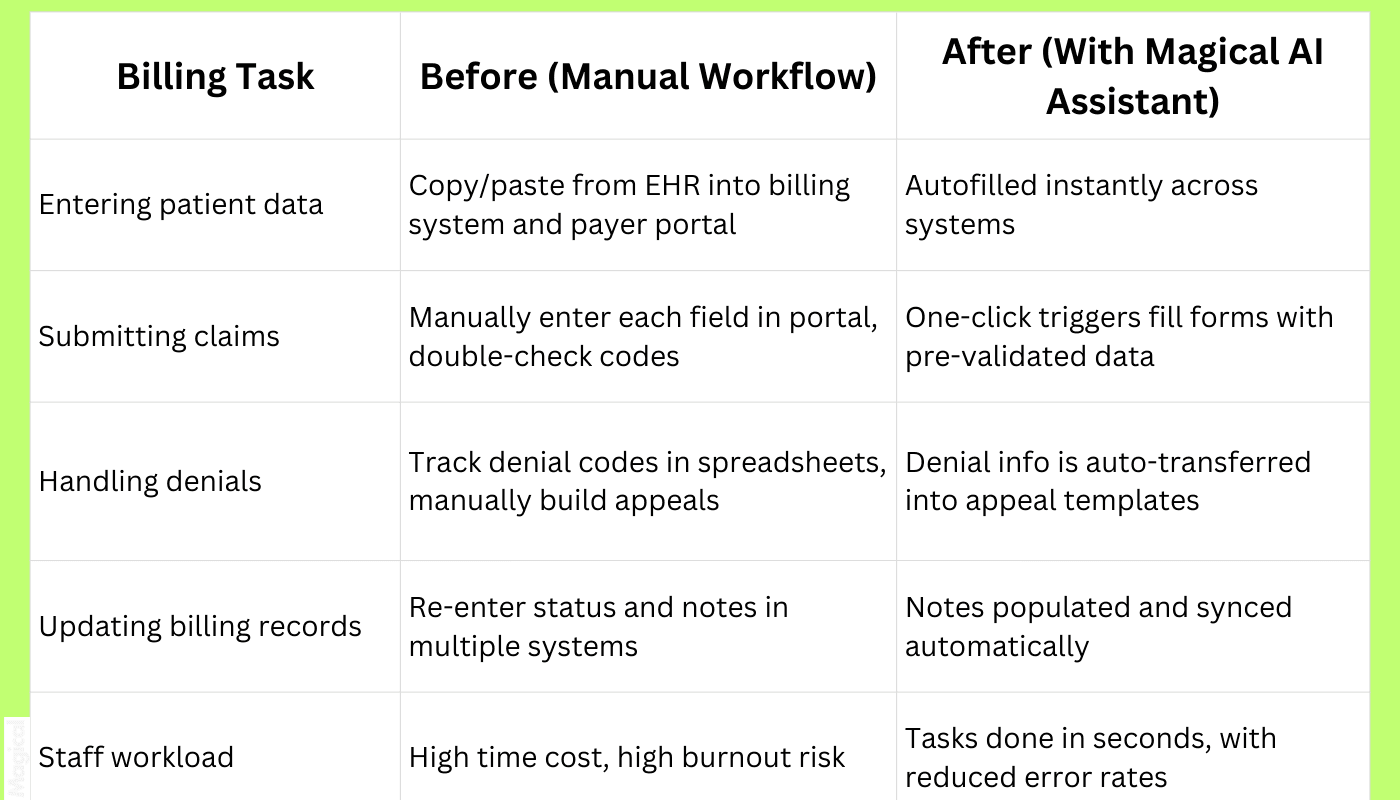
Before Magical:
Dozens of tabs
Dozens of clicks
Constant rework
After Magical:
One command
Fewer mistakes
More time back
Steps to Fix Your Medical Billing Workflows Today
You don’t need a six-figure project plan to improve billing.
You need to start small, solve one high-friction problem, and build momentum from there.
Here’s how leading admin teams are doing it.
Step 1: Map Your Current Process
Before you fix anything, get clear on what’s actually happening, not what you think is happening.
Create a step-by-step breakdown of your billing workflow:
From patient visit to claim submission
From denial to appeal
From payment to documentation
Highlight where things slow down, get repeated, or rely on manual tracking.
Step 2: Involve Your Billing Team
You don’t need a consultant to find inefficiencies. Your team already knows where they are.
Ask your frontline staff:
What slows you down the most?
Which platforms require constant rework?
What would you automate if you could?
Your best insights come from the people doing the work every day.
Step 3: Choose a Smart AI Assistant
You’re not looking for an “AI platform.” You’re looking for a browser-based, HIPAA-conscious assistant that works with your existing tools, not against them.
Choose a solution like Magical that:
Works directly in Chrome
Doesn’t store PHI
Automates task-level workflows inside payer portals, EHRs, and spreadsheets
Requires zero IT lift to implement
Start with something simple. Watch what happens.
Step 4: Start Small and Scale
Don’t roll out across the org. Automate one billing process, like denial tracking or portal submissions, and measure:
Time saved
Error reduction
Staff satisfaction
Then expand into new use cases. Fix the small leaks before they sink the whole ship.
ZoomCare Spotlight: Fast-Tracking Admin Work with Magical
ZoomCare is known for same-day, on-demand care. Patients expect speed.
But behind the scenes, their admin team was weighed down by repetitive billing and documentation work that didn’t match the pace of their clinics.
Instead of hiring more staff or investing in a complex integration project, ZoomCare leaned on Magical to simplify billing workflows right inside their browser.
Here’s how their team used it:
Automated repetitive documentation steps that used to take hours
Streamlined claim follow-ups by reducing manual data transfer
Eliminated redundant copy-paste tasks between scheduling, billing, and payer systems
For a lean admin team, the impact was immediate. They could handle the same workload with fewer headaches, without slowing down patient care.
Magical gave ZoomCare what every healthcare org wants: a billing workflow that runs smoothly without adding more people or more systems.
Results You Can Expect from Fixed Billing Workflows
When billing workflows stop breaking, everything downstream gets easier: faster payments, fewer denials, and happier staff.
Here’s what teams typically see after applying AI assistants to their processes:
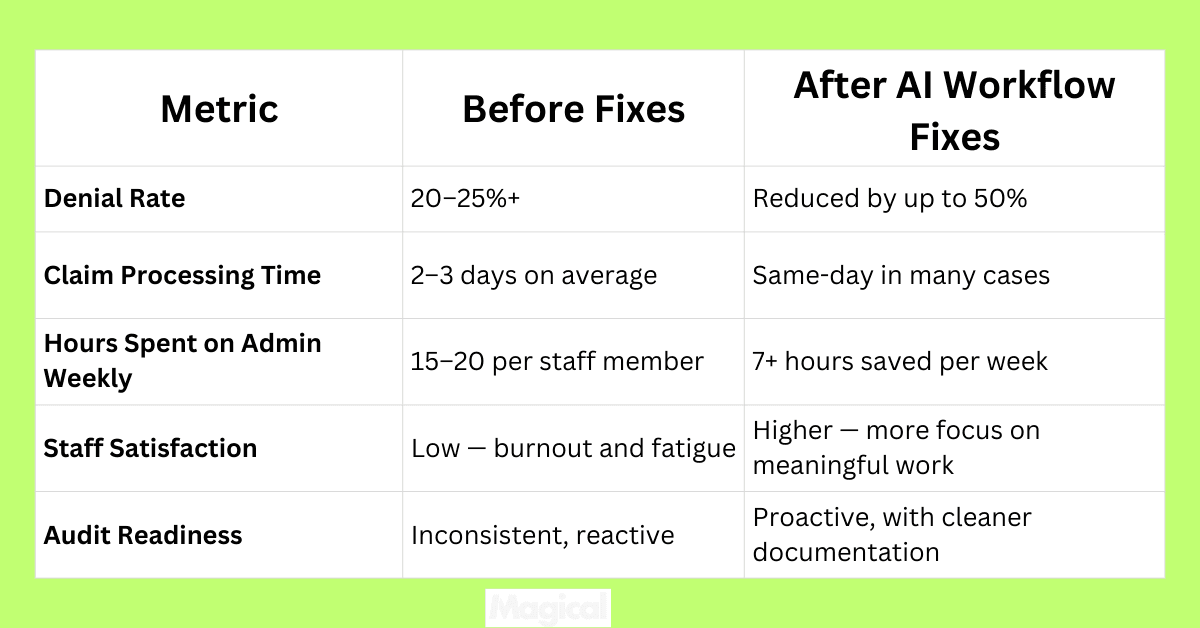
The difference shows up everywhere:
Finance teams see faster cash flow.
Admin teams feel less stretched.
Patients get cleaner bills and fewer surprises.
That’s not just efficiency. That’s a stronger revenue cycle.
Final Thoughts: Get Ahead of Billing Breakdowns with AI
Broken billing workflows aren’t just an inconvenience. They’re a drain on revenue, a driver of burnout, and a liability waiting for the wrong audit to happen.
The good news? They’re fixable.
You don’t need to rip out your systems or spend a year implementing a new platform.
With the right AI assistant, you can remove the friction points (the copy-paste, the endless re-entries, the preventable errors) and give your team back the time they’ve been losing.
Because billing shouldn’t feel like a firefight. It should flow.
And the teams that start fixing their workflows today are the ones who’ll be ready for tomorrow’s challenges.
Ready to Simplify Billing Workflows for Good?
Download the free Magical Chrome extension or book a demo for your team today!
Magical is used at 100,000+ companies and nearly 1,000,000 people to save 7 hours per week on average, fixing broken workflows without touching your EHR or adding more admin headaches.