
The claim didn’t get denied.
It didn’t get approved.
It didn’t go anywhere.
It’s just… sitting there.
Quietly draining your cash flow, tying up your staff, and bloating your backlog.
Multiply that by hundreds (or thousands) of claims a month, and you’ve got a hidden sinkhole in your revenue cycle.
Welcome to the world of EDI hold reports.
They don’t make headlines in healthcare. But behind the scenes, they’re one of the biggest reasons your team is chasing down missing data, resubmitting claims, and burning hours in payer portals and clearinghouse dashboards.
If you’ve ever thought, “Why does it feel like we’re doing everything right and still falling behind?”, this is where you start looking for answers.
EDI in Healthcare: A Quick Primer
Think of Electronic Data Interchange (EDI) as the digital bloodstream of healthcare billing. It’s how patient information, claim data, and payment details move from your systems to your payers….and back again.
No EDI, no money.
In fact, nearly 96% of all claim transactions in the U.S. healthcare system are processed via EDI, according to the CAQH Index. It’s fast, standardized, and should eliminate errors that come with paper forms, phone calls, or faxed PDFs. Emphasis on should.
Because here’s the twist: while EDI is designed to streamline, it only works if every piece of data is perfectly formatted, coded, and complete. One wrong number, one blank field, and the transaction hits a wall.
No error message.
No payer feedback.
Just a quiet stall.
And that’s where EDI hold reports come in. They flag those problem transactions that are stuck in limbo. These reports are created by payers, clearinghouses, or internal systems to identify EDI submissions that couldn’t move forward due to missing or invalid information.
The challenge? Most healthcare admin teams don’t even know these claims are on hold until weeks have passed, or a denial shows up. By then, the damage is done: delayed payments, frustrated staff, and resubmissions that push you further behind.
What Is an EDI Hold Report?
An EDI hold report is the digital equivalent of a blinking red light on your billing dashboard. Except no one tells you it’s flashing until money’s already stalled.
At its core, an EDI hold report is a log or alert generated when an electronic transaction can’t proceed through the healthcare claim lifecycle.
It’s not rejected by the payer (yet). It’s not denied (yet). It’s just… on hold.
Caught in a limbo between your system and theirs, flagged for missing or incorrect information that needs fixing before the claim can be processed.
These reports typically come from clearinghouses, payer systems, or internal revenue cycle platforms, and they’re used to identify claims that failed some kind of EDI validation. That could be anything from a missing patient date of birth, to an invalid diagnosis code, to an insurance plan ID that doesn’t match the payer’s system.
Here’s what a typical EDI hold report might include:
Patient identifiers (name, DOB, insurance member ID)
Payer name and plan
Submission timestamps
Transaction type (e.g., 837 claim, 270 eligibility request)
Hold reason or error code
Status: On hold, pending fix, resubmitted
In other words, it’s a to-do list for your billing or admin team, but without any clear owner, timeline, or system of prioritization.
What makes them so painful? You usually have to go looking for them. In payer portals, third-party dashboards, or backlogs in your PMS.
And until you act, those claims aren’t moving.
They’re not aging toward payment. They’re not getting worked by the payer. They’re just sitting there, racking up time, cost, and frustration.
Why Claims Get Held
The bad news is that most claims don’t get held for complex, obscure reasons. They get held for tiny, obvious things. The kind of stuff a human could catch in seconds if they weren’t buried under hundreds of submissions a day.
And that’s the maddening part. These aren’t big mistakes. They’re repeatable, predictable, and, if you had the right tech in place, totally preventable.
Let’s break down the most common culprits:
Missing or invalid patient information: A mistyped insurance ID. An incorrect date of birth. A name that doesn’t match the payer’s database. It doesn’t take much to trigger a hold.
Formatting issues: Dates submitted in the wrong format. Required fields left blank. Fields populated in the wrong data structure (e.g., SSN instead of ID number).
Coding mismatches: CPT and ICD codes that don’t align with payer expectations. Outdated modifiers. Diagnosis codes that don’t justify the billed procedure.
Eligibility gaps: The patient wasn’t covered on the date of service. Or their plan doesn’t cover the service billed. Either way, the system flags it before it even hits the payer’s adjudication queue.
Duplicate claims: Multiple submissions for the same encounter. Sometimes accidental. Sometimes a misguided attempt to fix a stalled claim.
Timing errors: Submissions sent outside the payer’s filing window. Claims submitted before authorization was approved.
Common EDI Hold Codes
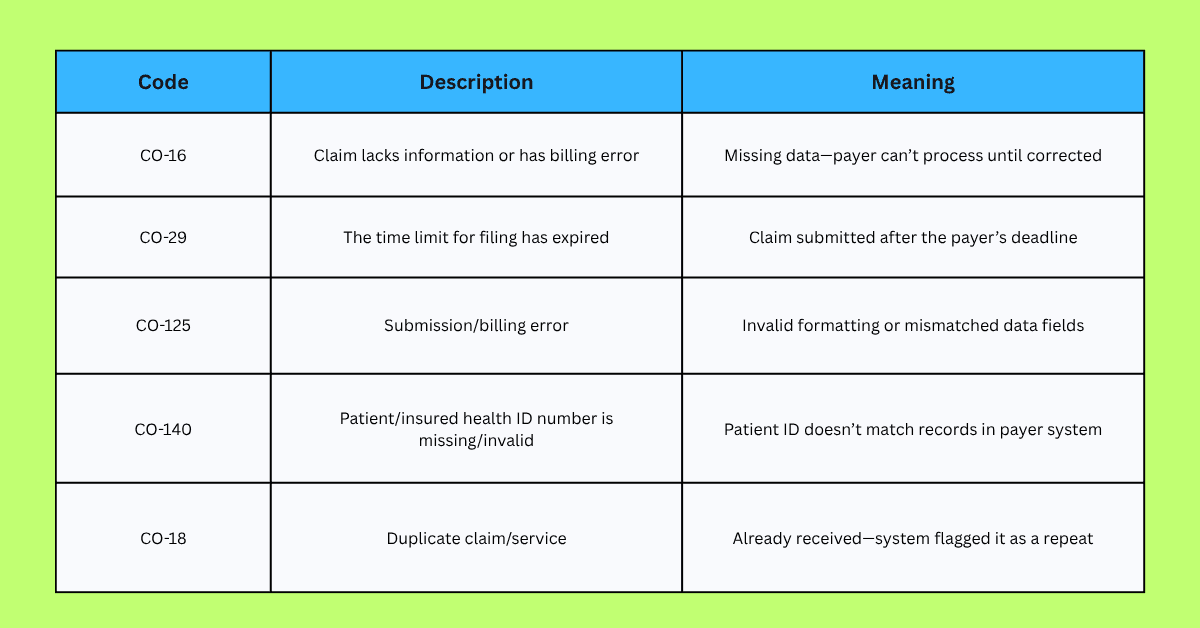
These codes show up in clearinghouse logs or payer responses, but they’re often buried in technical jargon or spreadsheets your team has to dig through manually.
The result: Hours of wasted time. Claims that don’t age. Revenue that stays locked up in administrative purgatory.
But there’s a better way. And it starts with fixing the process, not just the claim.
Why EDI Hold Reports Matter to Admin Teams
If you work in billing or rev cycle management, you already know this: the problem isn’t just that a claim is on hold. It’s that nobody tells you until it’s already costing you.
Claims don’t move. Payments don’t land. And your team spends hours every week trying to figure out why.
Here’s what that actually looks like on the ground:
Revenue gets stuck: Held claims delay reimbursements by days or weeks. That’s cash flow your practice or department is counting on. And the longer a claim sits, the more likely it is to miss filing deadlines, fall through the cracks, or get permanently written off.
Team capacity gets drained: Your most experienced staff, the ones you want solving high-impact problems, are busy reworking minor data issues. Instead of building better workflows, they’re toggling between clearinghouse portals, PMS systems, and EHRs just to correct a missing date of birth.
Work piles up silently: Unlike denials, which trigger clear feedback, held claims don’t scream. There’s no alert. No red flag. Just a slow, quiet backlog that builds up until someone notices revenue’s not where it should be.
Compliance risks increase: The longer a claim is delayed, the greater the chance it’ll hit payer filing deadlines. Miss that window—even by a day—and the claim’s dead. No payment. No appeal. No recovery.
Morale drops: No one gets into healthcare admin to chase down typo-driven errors. It’s tedious, demoralizing, and burnout-inducing. Your team deserves better tools.
In short, EDI hold reports aren’t just a technical issue. They’re a workflow bottleneck, a revenue blocker, and a source of unnecessary stress for teams who already have too much on their plate.
But here’s the good news: manual hold management isn’t the only option anymore.
Next up, we’ll walk through how most teams currently handle EDI hold reports—and why that process is breaking down.
Managing EDI Hold Reports: The Traditional Way
Let’s be honest: managing EDI hold reports the old-school way is a soul-sucking slog.
You don’t have a dashboard. You don’t get real-time alerts. You get a mess scattered across payer portals, Excel exports, clearinghouse queues, and internal billing systems.
Here’s what the “traditional” workflow looks like for most admin teams:
Log into your clearinghouse portal (again).
Dig through a backlog of claim statuses, look for anything marked "on hold," "rejected," or “needs correction.”
Open the EHR or PMS system.
Cross-reference the patient or encounter tied to the held claim. Realize you’re missing key info—insurance ID, CPT code, DOB, etc.
Manually correct the data.
Find the right field, update it, double-check everything, then hope it syncs properly across your systems.
Resubmit the claim.
With your fingers crossed that this time, the clearinghouse doesn’t flag it again for something else.
Repeat. For hours.
For dozens or hundreds of claims per week.
It’s not scalable. It’s not efficient. And in many cases, it’s not even consistent.
One team member fixes a claim one way.
Another does it differently.
There's no standardized process, and no system-level intelligence to prevent the same errors from recurring.
According to industry research from the Medical Group Management Association (MGMA), claim rework (often triggered by front-end errors) costs practices $25 to $118 per claim in time, labor, and revenue impact.
And that doesn’t include the emotional toll of constant context-switching:
From system to system
From claim to claim
From “Where did this go wrong?” to “Didn’t I fix this already?”
Your team deserves better than this kind of digital duct-tape workflow.
Good news: there is a better way.
How Automation Can Fix the EDI Hold Workflow
You don’t need more staff. You need less repetition.
You don’t need more portals. You need less toggling.
You don’t need more dashboards. You need fewer things to fix.
That’s what automation delivers when it’s done right.
In the context of EDI hold reports, automation isn’t just about speed. It’s about eliminating the error-prone steps that cause the holds in the first place.
It catches issues before they hit the clearinghouse. It closes gaps before your team even notices them. It turns claim management from chaos into flow.
Here’s what that actually looks like when you automate:
Auto-Detect Hold Reasons in Real-Time
Instead of manually digging through claim statuses, automation tools can:
Scan incoming EDI transactions
Flag missing or invalid data fields
Identify hold patterns based on payer rules and historical errors
You don’t find the problem. It finds you.
Populate Missing Data Automatically
With the right automation in place, you don’t need to copy and paste from EHRs, portals, or spreadsheets. Tools like Magical can:
Pull correct patient info from prior claims or internal records
Auto-fill form fields across multiple systems simultaneously
Standardize inputs so data formatting is no longer a problem
Resolve and Resubmit Faster
Automation eliminates the need to “rework” claims in batches. Instead:
Holds are fixed in-line, right at the source
Updated claims can be resubmitted immediately
Teams can move from reaction to prevention
Create Consistency at Scale
When claim corrections are automated, they’re consistent—no matter who’s on shift. That means:
Fewer human errors
Easier compliance audits
Reliable results across teams and locations
The result? Less time spent reworking.
More claims processed cleanly the first time.
A billing team that can actually breathe.
In fact, healthcare organizations that use automation in RCM workflows report up to 25% fewer denials and rejections, along with 30–40% gains in administrative efficiency.
This isn’t a theory. It’s happening now, with the right tech.
Which brings us to Magical.
A Better Way to Handle EDI Holds: Magical in Action
Most automation tools promise to make things easier.
Magical actually does.
Built for the kind of high-velocity admin teams that don’t have time to slow down, Magical turns the chaos of EDI hold reports into a streamlined, repeatable, and almost frictionless workflow.
No integrations. No dev resources. No toggling between systems.
Just faster claims, fewer errors, and cleaner data, on autopilot.
Here’s how Magical handles the EDI hold headache:
Detects issues in real time
Magical recognizes when data is missing or mismatched before you submit the claim. Think of it as a second set of eyes that never blink—and never miss a field.
Fills in missing info automatically
Instead of switching tabs or retyping patient data, Magical pulls from existing sources (EHRs, intake forms, billing history) and populates fields instantly. The data goes where it needs to go, formatted the way it needs to be.
Eliminates toggling across platforms
Your team no longer needs to jump between clearinghouses, payer portals, and billing software. Magical sits inside your existing workflows and completes tasks where you’re already working.
Secure and HIPAA-compliant
Magical is built with privacy and compliance in mind. Your data stays protected, your workflows stay audit-ready, and your team stays in control.
The outcome?
Rework hours reclaimed
Backlogs cleared
Admin staff breathing again
Just ask ZoomCare, who used Magical to eliminate repetitive patient data entry workflows—and saved 10 hours per week in the process. Or TCPA, who scaled claim prep automation without hiring additional headcount.
When claims are clean the first time, you don’t just move faster—you stop leaking revenue, morale, and time.
And that’s the real magic.
Real Case Study Snapshots
You don’t need theory. You need proof.
Here’s how teams just like yours are using Magical to clear EDI holds, reduce admin load, and accelerate revenue recovery, without ripping out their existing systems.
ZoomCare: Cutting Through the Noise in Patient Workflows
Challenge: ZoomCare’s team was bogged down by repetitive patient data entry tasks, especially in workflows where accuracy and speed directly impacted claim readiness.
Solution: Magical automated their most time-consuming manual workflows, allowing staff to focus on value-driving tasks.
Outcome:
10+ hours/week saved
Clean, complete data at every step of the billing cycle
Fewer claims stalled due to missing info
WebPT: Scaling Clean Claims Without Scaling Staff
Challenge: As one of the largest outpatient rehab platforms, WebPT needed to scale admin efficiency across a huge claims volume without burning out their staff.
Solution: Magical helped automate cross-system workflows that often led to EDI formatting errors and delays.
Outcome:
Increased throughput
More first-pass claim approvals
Reduced dependency on manual QA and post-submission rework
TCPA: Replacing Repetition with Precision
Challenge: TCPA’s high-volume workflows were riddled with repeat data tasks—copying and pasting between systems just to submit clean claims.
Solution: Magical stepped in to automate data entry, eliminating the human error that so often triggers rejections and holds.
Outcome:
Faster claim prep
Fewer errors from manual input
Workflow scale-up without adding headcount
When EDI hold reports stop being manual problems, your team gets time back, your claims get paid faster, and your business moves like it should.
FAQs About EDI Hold Reports
Is an EDI hold the same as a claim rejection?
Not quite. A rejection typically happens after the claim has reached the clearinghouse or payer and fails validation. An EDI hold occurs earlier, often inside your own billing system or at the clearinghouse, because something is missing or improperly formatted.
Think of a hold as a traffic jam before the highway; the claim hasn’t even left the on-ramp.
Can a claim be on hold and still get paid later?
Yes, if you catch and fix the issue in time. Once the problem (missing info, invalid code, etc.) is corrected and the claim is resubmitted, it can move forward and be adjudicated by the payer.
The real risk is delay—held claims often sit unseen, aging out of timely filing windows or stacking up in rework queues.
How do I know if we’re missing EDI hold reports?
If your team relies on manual status checks across clearinghouses, portals, and internal logs, you’re almost certainly missing some. EDI holds don’t always trigger alerts, and they often look like “invisible backlog.”
A sharp sign: if claims are taking longer than usual with no denial or approval, they might be stuck in hold.
Can automation really fix EDI holds?
Absolutely. Automation tools like Magical are built to detect missing fields, standardize data, and complete repetitive billing tasks without toggling between systems. That means fewer errors, faster corrections, and dramatically less time spent chasing down holds.
Is Magical HIPAA-compliant?
Yes. Magical is designed with privacy and security at the core. It uses secure data handling protocols and aligns with HIPAA requirements to ensure your patient and claim data stays protected every step of the way.
How hard is it to implement Magical into our existing workflow?
It’s not. Magical runs on top of the tools you already use (EHRs, PMSs, clearinghouses) without requiring API integrations, engineering work, or long onboarding cycles. Your team can start automating repetitive tasks within minutes.
Final Thoughts: From Reactive to Proactive with Magical
EDI hold reports aren’t going away. But the slow, manual scramble to fix them? That can end today.
Because the truth is, most of the issues that stall claims—missing data, formatting errors, miskeyed IDs—aren’t complex. They’re just repetitive, predictable, and perfectly suited for automation.
When your team no longer has to hunt through portals, copy-paste between systems, or guess what’s holding up revenue, everything changes:
Claims move faster
Admin stress drops
Revenue flows without friction
Magical helps you get there.
Fast. Secure. No engineering required.
Try the free Magical Chrome extension to start eliminating repetitive billing tasks today or book a demo to see how your whole team can scale smarter with no-code automation built for healthcare.
Stop chasing claims. Start reclaiming your time.