
If your team is still retyping the same data across three different systems, you don’t have a people problem.
You have a swivel chair problem.
Insurance verification in one portal.
Claim submission in another. Denial codes logged in a spreadsheet.
Over and over, click after click, tab after tab.
It’s not just inefficient. It’s expensive.
Every duplicated step is time your staff doesn’t have and revenue your org may never see.
And no, the answer isn’t hiring more people to do the same broken process faster.
It’s eliminating the swivel chair work entirely.
That’s where AI assistants come in.
Not by replacing your billing team. But by taking the constant tab-switching and data re-entry off their plate so they can focus on the work that actually moves revenue forward.
Let’s talk about how to kill swivel chair work in RCM once and for all.
What Is Swivel Chair Work in Revenue Cycle Management?
Swivel chair work is exactly what it sounds like: the constant back-and-forth between systems, screens, and portals just to get one task done.
In revenue cycle management (RCM), it shows up everywhere, and it quietly drains hours from your team every week.
Defining Swivel Chair Work
Swivel chair work happens when your staff has to:
Pull information from one system
Manually re-enter it into another
Repeat the process again for reporting or tracking
It’s not value-added work. It’s digital busywork.
And in high-volume workflows like billing, it compounds into thousands of wasted clicks and keystrokes.
Where It Shows Up in RCM
You’ll find swivel chair work in almost every stage of the revenue cycle:
Insurance verification: Copying patient info into payer portals.
Prior authorization: Entering the same codes and details across multiple forms.
Claims submission: Manually rekeying data from EHR to billing system to payer site.
Denial management: Tracking rejection codes in spreadsheets, then retyping them into appeals.
Payment posting: Updating balances across disconnected systems.
If it requires constant tab-switching and redundant entry, it’s swivel chair work.
Why It’s a Problem
It might feel small in the moment, but swivel chair work has a big impact:
Errors creep in with every manual step.
Claims get delayed because staff are stuck re-entering data.
Costs climb as more labor gets poured into repetitive processes.
Burnout spikes when staff spend most of their day doing work that feels meaningless.
It’s not just a workflow annoyance. It’s a revenue cycle blocker.
The Real Cost of Swivel Chair Work in Healthcare
Swivel chair work might look harmless. Just a few extra clicks here, a bit of copy-paste there.
But across an entire revenue cycle team, it compounds into thousands of wasted hours and millions in delayed or lost revenue.
Here’s what it really costs.
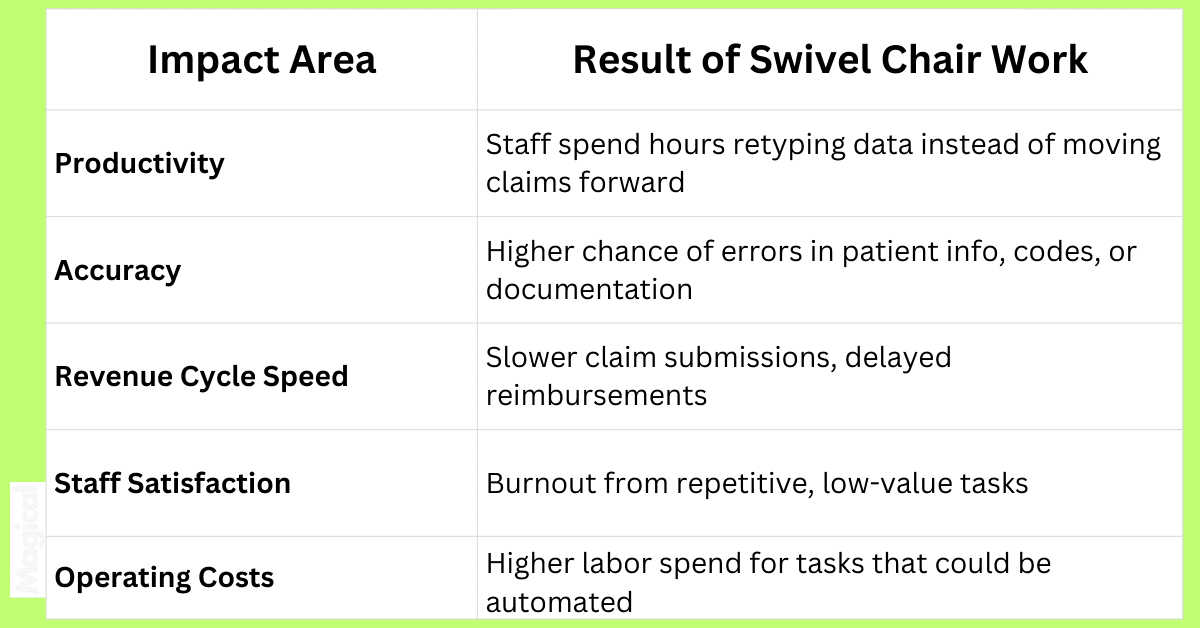
Why It Hits Harder in RCM
Every extra step = extra delay. When staff re-enter claim data across portals, payment timelines stretch.
Every manual click = more risk. A typo in a diagnosis code or missing modifier can turn into a denial, and denials cost time and money to fix.
Every wasted hour = higher churn. According to Becker’s Hospital Review, up to 40% of RCM staff time goes to redundant admin tasks.
The swivel isn’t just annoying. It’s expensive, risky, and unsustainable at scale.
How AI Can Eliminate Swivel Chair Work Without Disrupting Systems
Healthcare billing systems aren’t going to suddenly merge into one perfect platform.
Payers will still use portals. EHRs will still live in their silos.
That’s the reality.
The good news? You don’t have to fix all of that to eliminate swivel chair work.
AI assistants are designed to work between your existing systems, handling the tab-switching and data transfers so your people don’t have to.
What AI Assistants Do Differently
Instead of your team bouncing between screens, AI assistants:
Autofill forms and fields across payer portals, billing systems, and spreadsheets
Transfer data instantly from one system to another
Standardize entries so formatting errors don’t creep in
Log updates automatically, creating an audit trail without extra work
They do the swivel chair work for you. Yay!
No-Code, Browser-Based Tools
One of the biggest blockers to automation in healthcare is integration. Most RCM teams can’t wait 12 months for IT to connect systems.
That’s why the best AI assistants are:
Browser-native (work inside Chrome, no installs needed)
No-code (your team sets up workflows themselves)
HIPAA-conscious (don’t store or transmit PHI)
Tools like Magical fit this model: lightweight, secure, and ready to eliminate admin friction in hours, not months.
Smart Automation for High-Volume Tasks
Swivel chair work shows up most in repetitive, high-volume billing workflows. AI assistants can automate things like:
Insurance verification: Autofilling patient data into payer portals
Denial handling: Pulling codes from EHR and inserting them into appeal templates
Claims submission: Preloading payer forms with visit data
Payment posting: Syncing updates across systems without retyping
No system replacement. No new logins. Just fewer clicks and cleaner claims.
Case Study: How WebPT Reduced Manual RCM Work with Magical
WebPT manages billing at scale for physical therapy practices across the U.S. That means processing thousands of claims, denials, and payments every week.
Before Magical, their RCM team was caught in the swivel chair trap:
Copying patient and claim data between their EHR and billing tools
Manually rekeying information into payer portals
Tracking denials with spreadsheets that required constant updates
The work was repetitive, error-prone, and a huge drag on productivity.
With Magical’s AI assistant, WebPT eliminated the swivel.
Copy-paste tasks disappeared; data moved seamlessly between systems.
Error rates dropped thanks to autofill and standardization.
Claims moved faster because staff weren’t stuck in manual loops.
The results? A 90% reduction in claim-related copy/paste errors and a billing team that could focus on higher-value work instead of endless admin tasks.
Magical didn’t just make WebPT’s workflows faster.
It made them more resilient and far less reliant on human memory or manual processes.
Common Swivel Chair Workflows You Can Automate Today
You don’t have to overhaul your tech stack to start eliminating swivel chair work. Many of the most frustrating RCM tasks are already primed for AI automation.
Here’s what that looks like in practice:
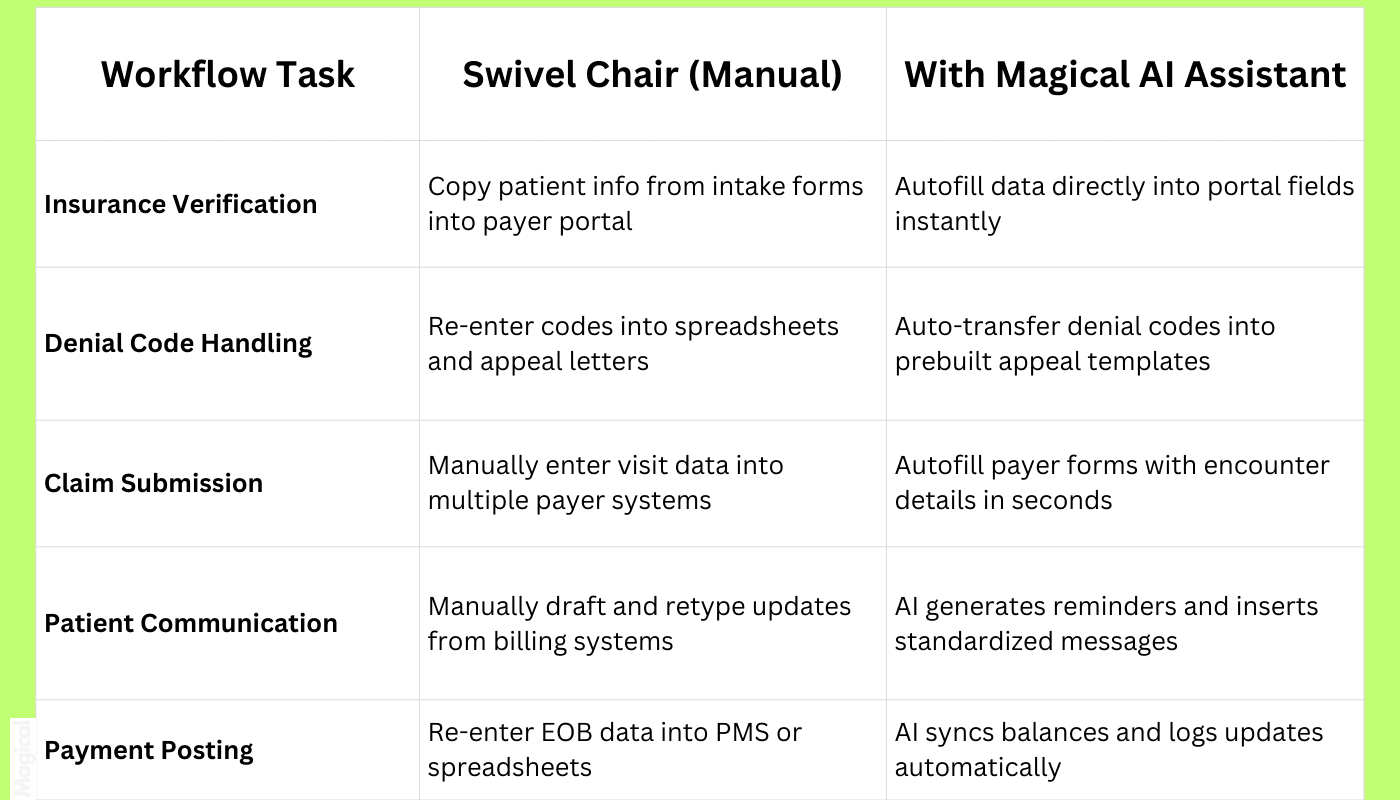
If it requires retyping, re-clicking, or rechecking, it’s swivel chair work.
And if it’s swivel chair work, it can be automated.
ZoomCare Case Study: Scaling Lean Admin Teams with AI
ZoomCare built its reputation on fast, on-demand care. But behind the scenes, their admin team was bogged down by repetitive RCM tasks:
Entering the same patient data across multiple systems
Manually following up on claims and billing records
Copying information into payer portals and internal logs
For a lean back office team, the swivel chair problem wasn’t just frustrating. It threatened their ability to keep up with the pace of care.
With Magical, ZoomCare changed that.
Documentation tasks were automated right inside their browser.
Claims and billing follow-ups became faster, with fewer manual touchpoints.
Copy-paste work disappeared, freeing up hours every week.
The result? Their team could scale workload without scaling headcount.
By removing swivel chair work, ZoomCare didn’t just speed up their revenue cycle. They gave their admin staff the breathing room to do meaningful work again.
Steps to Eliminate Swivel Chair Work in Your RCM Workflow
You don’t need a massive IT project to fix swivel chair work. What you need is a practical, step-by-step plan your team can start using this week.
Here’s how to make it happen.
Step 1: Audit Your Current Processes
Map your revenue cycle workflows from intake to payment posting.
Where is your team retyping information?
Which systems require the most tab-switching?
Where do errors show up most often?
The places where your staff sigh and say, “here we go again” are the swivel chair hotspots.
Step 2: Choose a Task-Based AI Assistant
You don’t need an enterprise automation platform. You need an AI assistant that:
Works in your browser (no integrations required)
Doesn’t store PHI
Automates repetitive data entry across payer portals, spreadsheets, and billing systems
Lightweight tools like Magical are designed for exactly this, letting teams fix processes without IT lift.
Step 3: Pilot a High-Impact Use Case
Start small. Pick one workflow that’s high-volume and high-friction, like insurance verification or denial logging, and automate it with your AI assistant.
Track the impact:
Hours saved
Errors reduced
Claims submitted faster
The wins will speak for themselves.
Step 4: Measure and Scale
Once the first use case delivers results, expand.
Clone successful workflows across teams
Share automation templates
Build a library of repeatable tasks your staff can use anywhere
This is how you go from saving hours a week to saving dozens of hours across the entire department.
Why Eliminating Swivel Chair Work Improves Your Entire Revenue Cycle
Swivel chair work isn’t just an annoyance. It slows down the entire revenue cycle. When you remove it, the benefits ripple across every stage of billing and collections.
Speed Up Reimbursement
Every redundant click adds time between service and payment.
AI assistants cut that lag by moving claims faster and cleaner through the pipeline, which means your organization gets reimbursed sooner.
Reduce Denials
Manual re-entry is where most billing errors sneak in: typos, mismatched codes, missing modifiers.
When AI handles the data transfer, you get cleaner claims and far fewer rejections from payers.
Free Up Your Team
Instead of babysitting payer portals or typing denial codes into spreadsheets, your staff can:
Focus on complex cases
Proactively manage appeals
Support providers and patients
That’s a better use of their time and your payroll dollars.
Boost Morale
No one feels fulfilled copying the same numbers into three systems. When swivel chair work disappears, burnout drops, and retention improves.
Your best people stay longer because their work actually feels valuable again.
Eliminating swivel chair work doesn’t just make tasks faster. It makes your entire revenue cycle stronger, cleaner, and more resilient.
Final Thoughts: It’s Time to Retire the Swivel Chair
Revenue cycle management is already complex. Adding layers of swivel chair work only makes it slower, riskier, and harder for your team to keep up.
The truth is, your staff shouldn’t be spending their days retyping data across systems that will never integrate cleanly.
That’s not the best use of their time or your budget.
AI assistants give you a way out.
They don’t replace your team. They remove the repetitive digital grind that’s been holding them back.
Fewer clicks. Fewer errors. Faster claims.
That’s not just efficiency. That’s a competitive advantage.
It’s time to retire the swivel chair and give your revenue cycle the smooth, streamlined workflows it should have had all along.
Want to Ditch Swivel Chair Work for Good?
Download the free Magical Chrome extension or book a demo for your team today!
Magical is trusted by 100,000+ companies and nearly 1,000,000 people to save 7 hours per week on average, helping RCM teams eliminate swivel chair work without replacing their systems.