
The payment came in.
The service was reimbursed.
But the job isn’t done. It’s just getting started.
For most billing teams, payment posting is the moment a claim’s journey finally closes. Or at least, that’s how it should work. But in reality, posting is where things often fall apart:
Payments that don’t match expected reimbursements
ERAs that don’t map cleanly to claim data
Manual corrections that never get logged
Zero-pay claims that go unnoticed for weeks
Staff stuck toggling between clearinghouses, Excel sheets, and EHRs
Posting isn’t just the “final step” in the revenue cycle — it’s where the truth lives.
What got paid.
What got underpaid.
What got denied.
And what needs attention — now.
When posting is clean, real-time, and connected, your revenue data tells the right story.
When it’s delayed or manual, your team is flying blind, and cash flow suffers.
Let’s cut through the jargon and unpack what payment posting is, why it matters, and how the smartest RCM teams are automating it for speed, accuracy, and control.
Let’s go.
What Is Payment Posting in Healthcare RCM (Really)?
At its simplest, payment posting is the process of recording how much a payer reimburses for a billed medical service.
But in the real world of RCM, it’s a lot more than just “logging a payment.”
It’s:
Verifying that the amount received matches what was expected
Mapping the payment to the correct patient account and claim
Recording payer adjustments, denials, and contractual write-offs
Flagging underpayments or zero-pays for follow-up
Updating internal dashboards and revenue reports
Triggering downstream actions like patient statements or secondary billing
Payment posting is the source of truth for what happened after you submitted a claim.
Two Types of Payment Posting
Type | Description |
Manual Posting | A staff member reads remittance advice (ERA or paper EOB), matches it to claims, enters data line by line |
Automated Posting | The billing system or AI agent ingests the ERA file, applies payments, flags exceptions, updates claims in real time |
According to Kareo, 80 to 90 percent of small-to-mid-size providers still rely on some level of manual payment posting, especially when dealing with multiple payers or non-standard ERA formats.
Why Payment Posting Matters So Much
Payment posting is how revenue gets confirmed. If it’s not posted, it’s not real.
Here’s why it matters:
Revenue tracking: Without accurate posting, revenue reports are incomplete or misleading
Denial management: Unposted denials often go unworked
Underpayment detection: Variances from contracted rates are invisible without proper mapping
Patient billing: Incorrect or delayed postings result in wrong balances being sent to patients
Secondary and tertiary billing: Posting is what triggers the next payer in line
It also closes the claim loop. Until the payment is posted accurately, that claim is still technically open.
The Real Pain Point: Volume and Variation
Posting gets messy because:
ERAs aren’t standardized across all payers
Some payers still use paper EOBs
Denials are buried inside adjustment codes
Contractual write-offs vary payer to payer
Data entry rules vary claim to claim
In a 2024 HFMA study, RCM directors cited payment posting as one of the top three bottlenecks for clean revenue reporting, behind only prior auth and eligibility errors.
If You Don’t Control Posting, You Don’t Control Revenue
It’s not the end of the claim — it’s the moment of truth. That’s why the best RCM teams don’t just post payments.
They engineer payment posting to be:
Fast
Accurate
Automated
Exception-aware
Audit-ready
And that’s exactly what we’ll get into next.
The Biggest Mistakes Teams Make With Payment Posting (And How They Add Up)
Payment posting isn’t complicated in theory. But in practice, it’s high-volume, high-stakes, and high-variability. It’s also one of the most overlooked places where small mistakes can snowball into:
Revenue leakage
Misreported financials
Missed denials
Audit risks
Unhappy patients
Let’s break down the most common posting errors that are quietly killing margins and momentum for RCM teams.
Posting Only the Payment, Not the Adjustments
It’s not just about how much the payer sent. It’s about why that amount came in.
Skipping adjustment codes or contractual write-offs means:
You miss underpayments
You fail to enforce payer contracts
Your financial reports show inflated expected revenue
In a RevCycle Intelligence report, health systems cited contractual allowances and unposted adjustments as one of the top causes of revenue leakage in 2024.
Ignoring Zero-Pay and Partial-Pay Claims
Teams focused on cash posting sometimes skip over ERAs that show:
$0 payment
Partial payment with confusing denial reasons
Pending coordination of benefits (COB)
These are signals, not noise. And when ignored, they:
Never trigger denial follow-up workflows
Delay or block secondary billing
Leave AR falsely “clean” on dashboards
If it’s not posted, it’s not in play.
Posting Without Linking to the Original Claim
Sounds basic, but it happens more than you think — especially in manual systems.
If payments get posted to the wrong
Patient account
Date of service
Encounter ID
...then reporting is wrong, balances are wrong, and reconciliation takes hours (or worse, never happens).
Even worse, this can result in:
Duplicate statements
Patients charged for already-paid visits
Compliance red flags in audits
Not Logging Denial Codes or Takebacks
When a claim is denied and no one logs the denial reason or status code (e.g., CO-97, PR-204), teams lose:
Visibility into denial patterns
The ability to trend by payer or code
Insights into preventable errors upstream (like modifier misuse or LCD mismatches)
It also blocks your ability to appeal or rework the claim on time.
Denial tracking gaps due to incomplete posting can cost mid-size revenue teams millions in delayed AR recovery every year.
Treating Posting Like a One-Way Task
In modern RCM, posting should be:
A trigger, not a dead end
The action that sets off patient billing, follow-up, rework, or closure
Fully integrated into your billing analytics and forecast reports
But in many orgs, it’s still siloed, done in a separate system, with zero audit trail or data sync.
That disconnect causes:
Broken patient billing cycles
Misaligned reports
Gaps in payer performance data
Longer AR days with no clear root cause
How Posting Errors Stack Up
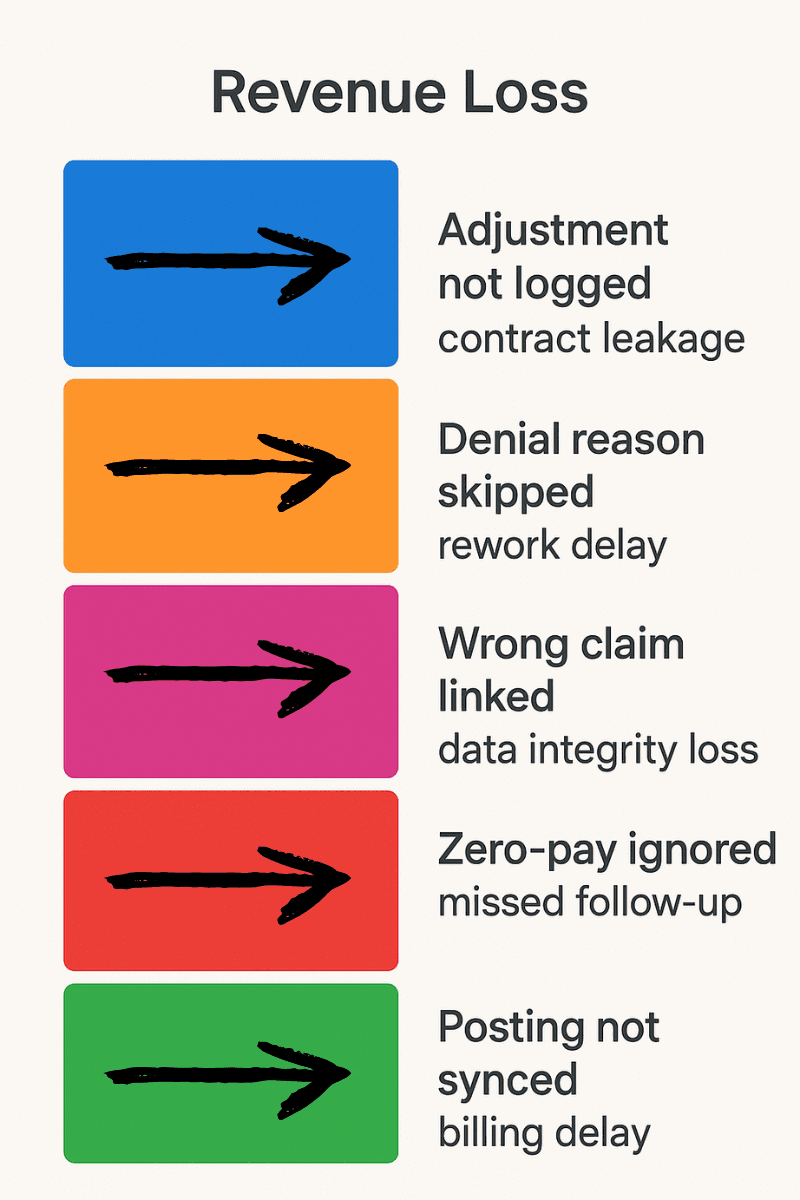
Tiny errors. Big financial outcomes.
Posting Mistakes Don’t Show Up Immediately — Until They Do
You don’t notice them day to day. But over weeks and months, they create:
Reporting gaps
Missed appeals
Delayed cash
Burned-out billing teams doing preventable cleanup
That’s why modern RCM teams are shifting from manual posting to automated, audit-ready payment workflows powered by AI agents — and we’re about to show you exactly how.
How to Automate Payment Posting Without Losing Control or Compliance (5 Steps)
Automating payment posting doesn’t mean handing the wheel to a bot and hoping for the best. It means designing a workflow that’s consistent, scalable, and auditable, without the bottlenecks.
The best RCM teams aren’t just automating payment entry. They’re automating the entire posting ecosystem:
Reading the ERA
Mapping it to the right claim
Logging denials and adjustments
Triggering follow-up or downstream actions
Creating a full audit trail — instantly
Here’s how they’re doing it.
Step 1: Pull and Parse the ERA
The automation starts the moment an electronic remittance advice (ERA) comes in from the payer.
Instead of waiting for someone to download it, open it, interpret the codes, and start typing into your billing system, an AI agent can:
Detect new ERA files across multiple clearinghouses
Parse payment, adjustment, and denial segments (835 files)
Identify zero-pays and partial pays automatically
Flag inconsistencies in expected vs received amounts
Tools like Waystar and FinThrive offer built-in ERA parsing, but they still often require staff to manually link or review claims. AI agents like Magical bridge that gap by taking real action inside your system of record.
Step 2: Match to the Correct Claim and Account
With automation in place, the agent can:
Cross-check patient ID, DOS, and claim ID
Validate against original submission data
Prevent misposts by flagging unmatched or ambiguous entries
Apply payments to the correct encounter — even across different subsystems (EHR, billing, accounting)
This protects your data integrity at scale, even across payers with inconsistent file formats.
Step 3: Post the Payment and Adjustments
Once the match is confirmed, your AI agent can:
Enter the payment amount into the correct system
Apply contractual adjustments or allowed amounts
Log the full transaction with payer, check number, and timestamp
Categorize adjustments (contractual, deductible, coinsurance)
This means:
No more skipped write-offs
No more chasing down check stubs
No more random manual overrides
According to HFMA, RCM teams using intelligent automation for payment posting see 20 to 40 percent faster revenue recognition and fewer write-off disputes with finance teams.
Step 4: Log Denials, Zero-Pays, and Next Actions
If the ERA includes:
Denial codes (CO, PR, etc.)
Takebacks
Coordination of benefits indicators
The agent can:
Log denial codes with descriptions
Trigger follow-up workflows for appeal or rework
Notify billing team if manual action is needed
Add internal notes for downstream resolution
Everything is recorded — nothing falls through the cracks.
Step 5: Sync with Reporting, Patient Billing, and AR Dashboards
With all payments posted and logged, your agent can also:
Update internal dashboards
Sync with patient portals and accounting systems
Trigger patient billing workflows (if balance remains)
Close out paid claims and clean up AR days
No toggling. No spreadsheets. No logging into three systems to close one loop.
What Makes This Work: Agentic Automation, Not Rules-Based Logic
Traditional automation relies on brittle rules — “If X, do Y.” But payment posting is messy, inconsistent, and full of edge cases.
That’s why top-performing teams are using AI agents like Magical, built to:
Navigate web-based portals
Adapt to payer-specific logic
Handle unstructured or semi-structured data
Make decisions in real time based on context, not just code
This isn’t RPA. It’s real AI doing real work — at human speed, without the errors.
Final Thoughts: If You Can’t Post It, You Can’t Prove It — Or Get Paid On Time
You can submit the cleanest claim in the world.
You can fight for every denial.
You can optimize codes, modifiers, and workflows.
But if you don’t post the payment properly, it might as well have never happened.
Because payment posting is the proof.
It’s what closes the loop.
It’s what turns effort into income and errors into insight.
And in 2025, where denials are up and cash flow is tighter, you can’t afford to treat posting like a clerical task. It’s a financial control point. A compliance checkpoint. A strategic advantage — or a silent leak.
Modern Teams Automate Posting to Stay in Control, Not Give It Up
They’re not replacing humans.
They’re freeing them to focus on:
Contract follow-ups
Payer analysis
Denial prevention
Appeals that move the needle
Because the truth is: posting is predictable, repeatable, and full of friction.
And those are exactly the workflows your AI agents should be handling.
Try Magical & Let Your Agents Handle the Post
Magical helps teams in healthcare, finance, and insurance automate the most manual parts of their revenue cycle, including payment posting.
Install the free Magical Chrome extension and start using Magical to:
Parse ERA files
Post payments and adjustments accurately
Log denials and actions for audit trails
Trigger next steps without toggling systems
Because if posting is where the money lands, it should never be where your momentum stops.