
CFOs don’t need another pitch about “transforming the healthcare experience.”
They need numbers.
Where’s the time saved?
Where’s the cost reduced?
Where’s the measurable impact on margins, reimbursements, and staff capacity?
Healthcare automation is no longer experimental.
It’s a financial strategy.
But the market is crowded, and the promises are big. Without real data, it’s hard to tell what’s worth the investment.
And what’s just noise.
This guide breaks down how to evaluate automation from the only perspective that matters at the executive level: ROI.
You’ll get clear metrics, examples from real healthcare teams, and the questions every CFO should be asking before greenlighting another platform.
Why Automation Is a CFO-Level Conversation
The numbers don’t lie. Operating margins across hospitals and healthcare systems continue to hover near zero.
In some segments, they’re negative.
Labor costs are high.
Reimbursement delays are getting worse.
And manual administrative work continues to absorb time and money with little to show for it.
A recent Kaufman Hall report shows the pressure isn’t easing. Even small inefficiencies in admin workflows are now seen as financial liabilities.
This isn’t just an operations problem. It’s a margin problem.
Which makes it a CFO problem.
Admin Teams Are Overloaded with Low-Value Work
Scheduling coordinators.
Billing specialists.
Intake teams.
These roles keep your revenue moving, but most of their day is consumed by tasks that should be automated.
Manually entering claim details into payer portals
Copy-pasting patient data across systems
Re-submitting denials without standardized workflows
Chasing down eligibility responses that should have been automated
All of it costs money. All of it slows down cash flow.
And none of it scales.
Automation Isn't Just About Speed. It's About Control
The real value of automation isn’t just time savings. It’s standardization.
Predictability.
Visibility into where your revenue cycle is leaking time and dollars and the ability to fix it.
For CFOs, this means:
Fewer FTEs required to scale administrative ops
Faster days in A/R and cleaner claims on first submission
Lower compliance risk from manual entry errors
Better use of current headcount without immediate hiring needs
When you invest in automation, you're not just buying software. You're freeing up budget. You’re building capacity without adding cost.
5 Key Metrics to Calculate Automation ROI in Healthcare
Automation doesn’t need to be complex to show value. You don’t need a custom dashboard or six-month pilot.
Most ROI can be measured using metrics your finance and operations teams already track.
Here’s how to calculate ROI that matters based on time, cost, and revenue impact.
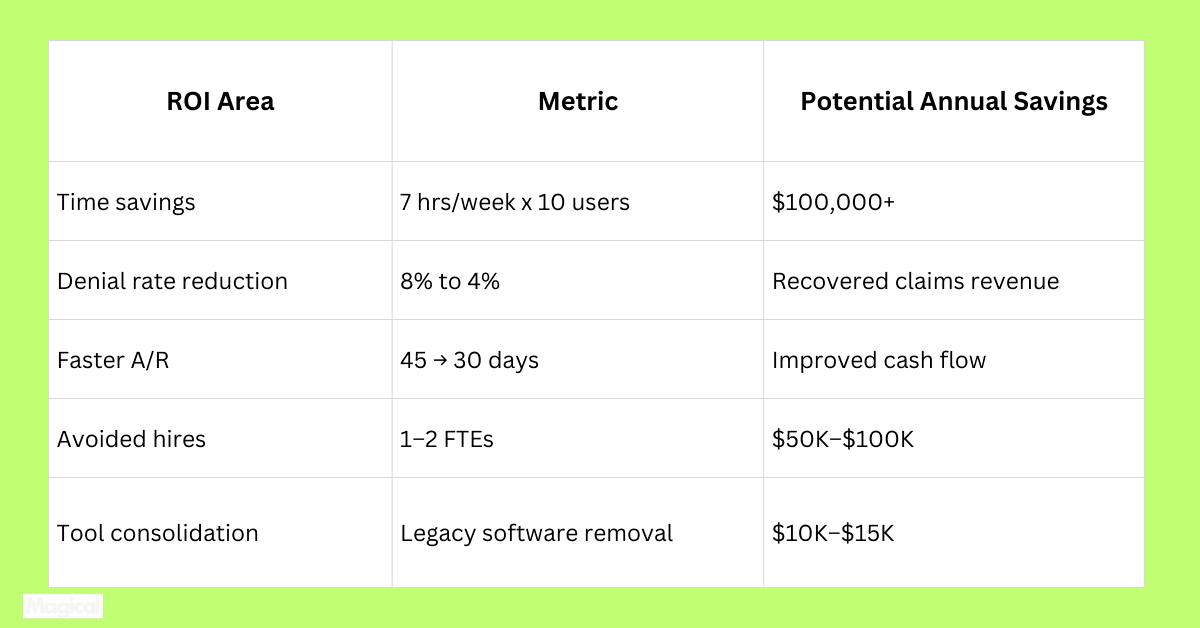
1. Time Saved Per User
Start simple. How many hours are being spent on repetitive tasks per week? Multiply that by the team size and the average hourly wage.
Formula:
Hours saved per week × Avg. hourly wage × Team size = Weekly labor savings
Example:
7 hours × $28/hour × 10 billing specialists = $1,960 saved per week
That’s over $100,000 per year from one team.
2. Error Reduction and Rework Costs
Manual data entry leads to claim errors, denials, and rework. Even small error reductions can recover significant revenue.
Track:
Initial denial rates before and after automation
Cost per denied claim (including time to reprocess)
Time to appeal and recover payment
Improving denial rates by just 5–10% can reclaim millions annually in large systems.
3. Faster Reimbursements (Days in A/R)
Automation helps reduce delays caused by missing information, incorrect submissions, and manual follow-ups.
Measure:
Average days in A/R before and after automation
Net revenue improvement based on faster reimbursement cycles
Example: Reducing A/R from 45 days to 30 can significantly improve cash flow and reduce borrowing or float needs.
4. Staff Reallocation or Cost Avoidance
When admin teams spend less time on repetitive work, they avoid new hires and reallocate existing staff to higher-value tasks.
Calculate FTEs saved per automated workflow
Estimate headcount avoided in the next 12–18 months
Example: 1 avoided FTE = ~$50,000/year in salary + benefits
Multiply that across departments, and the savings compound quickly.
5. Software and Tech Stack Consolidation
Some automation tools replace outdated point solutions or reduce reliance on manual workarounds.
Eliminate overlapping tools
Reduce third-party support costs
Simplify vendor management
Example: Replacing two legacy form tools with one browser-based workflow solution = $12,000/year saved
The Indirect (But Powerful) ROI of Automation
Not every return shows up in a budget line. Some of the most important gains from automation happen behind the scenes, and they add up fast.
Staff Retention and Satisfaction
High turnover in billing and admin roles isn’t just a people issue. It’s a cost center.
Replacing a billing specialist can cost 30%–50% of their salary, once you factor in lost productivity and training.
Automation reduces burnout by eliminating repetitive, low-skill tasks. When staff feel supported by smart tools, they’re more likely to stay and perform better.
Faster Onboarding and Ramp Time
Automated workflows create consistency. That means new hires don’t spend weeks learning manual processes or undocumented workarounds.
Instead of job shadowing and trial-and-error, they’re guided by prebuilt automations that handle the heavy lifting. That shortens onboarding timelines and improves accuracy from day one.
Compliance Risk Reduction
Manual processes are inconsistent. Inconsistency leads to compliance issues, especially when protected health information (PHI) is involved.
Automation ensures:
Standardized workflows across teams and locations
Fewer manual errors that lead to HIPAA violations
Clear audit trails for every task performed
This doesn’t just reduce risk. It lowers the cost of compliance, internal audits, and external reporting.
Improved Patient Experience
Patients don’t care about your backend workflows, but they do notice billing errors, delays, and inconsistent communication.
By automating eligibility checks, payment reminders, and follow-up workflows, your team can deliver faster, more accurate service. That improves patient trust, speeds up collections, and reduces inbound call volume.
These indirect gains don’t always get calculated.
But when they’re missing, the costs show up elsewhere in places like turnover, patient churn, compliance gaps, and operational drag.
Real-World ROI with Magical
Magical isn’t built for theoretical workflows. It’s built for the people doing the work, such as billing coordinators, schedulers, and operations staff who need faster results without adding more software.
Here’s what that looks like in the real world.
TCPA: Lower Costs Without Sacrificing Compliance
TCPA, a multisite practice, needed to streamline patient outreach and admin coordination without compromising HIPAA standards. Their team used Magical to automate time-consuming, repetitive tasks across locations like appointment reminders and claim updates.
Result: A scalable, secure automation framework that protected PHI while saving hundreds of admin hours across teams.
WebPT: Faster Workflows, Zero IT Support
WebPT reduced manual billing overhead by using Magical to automate repetitive browser-based tasks across their platform. No development resources were required. The frontline staff built and launched automations themselves.
Result: Significant time saved per billing team member, with faster throughput and fewer delays in patient processing.
ZoomCare: Automation Without a Systems Overhaul
ZoomCare wanted to improve task efficiency across billing and insurance workflows without switching platforms. Using Magical, teams created browser-native automations to streamline data entry, reduce task switching, and standardize repeatable actions.
Result: 5x faster completion on common workflows, without needing to change their existing tech stack.
Consistent ROI Across Teams
Across industries, Magical users report:
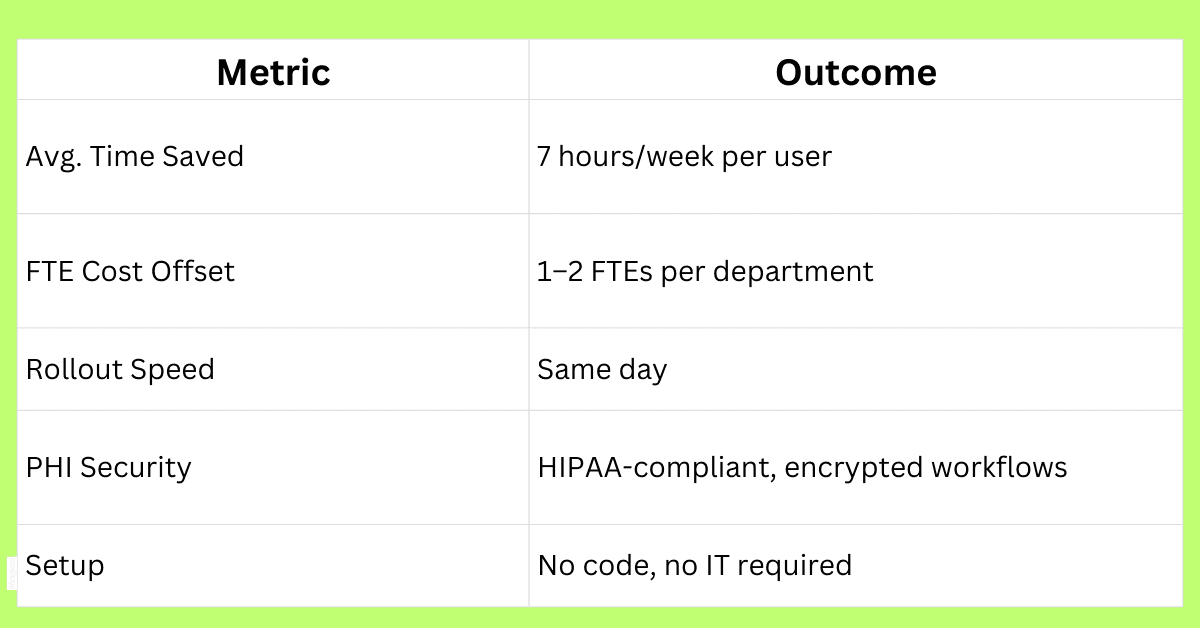
7 hours saved per week, per user
Faster claim status follow-ups
Reduction in repetitive data entry
Improved billing accuracy and staff efficiency
And because Magical runs directly in the browser, there’s no integration work, no long rollout timelines, and no learning curve.
What Makes Automation ‘Worth It’ for Healthcare CFOs
Not every automation tool justifies its price tag. The best ones don’t just reduce labor.
They create long-term financial and operational advantages.
Here’s what to prioritize.
Works Within Your Existing Tech Stack
You don’t need another system to manage. You need something that reduces the workload inside the systems you already use.
Magical runs in the browser, on top of your current EHR, RCM, or clearinghouse portal. There’s no integration work, no data migration, and no disruption to existing workflows.
Enables Teams to Scale Without Hiring
With the right automation in place, billing and admin teams can handle more volume without adding headcount. That improves your team’s output and extends the value of every FTE.
For CFOs, this means scaling throughput without growing payroll.
Delivers ROI From Day One
You shouldn’t need a six-month pilot to prove automation works.
Magical users launch their first workflow in under an hour. Results like faster status checks, fewer claim re-entries, and shorter turnaround times are visible within the first week.
Reduces Risk, Not Just Workload
Every manual process carries risk, especially when protected health information is involved. Automating repeatable tasks reduces the chance of human error, keeps workflows consistent, and gives you audit-ready visibility.
For finance leaders, this translates to fewer compliance issues and better governance.
6 Questions Every CFO Should Ask Before Investing in Automation
Not every automation platform is built for healthcare. And not every “AI-driven” tool delivers real operational value.
These questions will help you cut through the noise and get to what matters.
1. What’s the average time savings per team member?
If the vendor can’t give you a baseline (like hours saved per week per user), they likely haven’t measured it. You need specifics, not generalities.
2. Can this reduce the need to hire more admin staff?
A solid automation platform should support future growth without requiring a proportional increase in headcount. Ask for examples of teams who scaled operations without adding staff.
3. How quickly can we see results?
Look for platforms that deliver early wins within days or weeks, not quarters. If the implementation timeline is vague or open-ended, that’s a risk.
4. Is it HIPAA-compliant and built to handle PHI?
Any automation tool that interacts with claims, patient info, or financial records must meet strict compliance standards. Ask about encryption, access control, and their willingness to sign a BAA.
5. Can we pilot this on a live workflow before committing?
Proof of concept matters. A vendor confident in their tool should be able to show ROI on one core workflow, without requiring a full rollout upfront.
6. Are there documented results from healthcare organizations like ours?
Push past the marketing site. Ask for case studies with teams that mirror your size, structure, and workflow complexity.
Final Thoughts: The Right Automation Strategy Builds Capacity. Not Just Savings
There’s a difference between cutting costs and creating room to grow.
The right automation platform does both. It reduces the hours wasted on repetitive admin work. It helps your team handle more without adding headcount.
And it protects the organization from the hidden costs of errors, denials, and compliance risk.
For CFOs, this isn’t about buying software. It’s about improving margins, increasing throughput, and building financial resilience.
Magical delivers that by making automation accessible to the teams already doing the work, without the long rollouts, system overhauls, or IT dependency.
Try It Yourself
Download the free Magical Chrome extension or book a demo for your team. Magical is used at 100,000+ companies and by nearly 1,000,000 users to save 7 hours a week on average.