
Your admin team didn’t go into healthcare to copy-paste insurance IDs into three different systems.
But that’s what they’re doing.
Every. Single. Day.
Moving between EMRs, billing portals, spreadsheets, and intake platforms like it’s normal to live in 14 browser tabs.
It’s not just slow. It’s burnout fuel.
And it’s costing your org in ways you can measure. And in some, you can’t.
You don’t need another bloated “automation platform” that takes six months to implement.
You need something lightweight, secure, and ready to handle the mindless work so your team can focus on actual healthcare ops.
That’s where AI assistants come in.
Not robots. Not rip-and-replace software.
Just smart, browser-based help that clears the backlog, without breaking the systems you already use.
What Is an AI Assistant in the Healthcare Back Office?
If you hear “AI assistant” and picture a talking robot replacing your team, you’re thinking too big and too wrong.
In the healthcare back office, AI assistants aren’t about artificial general intelligence. They’re small, task-specific tools built to take work off your team’s plate, not take your team out of the picture.
Think of them like supercharged helpers that live inside your browser, understand your workflows, and never get tired of clicking the same five buttons over and over again.
Not a Robot, Not a Replacement
Let’s be clear: AI assistants aren’t designed to make decisions about patient care, clinical judgment, or complex billing issues.
They’re designed to:
Transfer data between systems faster than a human ever could
Autofill forms and fields using the right context
Trigger repeatable workflows with a single command
Eliminate the boring, error-prone work that slows your team down
And they do it without requiring new software, IT integration, or vendor onboarding hell.
Types of Work AI Assistants Handle
AI assistants are perfect for all the high-volume, low-complexity tasks your team does every day, like:
Pulling patient info from EHRs into scheduling tools
Populating claims or prior auth forms
Verifying insurance data on payer portals
Copying denial codes into spreadsheets or appeals
Sending status updates to patients or internal teams
In short? If it involves repetition, structure, and a browser tab, it’s a job for an AI assistant.
How AI Assistants Work Alongside Human Teams
This is not about turning your billing team into AI supervisors. It’s about giving them back the time they’re currently spending on digital janitor duty.
With tools like Magical, the workflow looks like this:
The human triggers the action
The AI fills in the blanks, executes the routine
The human reviews, sends, or moves to the next task
It’s fast, flexible, and puts your people firmly in control. Just with a lot less clicking and a lot more done.
Real-World Use Cases of AI Assistants in Healthcare Admin
You don’t need to imagine how AI assistants could work.
Healthcare teams are already using them right now to move faster, reduce errors, and escape the admin hamster wheel.
Here’s what that looks like in real life.
Patient Intake and Data Validation
New patient onboarding usually means:
Re-entering info from online forms into EHRs
Manually checking for missing fields
Verifying insurance eligibility in separate portals
AI assistants streamline the whole process:
Autofill patient data from form to system
Flag incomplete fields before submission
Trigger eligibility checks with the right inputs preloaded
The result? Intake moves faster. Fewer typos. Fewer delays.
And patients don’t get stuck waiting because of a simple admin bottleneck.
Claims Management and Follow-Up
Claims aren’t complicated. They’re just annoying when you’re dealing with them at scale.
AI assistants can:
Populate claims forms based on patient encounter notes
Track claim status on payer portals
Transfer denial codes and rejection reasons into your appeal templates automatically
This keeps your team out of repetitive task mode and focused on revenue recovery, not just clicking boxes.
Appointment Coordination
Scheduling across departments or locations? Your team’s probably flipping between systems, copying availability from one calendar into another, and manually confirming with patients.
AI can:
Pull availability data directly from internal systems
Draft appointment reminders or confirmations
Insert standardized text across different platforms (without retyping)
It’s like having a virtual admin who handles all the easy stuff while your real team focuses on the exceptions.
Referral and Authorization Support
Referrals often mean pulling previous visit notes, clinical documentation, and patient details, then moving them all into new forms or portals.
AI assistants can:
Extract and autofill referral forms based on past visit data
Attach supporting documentation from source systems
Submit directly to the right portal or fax platform
You stop repeating yourself. Your team stops digging for files. And the patient moves forward without delay.
Case Study Spotlight: WebPT Cuts Admin Time with Magical
WebPT is the largest physical therapy platform in the U.S., and their billing and operations teams were no strangers to repetitive admin work.
Before Magical, their team was spending valuable hours every week copying and pasting information between systems.
Patient data, billing codes, claim notes — it all had to be transferred manually from one tool to another.
It wasn’t just inefficient. It left too much room for small errors that caused big headaches downstream.
Then they started using Magical’s AI assistant.
By integrating Magical into their browser workflows, WebPT’s team was able to:
Eliminate repetitive data entry between platforms
Reduce claim errors tied to formatting and copying issues
Speed up the submission process without changing any of their core systems
One of their key wins? A 90% reduction in claim-related copy-paste errors.
That’s not a marginal gain. That’s a workflow shift.
And because Magical runs inside Chrome, it didn’t require IT involvement, system integrations, or training on a new platform. Just install, set up workflows, and start saving time.
AI made their admin work feel less like a grind and a lot more like progress.
Benefits of AI Assistants in the Healthcare Back Office
AI assistants aren’t a luxury add-on. For most admin teams, they’re the difference between surviving the week and finally getting ahead.
Here’s what happens when you stop relying on humans to do what machines are better built for.
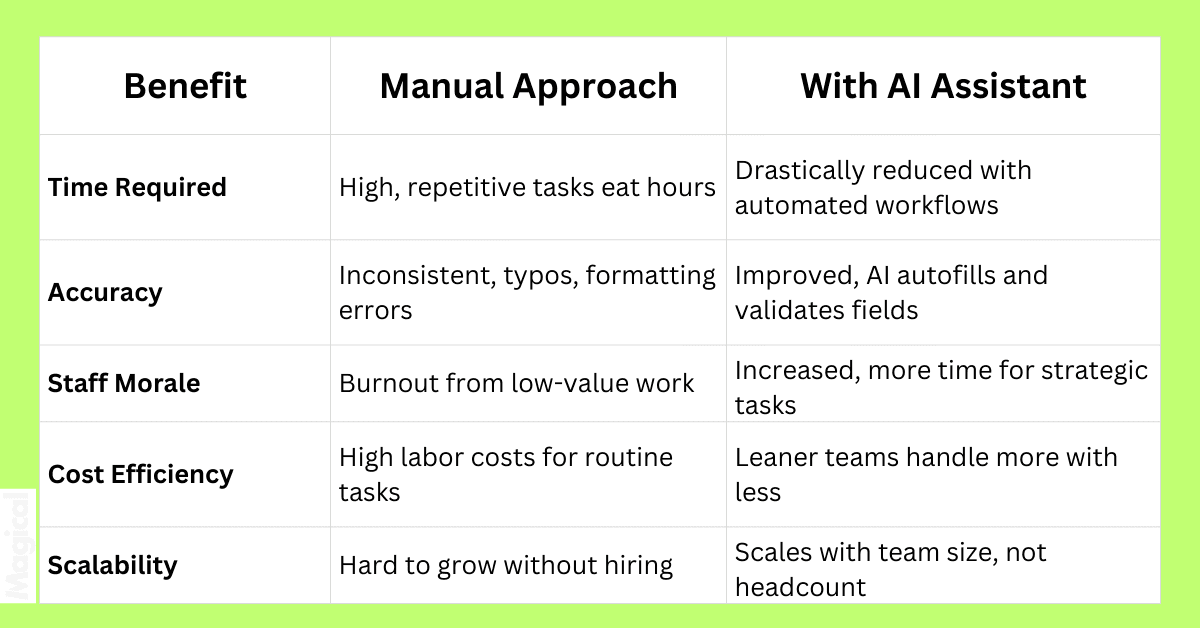
Less Copy-Paste. More Control.
When your team spends less time hopping between systems, fixing typos, and chasing down documentation, they get to focus on what actually matters:
Keeping claims moving
Supporting providers
Improving patient experience
Solving problems, not creating workarounds
AI assistants don’t replace your team. They unlock your team’s time.
The Human Impact: Empowering Admin Teams, Not Replacing Them
AI assistants aren’t here to take jobs. They’re here to take the parts of the job no one wants.
Because no one went into healthcare to retype a patient’s name 14 times a day.
AI Takes on the Tasks People Hate
Your team is already stretched thin. The last thing they need is another browser tab, another manual step, or another mind-numbing task that slows them down.
AI assistants help by:
Filling in repetitive forms
Transferring data between disconnected systems
Standardizing communications and status updates
Flagging missing information before it causes a delay
This isn’t about replacing intelligence. It’s about replacing repetition.
Teams Focus on Work That Matters
Once you strip out the swivel chair work and the low-value tasks, your team gets time back to focus on what actually improves operations:
Solving edge cases in billing
Communicating with patients and providers
Auditing claims before submission
Spotting revenue leaks and fixing them
And they do it faster because the distractions are gone.
Burnout Prevention Through Smart Automation
Burnout doesn’t just come from high volume. It comes from doing meaningless work at high volume. A task that costs billions of dollars annually.
AI assistants cut the fatigue factor:
Fewer errors = fewer fixes
Fewer keystrokes = less cognitive load
Fewer tasks = more time to breathe
Want to retain top performers? Give them a workflow that respects their time.
Choosing the Right AI Assistant for Your Healthcare Organization
Not all AI is created equal. And not all AI is built for the complexity (or the compliance requirements) of healthcare.
Before you plug in a new tool, make sure it’s built to actually solve your team’s problems without adding more risk, noise, or tech debt.
Here’s what to look for.
Look for Low-Lift Adoption
If your team needs IT support just to log in, it’s not the right fit.
The best AI assistants for healthcare back office teams:
Work directly in the browser (like Chrome)
Don’t require system integrations or EHR access
Can be deployed in minutes, not months
Magical is a prime example. Teams install it as a Chrome extension, set up a few workflows, and start automating tasks the same day.
No downtime. No red tape. No drama.
Prioritize Privacy and Security
If it touches PHI, it must be secure.
Even better: Use a tool that doesn’t touch PHI at all.
Look for AI assistants that:
Work on-device (not cloud-hosted)
Never store or transmit sensitive patient information
Are built to operate within HIPAA-conscious environments
Magical never stores data, which means your workflows stay secure by design, not just in theory.
Find a Tool That Adapts to Your Workflows
Your workflows are complex for a reason. The AI tool should adapt to them, not force you to change the way your team already works.
Avoid “one-size-fits-all” platforms that want to be your EHR, billing system, and CRM all in one. That’s not what admin teams need.
Instead, go with:
Browser-based assistants that support your current systems
Flexible workflow creation tools
The ability to start small, then scale as you go
Because the right assistant doesn’t replace your tools. It makes them all work better together.
ZoomCare Case Study: Supporting a Lean Admin Team with Magical
ZoomCare runs on speed. As a modern, on-demand healthcare provider, they deliver same-day care, urgent visits, and virtual appointments, which means their back office team has to move fast, too.
But like most healthcare orgs, ZoomCare’s admin workflows were getting bogged down by:
High-volume documentation
Manual scheduling updates
Repetitive patient data tasks across multiple systems
Rather than overhauling their infrastructure or hiring more staff, they turned to Magical.
With Magical’s AI assistant embedded directly into the browser, ZoomCare was able to:
Automate form-filling and documentation workflows
Eliminate redundant data entry across scheduling and billing tools
Support their lean admin team without adding new headcount
And because Magical works with their existing systems (not against them), there was zero disruption to clinical care or compliance processes.
Results:
Faster workflows
Lower error rates
A back office that could scale without slowing down
ZoomCare didn’t need more people. They needed better support for the people they had.
Magical delivered.
Getting Started: How to Introduce an AI Assistant to Your Team
Rolling out AI doesn’t have to be a massive initiative. You don’t need change management consultants or six months of training.
You just need to solve one annoying workflow. Then build from there.
Here’s how smart healthcare admin teams are making it happen.
Step 1: Identify High-Friction Workflows
Start small and aim smart. Ask your team:
What’s the most repetitive task you do every day?
Which workflows involve constant copy-paste or tab-switching?
Where do errors happen most often?
These are usually:
Insurance verification
Claim follow-ups
Intake form processing
Prior auth form completion
If it’s mindless and time-consuming, that’s your first AI use case.
Step 2: Test a Simple Use Case First
Don’t roll out AI to 10 teams all at once.
Pick one workflow. One user group. One result to measure.
For example:
Automate intake data transfer between a web form and your EHR
Use AI to pull claim status info from a payer portal
Autofill denial codes into a prebuilt appeal template
Keep the test focused. Track the impact. Then scale what works.
Step 3: Scale What Works
Once your team sees the time saved (and feels the relief), expansion becomes easy.
With a tool like Magical, you can:
Clone workflows across teams or locations
Share task templates
Train new staff in minutes
Start with 7 hours saved per week. Grow that to 70.
This is how lean teams punch above their weight.
Visual: Common Admin Tasks AI Assistants Can Handle Today
You don’t need to imagine the future of healthcare automation. It’s already here and it’s already working.
Here’s a breakdown of real, everyday tasks AI assistants like Magical are handling right now for healthcare teams:
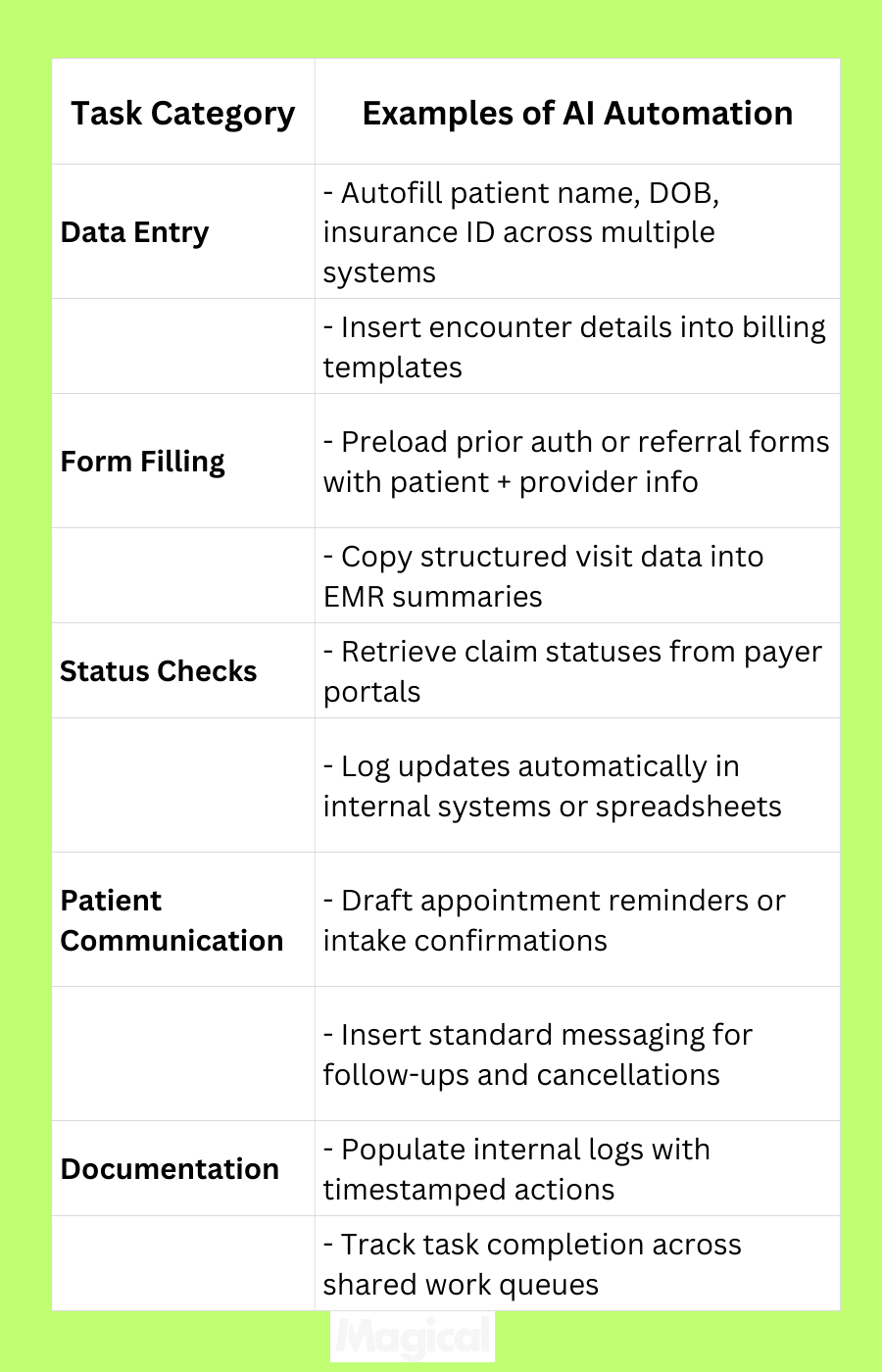
If your team is doing it by hand, there’s a 95% chance AI can do it faster.
And since AI assistants like Magical work in the browser, they follow your team, not the other way around.
Final Thoughts: Why AI Assistants Are the Future of Admin Work in Healthcare
The healthcare back office wasn’t built for today’s pace, but your team is still expected to keep up.
Endless tabs.
Repetitive forms.
Manual entry that drains time and energy from the people who keep your revenue cycle moving.
It’s not sustainable.
And it’s not necessary anymore.
AI assistants give you a better way.
Not by replacing your people, but by removing the digital junk that gets in their way.
When the busywork disappears, everything else gets better:
Fewer errors
Faster submissions
Happier staff
Stronger operations
This isn’t about dreaming up a future solution.
It’s about using the right tools right now and building a smarter, more resilient admin team in the process.
Want to Try an AI Assistant Built for Admin Teams?
Download the free Magical Chrome extension or book a demo for your team today!
Magical is used at 100,000+ companies and nearly 1,000,000 people to save 7 hours a week on average, automating the work your team hates, in the systems they already use.