
Some charges don’t fail loudly.
They don’t trigger alerts or denials.
They just… vanish.
A service is provided.
The chart is updated.
The patient goes home.
But somewhere between documentation and billing, something gets dropped. Maybe it’s a missing code.
Maybe a field wasn’t filled. Maybe it never got entered at all.
It doesn’t show up as a red flag. It just quietly disappears. Along with the revenue that should’ve followed.
Failed charges are the billing problem that doesn’t look like a problem until you zoom out and see what’s missing.
For healthcare admin teams already stretched thin, these silent misses are easy to overlook. But over time, they bleed revenue, increase audit risk, and leave your team in a constant state of catch-up.
You don’t need more spreadsheets. You need a system that doesn’t let things slip through the cracks in the first place.
Let’s pull back the curtain on the most common causes of failed charges and show you how automation makes sure every charge that should be captured, is.
What Is a Failed Charge in Medical Billing?
A failed charge isn’t always a coding error. It’s often just a missed opportunity. A billable service that never made it to the billing system at all.
It happens more often than most teams realize.
A procedure was performed but never documented.
A modifier was forgotten.
A service was charted but not coded.
No red flags, no alerts. Just lost revenue.
Charge Capture vs. Charge Reconciliation vs. Failed Charges
Let’s break down the language:
Charge capture is the process of recording services provided.
Charge reconciliation ensures what was recorded is actually billed.
A failed charge is what happens when there’s a disconnect between the two.
And in a manual system? That disconnect is a guarantee.
How Common Are Failed Charges?
According to a report by Becker’s Hospital Review, U.S. hospitals lose an average of $22 million per year due to ineffective charge capture and reconciliation.
In smaller practices, that may look like tens or hundreds of thousands of dollars per year, silent revenue leakage that adds up month over month.
And a report from HFMA shows that organizations can lose 1% to 5% of total revenue annually from incomplete or failed charges alone.
Let that sink in: Not denied. Not underpaid. Unbilled.
How Failed Charges Impact Healthcare Teams
Failed charges don’t just affect the bottom line. They stretch every link in the admin chain:
Providers lose confidence in the billing process
Billers spend hours chasing missing documentation
Revenue cycle teams scramble to reconcile after the fact
Leadership misses targets without realizing where the leaks are happening
And the worst part? Many failed charges go undetected entirely. Until a payer audit, a revenue dip, or a full-scale reconciliation effort exposes the gaps.
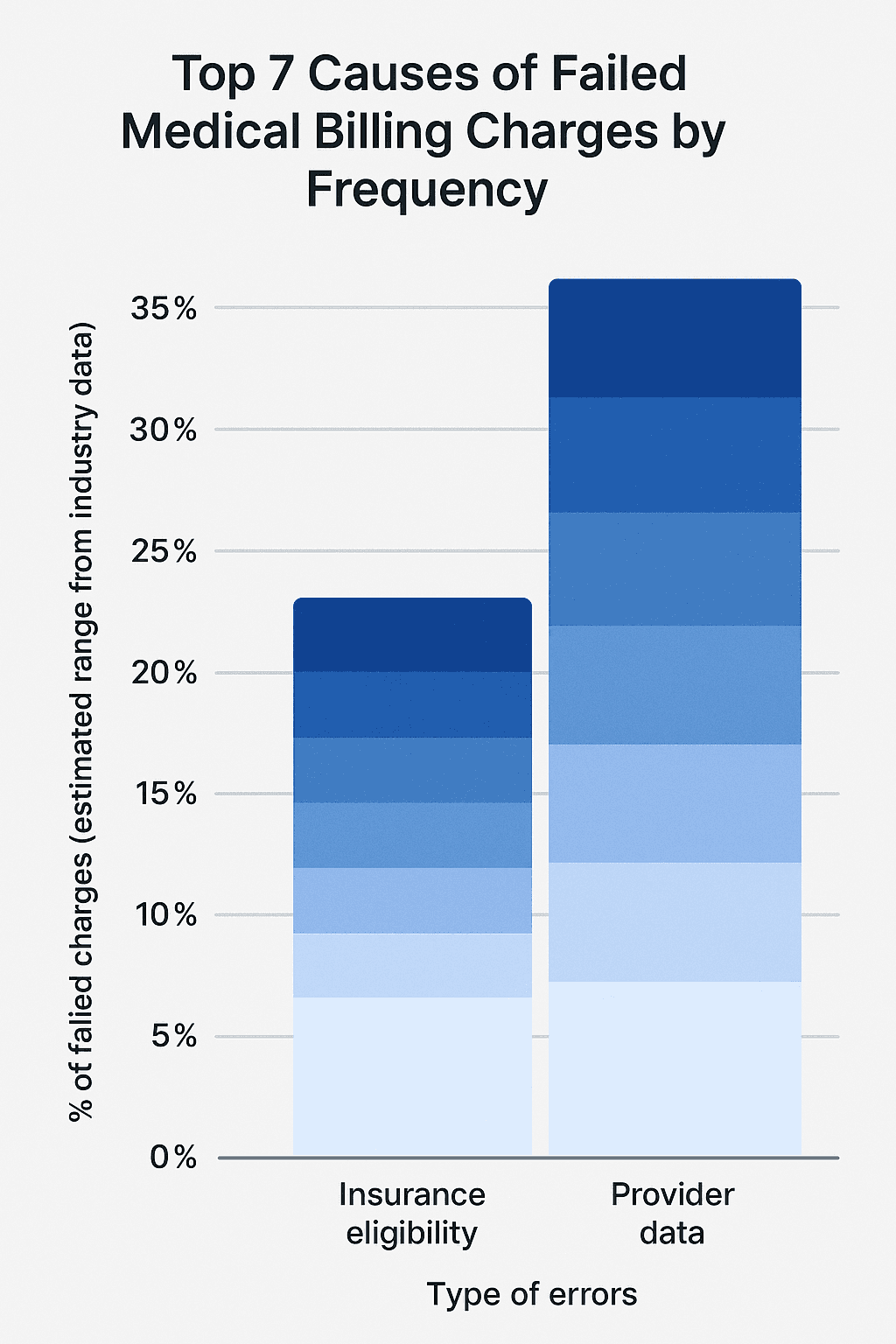
The Top 7 Causes of Failed Charges
Failed charges don’t happen in one place. They happen in the handoffs between departments, between systems, between the moment care is delivered and the moment billing is triggered.
Here are the top culprits behind missed charges and how automation helps you shut them down before revenue disappears.
1. Missing or Incomplete Clinical Documentation
If it’s not documented, it can’t be billed.
The most common reason charges fail? The service was provided, but the documentation doesn’t reflect it clearly enough to justify a claim. Providers may forget to add a note, skip a required detail, or assume something was captured that wasn’t.
And in busy clinics, this happens a lot.
Automation fix: Tools like Magical prompt providers or staff to complete required documentation fields before the workflow continues, so nothing gets skipped.
2. Coding Errors and Omissions
You can’t bill what you didn’t code.
When CPT or ICD-10 codes are entered incorrectly or not at all, the charge either gets rejected or quietly dropped. This often happens when codebooks are out of date, templates are inconsistent, or billers are entering data manually across disconnected systems.
According to the Centers for Medicare & Medicaid Services, coding errors account for up to 42% of all claim denials.
Automation fix: Use predefined templates that auto-fill codes based on service type, and prompt for required modifiers or documentation when something’s missing or mismatched.
3. Delayed Documentation or Billing
When care is documented late, charges often slip through the cracks.
If a provider doesn’t finish charting until days later or a note is finalized after billing has already moved on, the team may never go back to capture it. And if the charge is entered too late, it may fall outside the payer’s timely filing window (which ranges from 30 to 180 days, depending on the plan).
Automation fix: Magical surfaces prompts immediately after key actions, reducing lag time between care and billing, and keeping documentation timelines tight.
4. Unverified Insurance or Authorization Issues
A charge may be accurate, but if the patient’s insurance wasn’t verified or the pre-authorization wasn’t completed, it’ll fail on the back end.
Worse? If no one follows up, the charge may never get corrected or resubmitted at all.
Automation fix: During intake, Magical autofills insurance and pre-auth details into every platform, ensuring that data flows cleanly from the front desk to the billing office.
5. Front-End Intake Errors
Incorrect patient name. Transposed digits in a policy number. Outdated address.
Small errors entered at intake can cause claims to fail silently, especially when the billing team assumes the data is accurate.
And with most front-desk staff juggling EHRs, scheduling tools, and payer portals, manual mistakes are inevitable.
Automation fix: Magical captures and reuses validated data across systems, reducing the number of times staff re-enter the same information, and eliminating easy-to-miss typos.
6. Duplicate or Overlapping Entries
When two staff members enter the same charge or a system duplicates an entry across a recurring visit, it often gets flagged and denied as potential fraud. But if no one catches it, the charge gets thrown out, and the team assumes it was paid.
Automation fix: Built-in logic rules in Magical flag duplicate entries or overlapping codes before submission, so your team can clean it up before it causes problems.
7. Failure to Bill for Ancillary Services
These are the silent killers.
Injections. Supplies. Labs. Follow-up consults. Many of these services are billable separately, but they’re often bundled into the visit and forgotten during charge entry.
According to HFMA, ancillary charge capture failure is one of the most common sources of revenue leakage in outpatient care.
Automation fix: Magical’s smart prompts can remind staff to include commonly missed services based on the appointment type or previous charge history.
The Hidden Cost of Charge Failures
When a charge doesn’t go through, there’s no red light, no alarm, no paper trail. Just a quiet, invisible loss.
One missed charge may not seem like a big deal. But multiply that by hundreds of visits a month, and the cost isn’t just measurable. It’s massive.
Financial Fallout: Quiet Losses, Big Numbers
According to Becker’s Hospital Review, hospitals lose an average of $22 million per year due to incomplete or failed charge capture.
And that’s just what’s been reported. In smaller practices, these gaps may not show up until it’s too late, when revenue projections miss the mark, or year-end audits surface the omissions.
Charge leakage can account for 1–5% of an organization’s annual net revenue.
For a $10 million practice, that’s $100,000 to $500,000 per year evaporated.
Operational Strain: Rework and Recovery Mode
Missed charges don’t just cost money. They cost time.
Staff have to dig through notes, EHR logs, or appointment histories
Charges have to be manually corrected or back-entered
Resubmissions may fall outside of payer deadlines
And all of it takes time away from new claims, patient follow-up, and strategic billing work.
You’re not building a stronger revenue cycle. You’re just patching holes in a leaky one.
Burnout and Morale Damage
Billing teams are already stretched thin. When they’re constantly playing cleanup for errors they didn’t cause, it erodes morale.
They become the “fixers” instead of the strategists. And when every day is spent chasing what fell through the cracks yesterday, there’s no time to improve the process.
Eventually, your best people leave. Not because they can’t handle the work, but because they’re tired of fixing what automation should’ve prevented.
How AI and Automation Prevent Failed Charges
You don’t need more audits. You need fewer things to fix in the first place.
The best way to prevent failed charges isn’t to catch them late. It’s to make them impossible from the start. That’s what AI-powered automation does. It fills the blanks, prompts the right actions, and closes the gaps between documentation, charge entry, and billing, all before submission.
Here’s how it works inside a real admin workflow:
Real-Time Autofill for Critical Fields
Magical automatically populates:
Patient demographics
Insurance and policy numbers
CPT, HCPCS, and ICD codes
Referring provider and location data
Pre-auth details
Because when your team doesn’t have to manually re-enter data across EHRs, billing tools, and spreadsheets, they don’t make the copy-paste mistakes that cause charges to fail.
Less typing = fewer errors. Simple math.
Prompt-Based Documentation and Charge Capture
Most failed charges come from what doesn’t happen: missed notes, forgotten codes, skipped services.
Magical uses smart prompts to guide staff through the billing process. If a commonly missed item is absent, say, a supply charge for a procedure or a modifier on a code, the tool surfaces a real-time nudge:
“This visit type often includes a charge for admin supplies. Add now?”
“Modifier 59 is required when billing CPT 97110 + 97530 together. Add it?”
These aren’t alerts you dismiss. They’re safety nets you use.
Custom Rules That Flag Gaps Before Submission
With Magical, teams can set up logic-based rules to flag:
Missing documentation links
Duplicate charges
Charge/service mismatches
Out-of-date code sets
Instead of waiting for denials or audits to expose the issue, automation stops it before the claim goes out the door.
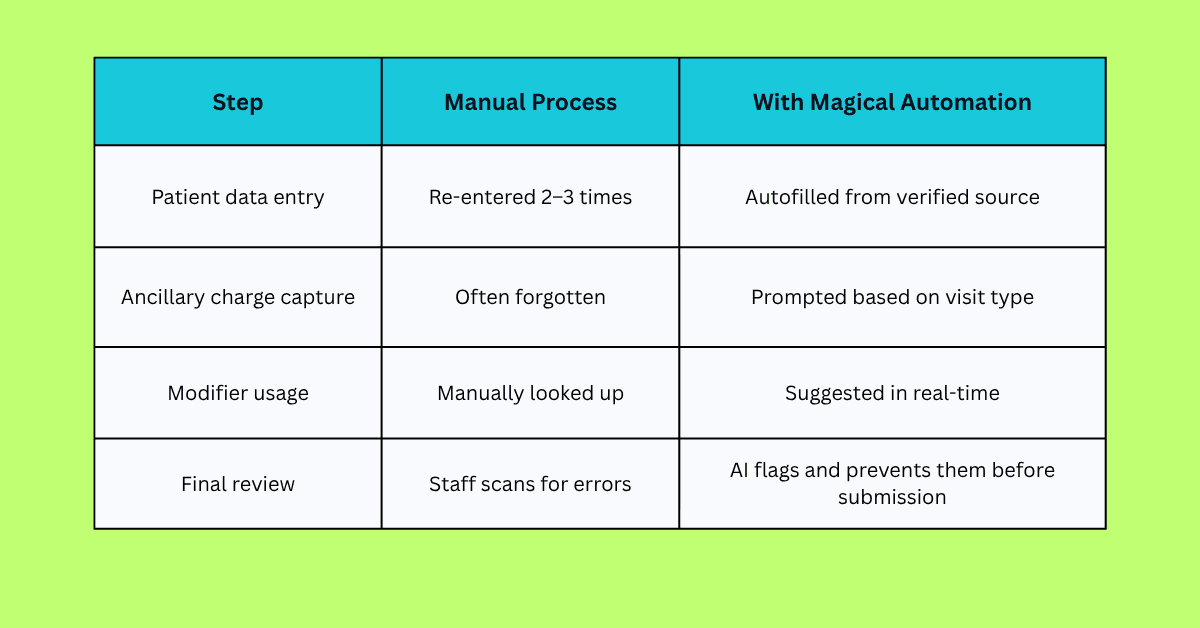
Example Workflow: How a Failed Charge Gets Caught and Fixed Automatically
Let’s say a patient comes in for a physical therapy session. During the visit, the therapist also provides manual therapy (CPT 97140). A billable service that’s often missed if it’s not documented and coded correctly.
Here’s what happens in a manual workflow:
Manual Workflow (High Risk of Failure)
The therapist documents the visit, but forgets to note manual therapy.
The admin enters the visit as CPT 97110 only (therapeutic exercise).
No modifier is added.
The claim is submitted as-is.
The charge for manual therapy is never billed. No flag, no alert—just lost revenue.
Automated Workflow with Magical (Failed Charge Prevented)
The therapist begins entering visit data in the EHR.
Magical prompts:
“Manual therapy (97140) often accompanies 97110. Was this performed?”The therapist confirms.
Magical autofills both codes and adds Modifier 59, based on payer rules.
Admin verifies the data with one click.
The complete claim is submitted, accurately, the first time.
Result:
The full charge is captured.
The correct modifier is added.
The claim gets approved, not denied.
No one has to backtrack, rework, or guess.
That’s how automation stops failed charges, not by reviewing them after the fact, but by making it easy to get them right the first time.
Case Studies: Real Results from Magical in Healthcare Billing
Automation isn’t just a nice-to-have. For these teams, it became the difference between chasing revenue and capturing it confidently.
Here’s how real organizations used Magical to prevent failed charges before they ever became a problem.
ZoomCare: 80% Reduction in Repetitive Admin Work
ZoomCare’s front-desk and admin teams were trapped in a copy-paste cycle manually moving patient data across EHRs, billing platforms, and intake forms.
That repetition wasn’t just slowing things down. It was creating gaps: missed modifiers, forgotten supply charges, and small field errors that caused claims to fail silently.
With Magical:
Admins built autofill templates for charge fields
Smart prompts ensured nothing got skipped
Manual work dropped by 80%
Failed charges disappeared.
TCPA: Cleaner Claims, Fewer Denials
TCPA struggled with failed charges tied to intake issues. Missing insurance info, inconsistent patient IDs, and delayed charting.
With Magical:
Intake data was autofilled into billing systems
Smart field checks flagged gaps in real time
Staff didn’t have to re-enter anything manually
Claim denials linked to data issues dropped significantly
WebPT: 5–10 Hours Saved Weekly Per Staff Member
WebPT’s billing team was spending hours reviewing and correcting common charge issues, especially missed codes on high-volume services.
With Magical:
Templates were created for frequent visit types
Missing CPT codes triggered prompts
Charges were submitted clean on the first pass
More revenue was captured with less effort
When the systems work, the revenue flows. And with automation doing the heavy lifting, your team can stop firefighting and start getting ahead.
How to Start Automating Your Charge Capture Process
Fixing failed charges doesn’t require replacing your billing system. It just takes a smarter way to work with what you already have.
Here’s how healthcare teams are starting to automate charge capture and seeing results in days, not quarters.
Step 1: Audit Your Recent Denials and Missed Charges
Start small. Pull a report of claims that were:
Denied due to missing codes
Delayed due to incomplete documentation
Flagged for “service not billed” errors
Look for patterns. You’ll likely find 3–5 repeat issues that can be automated right away.
Step 2: Map the Moments Where Charges Get Lost
Ask your team:
Where does data get re-entered manually?
What charge steps happen after the visit?
What do we rely on memory or paper checklists to catch?
Every one of these is an opportunity for automation.
Step 3: Install Magical and Build Autofill Workflows
Add the Magical Chrome extension
Create simple templates for:
Common CPT + modifier combos
Patient and insurance details
Ancillary services
Add smart prompts that appear when a field is empty or a required code is missing
It’s zero-code and designed for teams that don’t have time to “figure it out.” You’ll be up and running in under an hour.
Step 4: Test, Share, and Scale
Roll it out on one workflow (like PT visits or intake)
Share successful templates with your team
Track how many errors, rework cycles, or missed charges disappear
Expand to more visit types, locations, or departments
You don’t have to automate everything at once.
You just have to start.
Why Magical Is the Ideal Automation Layer for Healthcare Admin Teams
Most tools try to fix billing errors after they happen.
Magical fixes them before they exist.
While other platforms focus on analytics or back-end cleanups, Magical lives right where your billing data gets created. In the browser, alongside your team.
No integration headaches. No dev tickets. No downtime.
Just workflows that actually work.
It’s Chrome-Native and Works Everywhere
Magical runs inside your Chrome browser, so it works across:
EHRs
Billing software
Insurance portals
Spreadsheets
Documentation tools
Even your internal systems
If your team can type into it, Magical can automate it.
It’s Built for Admins, Not Engineers
Your team doesn’t need to “learn a new system.”
They don’t need to wait for IT.
They just install Magical and start working smarter right away.
You can:
Create autofill templates in minutes
Set smart prompts for missed fields or codes
Share everything across your team instantly
It Prevents Revenue Leakage at the Source
Instead of reconciling failed charges after submission, Magical ensures:
The right codes are entered
Supporting documentation is included
Every service that should be billed gets billed
And it does it without adding steps or slowing your team down.
With Magical, you don’t just reduce failed charges. You remove the friction that causes them.
Final Thoughts
Most failed charges don’t come from neglect. They come from broken workflows.
Charges that were never entered.
Services that were forgotten.
Codes that didn’t get double-checked.
It’s not that your team isn’t capable. It’s that they’re constantly fighting systems that weren’t built for speed, accuracy, or sanity.
That’s where automation changes everything.
Magical helps healthcare teams prevent failed charges by automating the billing work that’s most vulnerable to human error. No more missed fields. No more unbilled services. No more “we’ll catch it later.”
It’s fast. It’s simple. And it’s built for the work your admin team already does every day.
Start automating today.
Try the free Magical Chrome extension
Or book a demo for your team and see how fast failed charges stop being a problem