
Most healthcare automation pitches sound the same.
“Streamline your workflows.”
“Cut admin costs.”
“Drive efficiency.”
But here’s what they don’t say:
Will your team actually use it?
Does it fit into your current billing process, or does it break it?
Can you trust it with protected health data?
Buying automation in healthcare isn’t like buying any other kind of software.
The workflows are complex.
The systems are disconnected.
The risk of getting it wrong is high.
This guide is built for operations leaders and billing managers who need to make the right call the first time.
No fluff.
No theory.
Just a clear, tactical framework for choosing a vendor that delivers value and earns your trust.
Why Choosing the Right Automation Vendor Matters
The burden of administrative work in healthcare isn’t just frustrating. It’s expensive.
Billing teams are overrun with manual tasks that delay payments and increase error rates.
Scheduling teams are still toggling between platforms to verify eligibility or update patient info.
None of this is sustainable.
According to JAMA, administrative costs account for nearly 25% of total U.S. healthcare spending. Most of that is tied to workflows that could be automated, but aren’t.
Automation Has Become a Need, Not a Nice-to-Have
Staffing shortages are stretching teams thin.
Payer requirements are more complex.
Margins are tighter than ever.
The only way forward is smarter processes, and that means automation.
But automating healthcare workflows isn’t like automating sales or marketing.
The stakes are higher.
The systems are older.
And the compliance requirements are non-negotiable.
Which is why the right vendor matters. Choose the wrong one, and your team could end up with:
Tools they can’t use without technical help
Workflows that break your existing systems
Security risks that put PHI at risk
Automation that creates more work than it saves
You’re Not Buying Software. You’re Choosing a Partner
The best healthcare automation vendors don’t just sell platforms. They support the people doing the work.
They understand payer logic, billing timelines, compliance audits, and what happens when something breaks. They don’t overpromise, and they don’t disappear after onboarding.
That’s what you’re really evaluating: not just what the product does, but whether the team behind it can support your goals without getting in the way.
5 Key Criteria for Evaluating Healthcare Automation Vendors
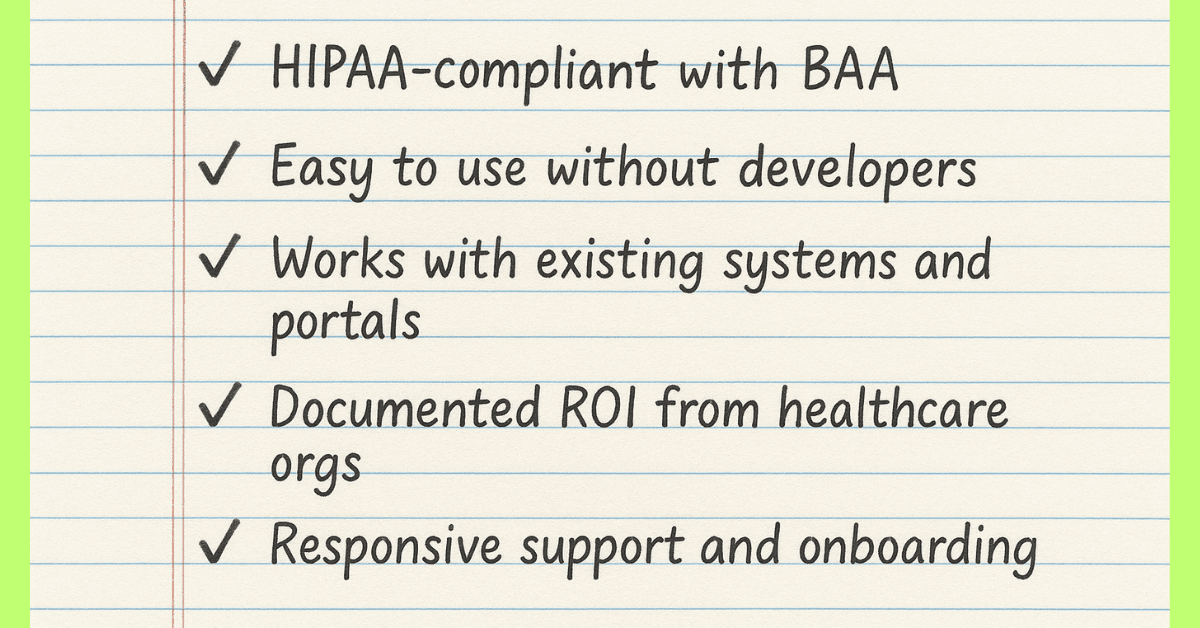
You don’t need a massive feature set. You need a solution that your team can use, your compliance officer can sign off on, and your budget can justify.
These are the non-negotiables.
1. HIPAA Compliance and Data Security
If a vendor can’t answer your security questions clearly, stop the conversation there.
Look for:
Signed Business Associate Agreement (BAA)
Encryption at rest and in transit
Audit logs and user access controls
SOC 2 or HITRUST certification
Healthcare data is sensitive. The platform must treat it that way from day one.
2. Usability for Non-Technical Teams
Automation isn’t useful if your team can’t set it up.
Make sure the platform offers:
No-code or low-code workflow builders
Clear instructions or guided setup
In-app support and documentation
A UI that’s built for operations, not engineers
If it takes three meetings with IT to build a denial workflow, it’s not solving your problem.
3. Integration with Your Existing Tools
You shouldn’t need to replace your RCM, EHR, or payer portals.
Strong vendors should be able to:
Run directly on top of your existing browser-based tools
Connect to spreadsheets, CRMs, or in-house apps
Work across tabs and platforms without formal integrations
This is especially critical for fast-growing teams with layered tech stacks.
4. Proven ROI from Similar Healthcare Teams
Look for evidence, not just marketing.
Ask for healthcare-specific case studies
Ask for time savings per user
Ask for outcomes tied to claims, denials, or patient experience
Ask for results within the first 30–90 days
You don’t need vague “efficiency gains.” You need hours back and fewer mistakes.
5. Support, Scalability, and Post-Sale Partnership
Too many platforms disappear after onboarding. The best vendors provide:
Ongoing live support or dedicated success managers
Onboarding timelines that match your team’s capacity
Scalable workflows that grow with your operations
You’re not looking for a vendor to “set it and forget it.” You’re looking for one that evolves with your needs.
Common Red Flags When Vetting Vendors
Not every platform that claims to “automate healthcare” is built for the reality of healthcare work. Here’s what to watch for before you commit.
No Clear Security Documentation
If you ask about HIPAA compliance and get vague answers, walk away.
A legitimate vendor should:
Provide documentation on encryption, access controls, and data handling
Sign a BAA without hesitation
Offer audit logs and user activity tracking
If they say, “We’re secure, but we don’t share those details,” it’s a liability.
Setup That Requires Custom Development
If a vendor requires IT or engineering help for every change, you won’t scale. Look out for:
Complicated APIs that need custom configuration
Scripts or code snippets your team can’t manage
Long onboarding timelines with unclear outcomes
Billing and operations teams should be able to build and manage workflows on their own.
One-Size-Fits-All Tools
Healthcare isn’t generic. Your automation vendor shouldn’t be either.
Watch for:
Features built for sales, marketing, or general business use
A lack of healthcare-specific terminology or templates
Support teams that don’t understand RCM or compliance workflows
If the tool doesn’t speak your language, your team won’t use it.
No Real Use Cases from Healthcare Teams
If all the case studies are from tech companies, the platform probably wasn’t designed for you.
Ask for proof from:
Clinics, hospitals, or specialty providers
Admin and billing teams, not just IT departments
Scenarios that match your workflows like eligibility, denials, claims, and intake
If they can’t show it working in healthcare, they’re still guessing.
How Magical Compares as a Healthcare Automation Vendor
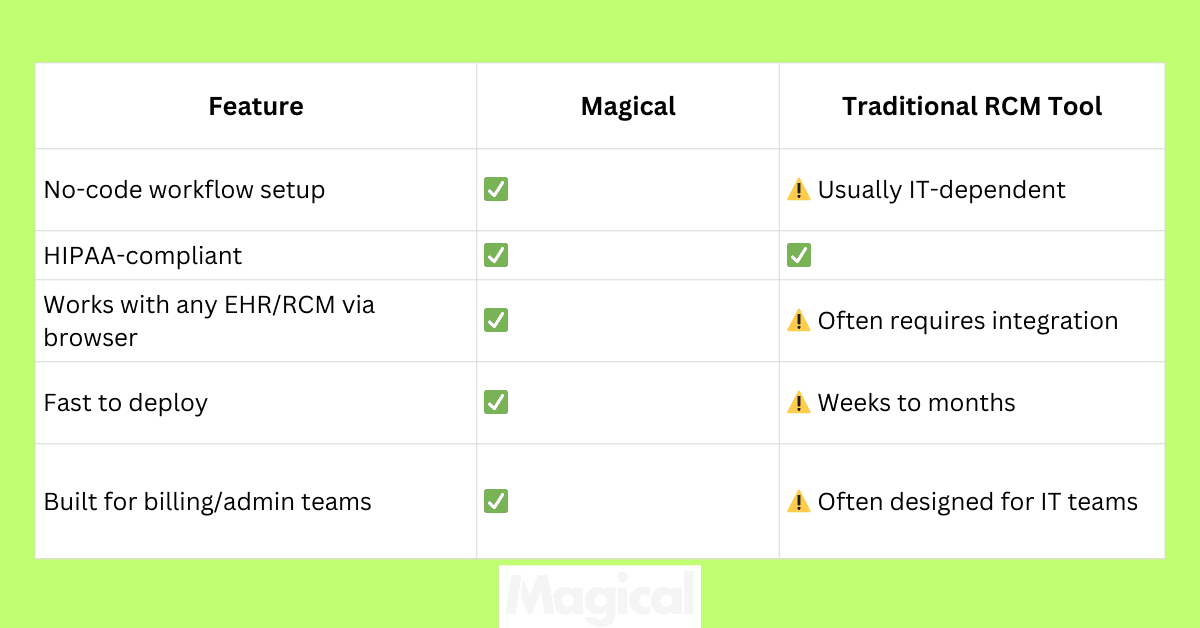
Magical wasn’t built for IT teams. It was built for the people who do the work, like billing coordinators, schedulers, operations managers, and administrative staff, juggling dozens of tools every day.
There’s no rip-and-replace.
No heavy configuration.
No dependence on engineering.
Just automation that works inside your existing browser workflows.
It’s secure. It’s fast to deploy. And your team can build it themselves.
Used by Healthcare Teams That Can’t Afford Downtime
TCPA
Built HIPAA-compliant patient coordination workflows. Automated admin tasks across a multi-location operation. Gained full visibility and control, without relying on outside developers.
WebPT
Reduced billing admin time by automating redundant steps. Empowered non-technical teams to take ownership of their own process improvements.
ZoomCare
Used Magical to eliminate manual data entry and task switching across their systems. Teams launched new workflows quickly, without engineering support or training delays.
Security and Compliance, Built In
HIPAA-compliant with BAA support
Encryption at rest and in transit
Audit logs for activity tracking
User-level permissions to control access
Browser-native, so no backend system access is required
What Sets Magical Apart
Works on top of your current systems, no integration required
Designed for non-technical users to automate their own tasks
Supports high-volume workflows like claim follow-ups, denial appeals, and patient record updates
Saves teams an average of 7 hours per week per user
6 Questions to Ask During the Vendor Evaluation Process
You don’t need a list of 50 questions. You need a short, focused set that tells you whether the tool is secure, usable, and built for your team.
Here’s what to ask before signing anything:
1. Are you HIPAA-compliant, and will you sign a BAA?
If the vendor hesitates or deflects, that’s a clear sign they’re not ready for healthcare. HIPAA compliance isn’t optional. It’s the baseline.
2. Can non-technical users build and manage workflows?
If your admin or billing team needs to involve IT for every change, the tool won’t scale. Ask to see a live demo from the user side, not just the backend.
3. What tools and platforms does this actually work with?
Make sure the automation runs inside the platforms your team already uses, like RCMs, EHRs, spreadsheets, and payer portals. No vague “integration roadmaps.”
4. What kind of support is available post-onboarding?
The relationship shouldn’t end once the workflows are live. Ask about support response times, live help options, and how often the vendor updates features based on user feedback.
5. How quickly can we see results?
A good vendor will be transparent about implementation timelines and will back up their claims with real results. Look for time savings, reduction in manual steps, or faster reimbursements within the first month.
6. Do you have proven outcomes from healthcare organizations?
Ask for actual case studies, not general testimonials. Ideally, these should come from teams similar to yours in terms of size, workflow type, and tech stack.
Final Thoughts: The Right Vendor Won’t Slow You Down
Automation in healthcare doesn’t fail because of the technology. It fails because teams choose tools that aren’t made for the work they do every day.
The right vendor makes things easier, not harder. They don’t just protect your data.
They protect your time.
They help your team build smarter workflows without relying on developers or waiting for integration timelines.
And they deliver ROI you can measure, not just hope for.
Magical is built for exactly that kind of healthcare team.
You don’t need to change your systems. You don’t need to wait six months to see value. You just need a tool that’s fast, compliant, and works where your team already works.
Try It Yourself
Download the free Magical Chrome extension or book a demo for your team. Magical is used at 100,000+ companies and by nearly 1,000,000 users to save 7 hours a week on average.