
Fixing medical billing errors is nobody’s dream job.
But for most healthcare admin teams, it’s become a full-time reality.
One missed digit in a policy number, one wrong code on a Friday afternoon and suddenly a clean claim becomes a costly delay.
You chase down missing documentation.
You resubmit.
You hope it gets paid this time.
And then you do it again.
This isn’t just inefficiency. It’s erosion. Slow, steady, and expensive.
What if your team didn’t have to fix the same billing mistakes over and over again?
What if those errors were caught and corrected before the claim ever left your system?
This isn’t a wish list. It’s automation.
And it’s working right now for healthcare teams who finally got tired of playing cleanup.
Let’s talk about how to stop fixing errors manually and start eliminating them automatically.
Why Fixing Medical Billing Errors Manually Isn’t Sustainable
You can’t solve a systemic problem with sticky notes and rework.
And yet that’s how most medical billing errors get “resolved.”
A denial lands.
Someone retraces the steps.
A code gets corrected, or a field gets updated.
Maybe the claim gets paid the second time. Maybe not.
Multiply that by dozens or hundreds of times per week, and you’ve got a billing team that’s not working forward. They’re stuck in reverse.
The Hidden Cost of Doing It Manually
Let’s do the math.
According to the American Medical Association, up to 20% of medical claims are denied at first submission (AMA). Each denial costs time, staff effort, and real money.
A 2022 survey by Harmony Healthcare found that it costs an average of $25 to $118 to rework a single denied claim, depending on complexity.
Now add in the labor. Billing teams spend 16+ minutes per claim correcting errors, many of which could’ve been avoided in the first place.
That time doesn’t show up on reports. But it is quietly draining your payroll, delaying your reimbursements, and burning out your team.
Rework Is a Symptom of System Failure
Reworking claims isn’t a skill problem. It’s a workflow problem.
Your team is moving data between tools that don’t integrate.
They’re manually entering the same information into multiple platforms.
They’re relying on memory to spot the errors they missed the first time.
It’s like bailing water out of a sinking boat without ever patching the leak.
In TCPA’s case study, teams were spending hours per week correcting simple billing errors caused by redundant data entry. After switching to Magical’s AI-powered autofill, those errors stopped happening in the first place.
Because when you automate the source of the error, you don’t have to waste time fixing it later.
The 5 Most Common Fixable Billing Errors
Not all billing errors are created equal. Some are unavoidable. Most aren’t.
These five mistakes show up in nearly every healthcare org. Not because teams are careless, but because manual systems make them inevitable.
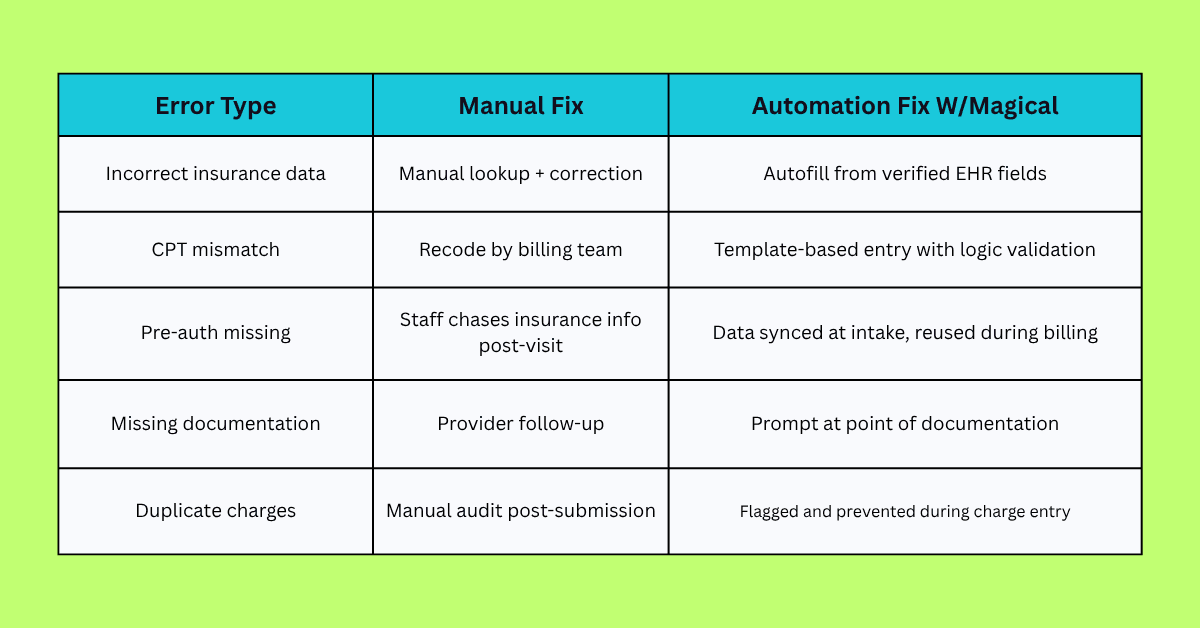
Here’s what they are, why they happen, and how automation stops them cold.
1. Incorrect Patient or Insurance Data
A single typo in a name, policy number, or date of birth? Denied.
Even a minor mismatch between what’s in the EHR and what’s submitted to the payer can cause a claim to bounce. And when admin teams are juggling multiple systems, it’s easy to make a small mistake with a big price tag.
Automation fix: Tools like Magical autofill verified patient and insurance information from system to system. No retyping, no toggling, no risk of inconsistencies.
2. Coding Errors (CPT, ICD-10)
The right procedure, the wrong code.
Whether it’s a mismatched CPT/ICD combo, outdated code set, or just a manual entry mistake, coding errors are a top driver of denials. CMS has reported that up to 42% of claim rejections stem from coding inaccuracies.
Automation fix: Create smart templates for commonly billed services with built-in code mapping and logic checks—so your team never has to guess.
3. Authorization & Eligibility Mismatches
The service was performed. The claim was ready. But pre-auth wasn’t confirmed, or the insurance coverage had expired.
Denied.
These issues happen when billing and intake systems don’t sync, and the data doesn’t follow the patient through the workflow.
Automation fix: Autofill insurance and authorization data across platforms the moment it’s entered during intake, so billing doesn’t rely on chasing info after the fact.
4. Incomplete Clinical Documentation
If the documentation doesn’t support the service billed, the payer doesn’t pay. It’s that simple.
Often, providers forget to chart a justification, leave out a modifier, or skip a note entirely, especially in high-volume clinics.
Automation fix: Use prompt-based workflows to remind providers to complete required documentation before the claim ever reaches billing.
5. Duplicate or Overlapping Charges
The same service gets entered twice. Or two team members submit charges for the same visit. Either way, it gets flagged and denied.
These errors are especially common when staff re-enter data across disconnected tools or copy/paste from previous records.
Automation fix: Use autofill and templated logic to reduce duplication at the source, and include validation rules that flag potential overlap before submission.
How AI Can Automatically Fix Billing Errors
Fixing billing errors manually takes hours. Fixing them automatically takes milliseconds.
AI doesn’t need to be complicated to be useful. At its best, it quietly scans for inconsistencies, fills in the blanks, and nudges your team to do the right thing before the wrong thing gets submitted.
That’s the kind of automation healthcare teams need. And with tools like Magical, that kind of automation is now accessible. No engineering, no integrations, no learning curve.
Here’s how it works.
Pattern Recognition with LLMs (Large Language Models)
AI can be trained to spot patterns in billing and documentation data, just like your most experienced biller would, but faster and more consistently.
If a certain CPT code usually pairs with a specific modifier, AI can flag when that modifier is missing. If a patient’s coverage history doesn’t match their current plan, it catches that too.
No second guess. No second look. Just proactive prevention.
Real-Time Autofill and Field Correction
Magical uses AI to autofill and validate data in real time, whether it’s a patient ID, insurance group number, or provider NPI.
You can build reusable templates that pull accurate data from your EHR and drop it into your billing platform, clearinghouse portal, or even spreadsheets, without manual entry or copy-paste.
It’s like a billing assistant that already knows your most common workflows.
Trigger-Based Fixes and Smart Prompts
When something’s off, Magical doesn’t just flag the issue. It suggests the fix, right there in the workflow.
Missing field? Prompted.
Code doesn’t match service? Prompted.
Incomplete note? Prompted.
These nudges prevent small mistakes from becoming costly delays—and they work in the background, inside the systems your team already uses.
What an Automated Error-Fix Workflow Looks Like
Imagine fixing a billing error before anyone even realizes it happened.
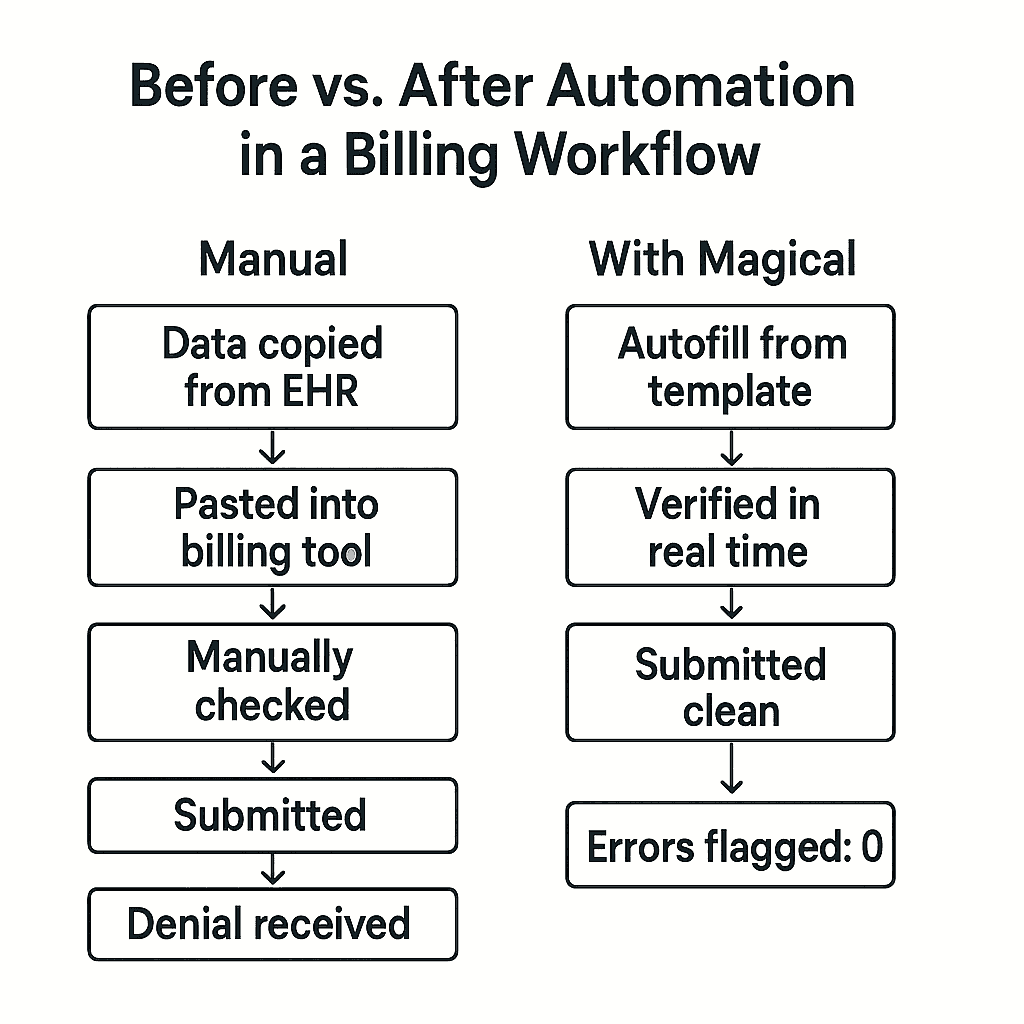
That’s the power of automation done right. It doesn’t just alert you after the fact—it guides your team in real time, quietly preventing the kinds of errors that normally slip through unnoticed.
Here’s what a typical automated billing error correction process looks like with Magical in the loop:
Step 1: Detection
A staff member opens a billing form, EHR interface, or payer portal.
Magical immediately scans the fields, looking for missing information, formatting issues, or combinations that don’t make sense (like a CPT code without the necessary modifier).
Example: The system notices the billing code doesn’t match the diagnosis entered in the EHR. A mismatch that would usually result in a denial.
Step 2: Autofill + Data Validation
Instead of making the team go hunting for the right info, Magical pulls it in automatically.
It autofills fields like:
Patient name and DOB
Insurance group number
NPI and provider details
Visit type and CPT codes (based on previous entries or templates)
The autofill isn’t just fast, it’s accurate. It’s pulling from your actual workflows, with your preferred formatting and terminology.
Step 3: Trigger + Prompt
If anything looks off, Magical doesn’t stay silent.
It generates a smart prompt, like:
“CPT 99214 typically requires Modifier 25. Would you like to add it now?”
Or:
“Missing insurance group number. Add from last visit?”
This happens before submission, so your team can fix issues in real time, instead of after a denial hits.
Step 4: Submission
Once everything’s clean, the claim is submitted.
No backtracking. No follow-up tasks. No, “we’ll fix it in the next billing cycle.”
Just a clean claim, sent fast, with confidence.
Step 5: Audit-Ready Tracking
Every autofill, prompt, and correction is logged, so your team has a full paper trail if you ever need to show compliance or track performance.
Tools That Enable This
Automation isn't about adding more tools. It's about adding the right ones—the ones that eliminate errors without adding overhead, complexity, or IT dependencies.
Here are a few solutions powering error-free billing workflows today:
Magical – Best for No-Code, Real-Time Billing Automation
Magical is a Chrome-native AI assistant that autofills, validates, and standardizes data entry across any platform you already use. EHRs, billing software, payer portals, and more.
It’s purpose-built for:
Admins who are drowning in duplicate data entry
Billers who are tired of fixing preventable mistakes
Teams that want results without needing engineers to set it up
Why it works:
Installs in seconds
No-code setup
Smart prompts + error detection
Works inside your browser. No integrations required
Clearinghouse Tools (Waystar, Change Healthcare, Availity)
These platforms help scrub claims for payer-specific errors before they’re submitted. They’re great for flagging downstream issues, but they typically require claims to be built first, meaning errors from earlier in the workflow still slip through.
Best used for: Final-stage validation and payer-specific formatting.
Practice Management Systems with Embedded Billing Logic
Some EHRs and PM systems (like Athenahealth, Kareo, or AdvancedMD) include built-in billing rules and flagging logic. But these often lack real-time prompts or cross-platform automation, and may not catch everything if documentation and billing are done in separate tools.
Best used for: Teams using an all-in-one stack (but still benefit from layering on automation tools like Magical for speed and consistency).
When Magical is added on top of your existing systems, it fills the gaps the others miss, catching errors at the point of entry, not just the point of submission.
Case Studies: How Magical Customers Fixed Billing Errors Automatically
Automation isn’t just a buzzword. It’s a billing strategy. And for these healthcare teams, it’s been a game-changer.
Here’s how organizations like WebPT, TCPA, and ZoomCare used Magical to eliminate billing mistakes before they happened, and what they gained in return.
WebPT: From Rework to Revenue Recovery
The problem: WebPT’s admin team was stuck in the loop. Copying data across systems, catching preventable mistakes only after claims were denied, and losing hours to corrections.
The fix: They used Magical to automate their most repetitive workflows. Autofilling billing and patient data into forms, flagging missing fields, and building custom templates for commonly billed procedures.
The outcome:
Saved 5–10 hours per team member per week
Cleaner claims and significantly fewer billing errors
A team that could finally stop chasing its own paperwork
TCPA: Fewer Denials, Faster Workflows
The problem: Inconsistent data entry during intake and insurance verification led to frequent mismatches, rejected claims, and frustrated staff.
The fix: Magical allowed the team to autofill verified patient and payer information across platforms in real time, ensuring accuracy from intake through billing.
The outcome:
Reduced claim denials tied to data mismatches
Increased billing speed and reduced rework
Staff no longer double- or triple-checking every field by hand
ZoomCare: Frontline Teams Reclaimed 80% of Their Repetitive Tasks
The problem: Front-desk staff were spending hours every week re-entering patient details across multiple apps, leading to duplicated charges and avoidable denials.
The fix: With Magical, they created cross-platform workflows that moved data automatically, with smart prompts that ensured every field was filled accurately, every time.
The outcome:
80% reduction in repetitive admin work
More consistent billing data
Happier teams and faster handoff between intake and billing
These aren’t edge cases. They’re proof that when the errors stop, the real work gets done.
Implementation: How to Get Started with Automated Billing Corrections
You don’t need six months, a team of consultants, or a full system migration to fix your billing errors automatically. You just need to start.
Here’s how teams are rolling out automation with Magical quickly, painlessly, and with immediate results.
Step 1: Identify Your Most Common Billing Errors
Start with the data. Pull a few weeks’ worth of denied or rejected claims. Look for trends.
Ask:
What types of errors keep repeating?
Are they happening at intake, during documentation, or at billing?
Are certain fields frequently missing or incorrect?
Pro tip: Focus on high-volume, low-complexity errors first. These are the easiest wins for automation.
Step 2: Map Your Workflow Gaps
Look at the tools and touchpoints in your billing process:
Where is the same data being entered more than once?
Which systems aren’t talking to each other?
Where do delays or denials usually start?
This gives you a clear picture of where automation will have the biggest impact.
Step 3: Install Magical and Set Up Smart Templates
This part takes minutes, not days.
Add the free Magical Chrome extension
Build autofill templates for common billing scenarios (insurance fields, CPT/ICD codes, provider details, etc.)
Create logic-based prompts that catch missing or mismatched data before it’s submitted
No code. No integrations. Just workflows that work.
Step 4: Train Your Team (It’ll Take Less Than 10 Minutes)
Magical is built for non-technical users. If your team can fill out a form in Chrome, they can use Magical.
Share templates across your team
Teach how to trigger autofill and respond to prompts
Watch the error rate drop and the approval rate rise
Step 5: Track Impact and Scale What Works
Start small—one workflow, one template, one department.
Then measure:
Time saved
Error reduction
Denials avoided
Reimbursement speed
Once you see the lift, roll it out across the rest of your workflows.
Why Magical Is the Ideal Automation Layer for Healthcare Billing Teams
Most billing automation tools are built for IT teams.
Magical is built for yours.
It doesn’t replace your systems. It doesn’t require custom integrations. It doesn’t need a six-month rollout plan. It works with what you already have right inside your browser.
Here’s why it works so well for healthcare billing teams:
Chrome-Native, Platform-Agnostic
Magical runs inside Chrome, meaning it works across:
EHRs
Billing platforms
Clearinghouse portals
Spreadsheets
Intake forms
Even internal web-based tools
No API? No problem. If your team can type into it, Magical can automate it.
Zero IT Headaches
No engineers needed. No vendor meetings. No backend configurations.
Your team can:
Install Magical in under a minute
Create smart templates in minutes
Start autofilling and correcting billing data the same day
Built-In Prompts and Logic
Unlike basic text expanders, Magical uses conditional prompts to catch errors in real time:
“Missing diagnosis code—add now?”
“Patient insurance mismatch. Update from last visit?”
“Code 99214 may require modifier 25. Add it?”
These aren’t just suggestions—they’re built-in safety nets.
Flexible Enough for Any Team Size
Whether you’re a solo billing specialist or leading operations across multiple clinics, Magical scales with your team.
You can:
Share templates across users
Standardize processes
Track results without needing separate reporting tools
This isn’t about bells and whistles. It’s about removing friction, reducing errors, and giving your billing team the tools they need to do their best work, without burnout.
Final Thoughts
Fixing billing errors shouldn’t be a full-time job. Not for your team. Not anymore.
Because here’s the truth: the more manual your billing process is, the more mistakes you’re going to fix.
And re-fix.
And fix again.
But that’s not the cost of doing business. That’s the cost of doing it the old way.
With the right automation, your team doesn’t have to choose between accuracy and speed. You get both.
Magical helps you stop billing errors before they start. Autofilling data, flagging problems, and guiding your team through clean claims the first time.
It’s fast, flexible, and built for the real workflows your billing team manages every day.
Start automating today.
Try the free Magical Chrome extension
Or book a demo for your team and see how automation can fix your billing errors—before they ever happen