
You don’t need another spreadsheet.
You need your time back.
Your team back.
Your sanity back.
Every week, claims stall for reasons that shouldn’t even make the list.
A missing digit in a policy ID.
A date in the wrong format.
A CPT code that worked last week but magically stopped passing the clearinghouse this week.
Your team isn’t making mistakes. They’re stuck managing a system designed to trip them up.
And the most maddening part? Most of these issues are predictable.
Fixable.
Automatable.
But here’s the catch: while most healthcare systems flag EDI holds, almost none of them fix them.
Not fast.
Not consistently.
And definitely not without dragging your admin team through three systems and five tabs.
That’s where this story shifts.
This isn’t about keeping up. It’s about flipping the script, so your claims don’t get held, your team doesn’t get buried, and your revenue doesn’t get stuck in limbo.
The EDI Hold Report Problem And Why It’s So Manual
Let’s not sugarcoat it: EDI hold reports are a black hole in your billing workflow.
They don’t show up with flashing lights.
There’s no red siren.
Just a quiet failure sitting in a queue somewhere, waiting for someone on your team to notice it, find it, and fix it.
And that fix? It’s almost always manual.
Here’s what that typically involves:
Logging into the clearinghouse portal (again)
Tracking down the claim in question
Decoding an error message that sounds like it was written by a computer for other computers
Opening up your EHR or PMS to find and correct the data
Re-submitting the claim and crossing your fingers it sticks this time
Now multiply that by dozens or hundreds of claims per week.
No wonder claim rework is draining admin teams. According to the Medical Group Management Association (MGMA), the cost of correcting and resubmitting a claim ranges from $25 to $118 per claim.
And a 2023 report from CAQH found that healthcare providers still spend over 20 minutes per claim on manual processes like data correction and resubmission.
That’s not just inefficient—it’s expensive.
And it’s not because your team is underperforming. It’s because they’re spending their time managing systems instead of managing revenue.
These are high-skill professionals manually fixing low-skill problems, just to get claims out the door. It's unsustainable. And it’s killing your margins one hold report at a time.
But here’s the part no one’s talking about: EDI holds are incredibly automatable. If you know where to look—and how to act on them in real time—you can eliminate 80% of the rework before it starts.
Let’s break down how.
What Can Be Automated in the EDI Hold Workflow?
If you can map it, you can automate it.
And when it comes to EDI hold reports, nearly every step—from identifying the issue to fixing the data and resubmitting the claim—follows a predictable path. That’s what makes this workflow automation gold.
Here’s where smart automation can completely change the game:
Data Collection & Report Retrieval
Most teams waste time toggling between payer portals, clearinghouses, and internal logs just to check the status of claims. Automation tools can:
Pull EDI status reports in real time
Aggregate hold reports from multiple sources
Flag claims stuck in “pending,” “held,” or “not accepted” queues
No more digging. No more wondering why payment hasn’t come through.
Error Code Recognition & Categorization
Every payer has its own language. But most EDI hold reasons fall into repeatable patterns: missing DOB, invalid insurance ID, duplicate submission.
Automation can:
Parse hold reports automatically
Recognize common rejection or hold codes (e.g., CO-16, CO-29, CO-125)
Tag claims based on fixable issues vs. escalations
Data Entry Correction & Autofill
Manually correcting bad data across EHRs, PMSs, and clearinghouses isn’t just time-consuming—it’s risky. Every click is another chance to introduce a new error.
Automation eliminates this by:
Auto-filling missing or invalid fields from trusted sources (e.g., EHR history, patient profiles)
Standardizing data formats (e.g., DOBs, ZIP codes, insurance IDs)
Reducing claim editing to a single approval step
Task Routing & Workflow Assignment
Not every EDI hold needs the same response. Some are quick fixes. Others require deeper investigation or payer outreach.
With automation, you can:
Automatically assign tasks to the right team members based on hold type
Set escalation rules for high-risk claims (e.g., authorization issues)
Trigger follow-up reminders or alerts before timely filing windows close
Claim Resubmission & Feedback Loop
Once the claim is fixed, automation closes the loop by:
Packaging and resubmitting the updated claim
Logging the correction for compliance tracking
Updating claim status automatically in your billing or RCM system
Automation doesn’t just speed up the EDI hold workflow. It de-risks it. Your team spends less time fixing errors and more time getting paid.
Let’s break it down visually.
Automation Opportunities at Each Stage of the Workflow
Below is a high-level view of where automation can make the biggest impact in the EDI hold report lifecycle, and how much time it can save per week.
EDI Hold Workflow Stages + Automation Options + Estimated Time Saved
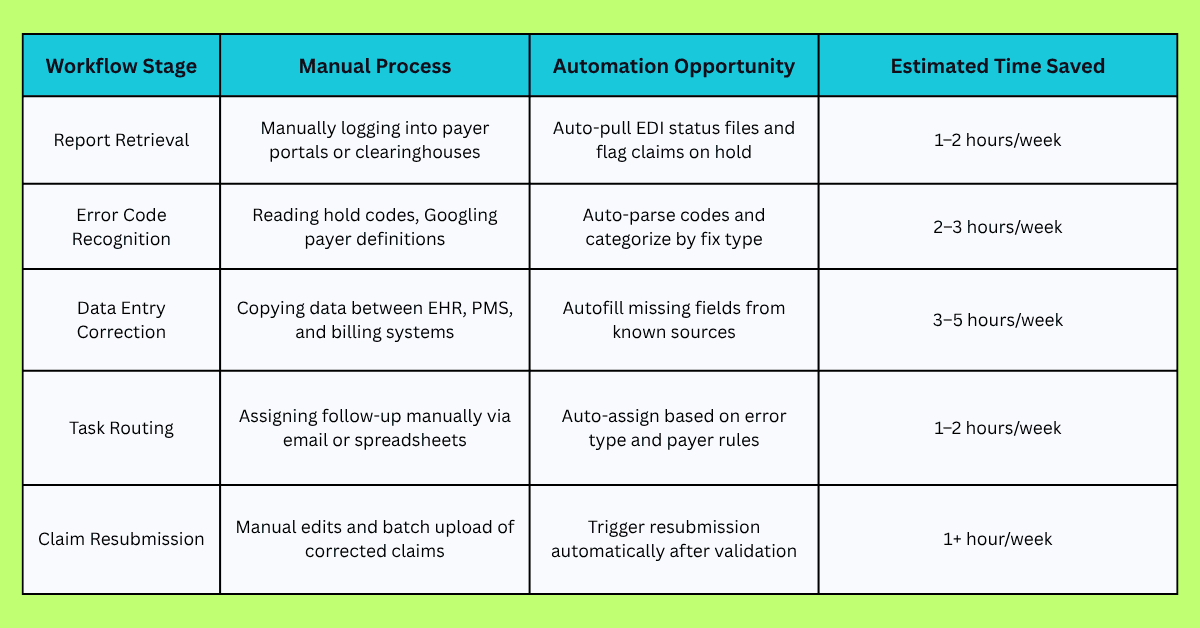
Total Weekly Time Savings: 8–13 hours per team (And that’s just for EDI holds—not including broader billing automation.)
Multiply that by the number of team members, and the ROI becomes undeniable.
This is where automation stops being a nice-to-have and starts being your competitive edge.
Tools and Technologies for EDI Hold Report Automation
Not all automation is created equal.
Some tools are built deep into payer systems.
Others bolt onto your existing tech stack.
And some, like Magical, sit quietly in your workflow, doing the repetitive work for you without ever needing an API or a dev team.
Here’s a breakdown of the most common tech solutions healthcare admin teams are using to reduce EDI hold friction.
RPA (Robotic Process Automation) Platforms
Examples: UiPath, Automation Anywhere
Strengths:
Good for rule-based tasks (e.g., logging into a portal and pulling a report)
Highly customizable workflows
Limitations:
Requires IT or engineering to build and maintain bots
Breaks easily when systems change
Best for: Large orgs with in-house dev teams
Clearinghouse Solutions
Strengths:
Real-time claim validation and scrubbing
Payer-specific rule engines
Limitations:Mostly reactive (errors flagged after submission)
Still require manual correction and resubmission
Best for: Practices already integrated with these clearinghouses
EHR/RCM Platform Features
Examples: Epic, AdvancedMD, Athenahealth
Strengths:
Built-in claim edits and validation rules
Centralized claim management
Limitations:
Vary widely in capability
Can’t fix issues across systems (e.g., intake → billing → clearinghouse)
Best for: Organizations with deep customization in their EHR/PMS stack
AI-Powered No-Code Automation (Magical)
Example: Magical
Strengths:
Instantly detects and fixes errors across systems
Autofills data with zero toggling or API setup
No-code implementation—your team can use it today
HIPAA-compliant, built specifically for repetitive admin workflows
Limitations:
Not a replacement for EHRs or billing systems—designed to supercharge them
Best for: Admin teams that want to scale without hiring, coding, or waiting for IT
If you're still using a patchwork of portals, manual checks, and hope, you're doing your billing team—and your bottom line—a disservice.
There are tools out there to fix it.
But only a few that fix it without making your life more complicated.
Real Results: What Happens When You Automate?
Let’s be clear: this isn’t about moving faster for speed’s sake.
It’s about moving smarter, with less friction, fewer errors, and zero wasted effort.
When healthcare admin teams automate their EDI hold workflows, here’s what actually changes:
Speed Goes Up, Way Up
Claims don’t sit in queues for days waiting to be noticed.
Hold reports get flagged instantly. Fixes get deployed in minutes, not hours.
No more “check again tomorrow” cycles.
According to HIMSS, healthcare orgs using automation in RCM see a 30–40% improvement in claims processing time.
Accuracy Skyrockets
Automation removes the #1 cause of EDI holds: manual data entry.
No more mistyped IDs, incomplete patient profiles, or date formatting issues.
With Magical, claims are auto-filled using clean, verified source data, so your team can focus on approvals, not rework.
Revenue Gets Unblocked
Held claims slow everything down. Denials stack up. Filing deadlines get missed.
Automated claim correction and resubmission means:
Fewer delays
Higher first-pass acceptance rates
Revenue comes in faster, with less overhead
Staff Burnout Drops
Fixing holds manually isn’t just inefficient. It’s exhausting.
Once those repetitive, mind-numbing tasks are off their plate, your team can:
Focus on escalations and high-value tasks
Reduce overtime and admin fatigue
Spend less time toggling, more time optimizing
Case in point: ZoomCare
By automating patient data workflows with Magical, they eliminated over 10 hours of admin time per week, streamlined claim prep, and improved accuracy across the board—without adding new software or hiring new staff.
That’s the real promise of automation. Not just faster billing… but smarter, cleaner, calmer operations.
How Magical Automates EDI Hold Reports (5 Benefits)
Magical doesn’t replace your systems. It makes them work together faster, cleaner, and without all the copy-paste chaos in between.
It’s not a clearinghouse. It’s not an RCM platform.
It’s the missing link in your workflow: a no-code automation layer that sits inside your browser and handles the repetitive grunt work your team never had time for.
Here’s how Magical steps in to automate your EDI hold workflow from end to end:
1. Instantly Detects Hold Triggers
Magical recognizes common hold scenarios (missing data, invalid formats, code mismatches) before your team even hits submit.
It works in real time, identifying red flags while claims are still in progress.
No guesswork. No cleanup after the fact. Just clean claims from the start.
2. Autofills Critical Fields Across Systems
Instead of toggling between your EHR, clearinghouse, and billing software, Magical auto-populates the fields that typically cause holds.
Whether it’s pulling a correct date of birth from the patient profile or applying payer-specific formatting, Magical keeps your data aligned across platforms, without logging into five tabs.
3. Standardizes and Corrects Data on the Fly
Magical doesn’t just detect problems. It fixes them. It applies rules and logic to:
Format fields properly (dates, ZIP codes, ID numbers)
Match payer-specific requirements
Ensure consistency between systems
Your team doesn’t have to remember which payer wants what. Magical already knows.
4. Resubmits Claims Faster and Cleaner
Once a claim is corrected, Magical helps your team push it forward without the usual back-and-forth.
The fix happens in the moment, in the right system, with the right data—so the next time it goes out, it doesn’t come back.
5. Built for Compliance and Scale
Magical is HIPAA-compliant, secure, and built specifically for healthcare admin teams.
It’s not another software platform to learn.
It’s a lightweight, intuitive extension your team can use right now. No training, no IT lift.
Think of it this way: While other tools flag the problem, Magical solves it.
Example Workflow: From EDI Hold to Reimbursement
Let’s break it down.
Here’s a real-world EDI workflow—what it looks like without automation… and what it becomes with Magical in the loop.
Scenario:
A claim for a routine patient visit is submitted. But it’s flagged by the clearinghouse for a missing date of birth and an invalid insurance ID format. It gets dropped into a queue and just sits there.
Without Automation:
A team member logs into the clearinghouse to spot the held claim
They look up the patient in the EHR
Manually copy the correct date of birth
Cross-check insurance formatting rules for the payer
Update the PMS fields manually
Re-submit the claim
Wait… and hope it clears
Time spent: 15–30 minutes
Multiply that by 40+ claims a week? You’ve got a full-time job.
With Magical:
As the claim is being created, Magical flags the missing DOB and invalid insurance ID format
It pulls the correct DOB from the patient’s record in the EHR
Applies the payer-specific formatting to the insurance ID
Autofills both fields in the PMS and claim form—no switching tabs
The claim is submitted clean the first time
It clears, gets adjudicated, and gets paid
Time spent: Under 60 seconds
No toggling. No backlog. No stress.
That’s the difference between reactive rework and proactive automation.
With Magical, claims don’t just move—they flow.
Case Studies: EDI and Repetitive Workflow Automation in Action
You’ve seen the problem. You’ve seen the fix. Now here’s the proof with real organizations, real outcomes, and real time saved.
These teams used Magical to cut through repetitive EDI workflows, reduce manual rework, and unlock serious admin efficiency, without adding staff or waiting on IT.
ZoomCare: Reclaiming Time, One Workflow at a Time
The challenge: ZoomCare’s admin team was bogged down with repetitive patient data entry tasks across their billing and claim systems. Manual processes created friction and delays.
The fix: Magical automated the entire data entry process, pre-filling claim forms and standardizing inputs before submission.
The outcome:
Saved 10+ hours per week in patient data workflows
Reduced EDI errors that triggered clearinghouse holds
Staff got back time to focus on high-impact tasks
WebPT: Scaling Accuracy Without Scaling Headcount
The challenge: As a large outpatient rehab platform, WebPT needed to keep up with high claim volume without drowning its team in manual claim prep and corrections.
The fix: Magical automated cross-system workflows, ensuring that critical billing data flowed cleanly from EHR to PMS to clearinghouse.
The outcome:
Increased first-pass claim approval rates
Fewer backlogged holds and denials
Admin team scaled output without expanding staff
TCPA: From Copy-Paste Chaos to Workflow Precision
The challenge: TCPA’s team was spending hours each week copying data between systems, introducing errors that delayed or derailed claims.
The fix: Magical automated those repetitive, error-prone steps, ensuring data consistency across platforms.
The outcome:
Reduced human error in claim creation
Faster claim prep
More clean claims submitted on the first try
This isn’t about doing more with less. It’s about doing better with less friction, fewer errors, and workflows that actually flow.
How to Get Started with EDI Automation
The good news? You don’t need to overhaul your billing systems, switch clearinghouses, or wait six months for IT to get back to you.
EDI automation isn’t some huge transformation project anymore. It’s a tactical shift your team can make today, starting with the bottlenecks you already know are slowing you down.
Here’s how to get started:
Step 1: Audit Your Current Workflow
Map out your existing EDI process from claim generation to submission. Identify:
Where EDI holds are most common
Which claims or payers create the most issues
How long it takes to resolve holds manually
Look for patterns. That’s where automation can start delivering fast ROI.
Step 2: Identify Repetitive, Rule-Based Tasks
What does your team do again and again?
Examples:
Re-entering the same patient info across systems
Correcting common formatting errors (e.g., ZIP codes, DOBs)
Copying and pasting from the EHR to billing forms
If it repeats, it can be automated.
Step 3: Choose a Tool That Works with Your Stack
Forget platforms that require full system integrations or dev teams to manage bots.
Look for:
No-code setup
Browser-based functionality
HIPAA compliance
Support for your EHR, PMS, and clearinghouse workflows
This is where Magical shines—your team can start using it within minutes.
Step 4: Automate One High-Impact Workflow First
Pick a single pain point.
Maybe it’s insurance ID corrections.
Or DOB errors.
Or reformatting address fields before claim submission.
Use Magical to automate just that task—and watch how quickly it clears backlog and reclaims hours.
Step 5: Scale the Wins
Once you’ve automated one workflow, expand gradually:
Add new triggers and fields
Involve other team members
Set up consistent automation rules across departments
Soon, you’re not just fixing EDI holds. You’re preventing them, at scale.
You don’t need a new platform. You need fewer tabs, fewer clicks, and fewer claims stuck in limbo.
Automation starts with one click—and compounds from there.
Common Questions About EDI Hold Automation
Is EDI automation HIPAA-compliant?
Absolutely—when you’re using the right tools. Magical is built with HIPAA compliance baked in, using secure handling, encryption, and access controls to keep patient data safe at every step of the workflow.
Your team stays in control, and your data stays protected.
Will I still need staff to manage claims?
Yes, but they’ll be focused on important work, not busywork. Automation isn’t about replacing your team—it’s about amplifying them.
With Magical, your staff can stop correcting the same five errors and start focusing on higher-value tasks like denial prevention, payer follow-up, and process improvement.
Can automation handle different payers and their specific rules?
Yep. While payer rules vary, many EDI hold triggers are repetitive and rule-based, exactly what automation is made for.
Magical can be customized with payer-specific field formats, validation logic, and even claim templates, so each submission meets the requirements before it hits the clearinghouse.
How hard is it to implement automation in our current setup?
With Magical? Not hard at all.
There’s no code, no integration, and no need to overhaul your EHR or PMS. Magical runs directly in your browser, meaning your team can:
Start automating today
Use it across existing systems (yes, even multiple tabs)
See results in minutes, not months
What kind of support does Magical offer?
You get access to support, onboarding help, and a team that understands healthcare workflows, not just generic automation. Magical was built for the real, messy, high-stakes world of medical billing, and the support reflects that.
Final Thoughts: Let AI Handle the Claims Chaos
The truth is, your billing team doesn’t need to work harder.
They need the chaos to stop before it starts.
EDI hold reports aren’t just annoying—they’re expensive, exhausting, and totally unnecessary when you have the right automation in place. The fields that are always missing? Filled. The formats that never match? Fixed. The toggling between systems? Gone.
This is the shift from rework to real flow.
With Magical, your team gets a smarter, faster, frictionless way to work—without ripping and replacing your current systems.
Try the free Magical Chrome extension today to start eliminating repetitive billing tasks, or book a demo to see how your team can automate EDI hold fixes across your entire claims process.
Let your team do what they do best.
Let Magical handle the rest.