
Most healthcare workflows weren’t built.
They just... happened.
A new system got layered on top of the old one.
A form got copied from a legacy doc.
A front-desk team figured out a workaround that became policy.
Now? You’ve got dozens of disconnected processes stitched together with spreadsheets, sticky notes, and hope.
Automation sounds like a fix, but without structure, it only adds noise.
What works in one department might break another. What saves time in one tool might create double work in the next.
That’s why this isn’t just a blog. It’s a checklist.
Not for perfection.
For progress.
So your team can stop putting out fires and start building workflows that don’t burn them out.
Why Healthcare Workflow Automation Matters Now
Healthcare admin teams aren’t just handling logistics anymore. They’re managing an avalanche of disconnected systems, rising patient expectations, and a shrinking workforce, often with the same tools they were using five years ago.
That math doesn’t add up.
According to the U.S. Bureau of Labor Statistics, the demand for medical records and health information technicians continues to grow, but turnover is rising just as fast.
Meanwhile, the number of manual admin tasks tied to every patient interaction (scheduling, intake, insurance, claims) keeps expanding.
A single patient visit can trigger over 20 separate admin actions across multiple systems. And nearly half of all healthcare workers now report feeling burnt out, with administrative burden named as one of the top three causes (Medscape, 2024 Report).
It’s not just a workload problem. It’s a workflow problem.
Manual processes lead to:
Delayed care
Inaccurate billing
Longer onboarding
More denied claims
And all of it adds up. A recent study from the Journal of the American Medical Association (JAMA) found that administrative complexity is responsible for 25% of all healthcare spending in the U.S., an estimated $250 billion annually.
Automation doesn’t fix everything. But it gives teams a chance to breathe.
It creates space.
For faster handoffs.
For cleaner data.
For less rework, and more real work.
The Healthcare Workflow Automation Checklist
Think of this less like a list of best practices and more like a blueprint for reducing chaos.
You don’t need to automate everything at once. But you do need a starting point, a plan, and a clear way to measure what’s working.
Here’s how high-performing healthcare teams are approaching it.
1. Identify High-Volume, Repetitive Tasks
Start with what’s eating your team’s time.
These are the workflows that happen every day, across every role:
Copying patient data between systems
Verifying insurance information
Sending appointment reminders
Populating prior auth forms
Manually entering billing codes
If your team is doing the same task 30+ times a day (and it follows a consistent pattern), it’s a strong candidate for automation.
Stat to support: The average healthcare employee spends 35% of their time on repetitive, rule-based tasks that could be automated, according to a McKinsey report.
2. Audit the Tools You Already Use
You don’t need a new system. You need better flow between the ones you have.
List every tool your team touches in a day: EHR, billing software, CRM, scheduling tools,and insurance portals. Then map out where manual entry is slowing things down.
Questions to ask:
Which platforms require double entry?
Where are tasks being duplicated?
Where do errors tend to creep in?
Case Study Tie-In: ZoomCare solved these handoff issues using Magical to automate intake and billing processes across tools, without ripping out existing systems.
3. Define Clear Goals for Each Workflow
Automation without a target is just noise.
Set specific, outcome-driven goals for each workflow you want to automate. Not “save time”, but how much time, for whom, and by when.
Example goals:
Reduce patient intake time from 12 minutes to 6
Decrease billing rework by 70% in 30 days
Eliminate 90% of copy/paste tasks in EHR entries
Magical Tip: Every goal should connect to a real KPI: time saved, error rate reduced, claims processed, staff hours freed up.
4. Choose a Tool That Doesn’t Add More Complexity
If your automation tool needs a developer to set up or maintain, it’s not built for your team.
Look for something your admins can own. That means:
No-code workflows
HIPAA-ready security
Fast setup (minutes, not months)
Works across browser-based systems
Stat to support: 75% of healthcare IT leaders say ease of integration is the #1 barrier to implementing new automation tools.
Example: Magical is a browser-based tool that lets staff automate multi-step workflows without code, engineering support, or full platform overhauls.
5. Involve the People Doing the Work
Automation only scales if the people closest to the process believe in it.
Before rolling out any workflow, involve the staff who use it every day. Have them test, give feedback, and help shape the automation from the ground up.
What this looks like:
Quick 30-minute pilot tests
Shadowing to spot friction points
Post-rollout check-ins to refine the flow
Case Study Tie-In: WebPT involved their documentation team directly in building automation templates, leading to faster adoption and measurable wins. See how they did it →
6. Start Small, Then Expand
Don’t try to automate everything. Pick one or two high-friction workflows and automate those first.
Once your team sees it works (and sees time come back), they’ll be more open to expanding.
Create a simple naming system for workflows, and store them in a shared location (e.g., “Intake-01-Medicare” or “Billing-04-DenialAppeals”).
7. Track the Wins (And Share Them)
Automation isn’t a one-time fix. It’s a system that needs tuning.
Track impact every 30, 60, and 90 days:
Hours saved
Error rates dropped
Claims processed faster
Fewer patient delays
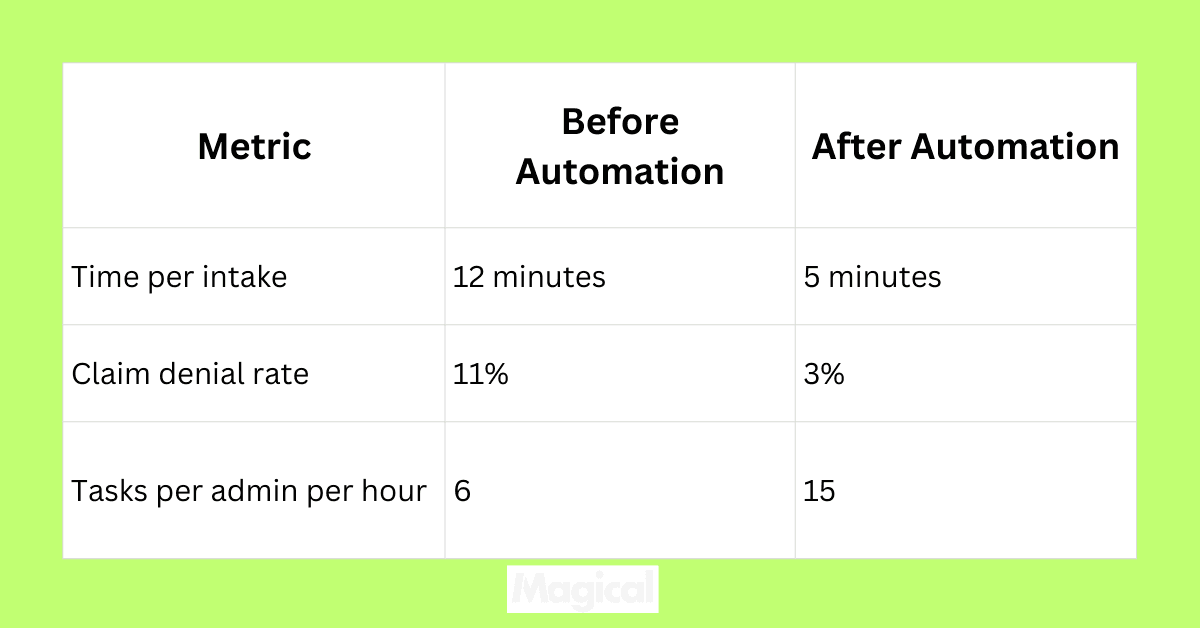
Use these numbers to get buy-in for more workflows or to make the case for budget.
Common Pitfalls to Avoid
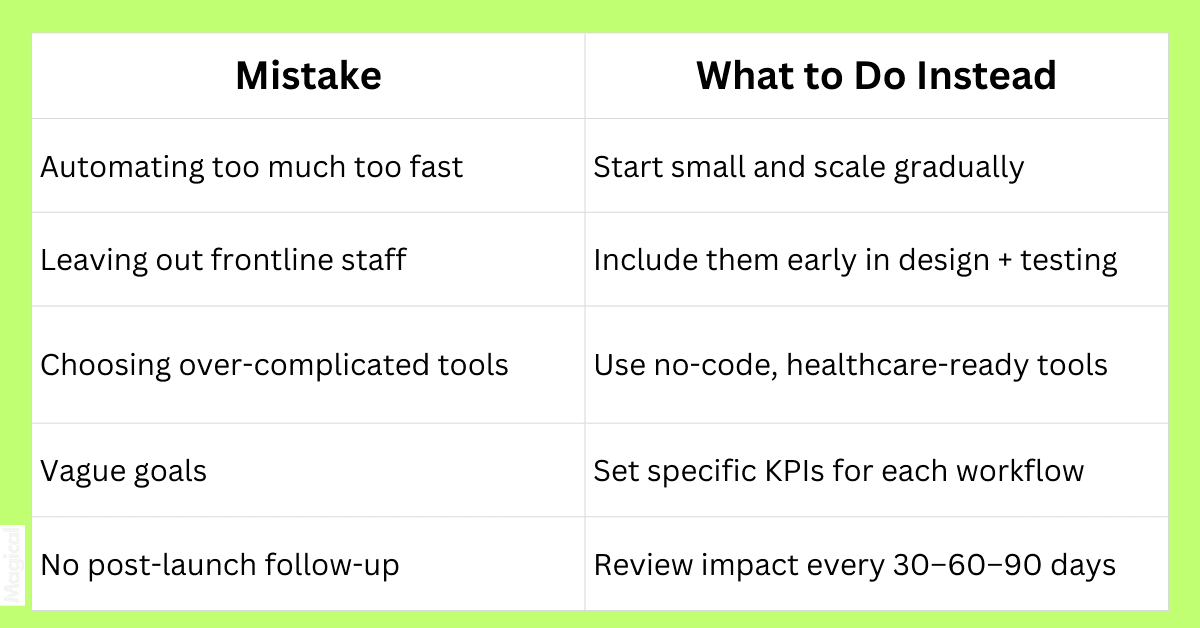
Workflow automation doesn’t fail because of bad intentions. It fails because of misalignment, overcomplication, and rushed rollouts.
If your automation effort feels heavier than the manual process it replaced, one of these common pitfalls might be the reason:
Trying to Automate Everything at Once
Ambition is good. But going wide too early leads to confusion, inconsistency, and rollback.
Start small. One department. One process. One clear win.
It’s not about doing more. It’s about doing what matters, consistently.
Ignoring the People Doing the Work
Admins know where the friction lives. They also know which workarounds actually keep things moving.
If your automation plan is built without their input, it won’t reflect reality. And it won’t stick.
Bring them in early. Let them shape it.
Choosing Tools That Break More Than They Fix
A good automation tool should reduce friction, not add training, IT tickets, or new logins to manage.
Generic platforms may promise flexibility, but if they weren’t built with healthcare workflows in mind, they’ll hit compliance and integration walls fast.
Look for tools that:
Work with browser-based platforms
Don’t require custom APIs or developer time
Are HIPAA-ready from day one
Not Defining the Finish Line
“Make it faster” isn’t a goal. “Cut intake time by 50%” is.
Without clear, measurable outcomes, your team won’t know if the automation worked or if it’s just another process to babysit.
Every rollout needs a finish line. And a plan to measure whether it was crossed.
Skipping Post-Rollout Optimization
Automation isn’t set-and-forget.
Teams change. Workflows evolve. Tools update. If no one checks in on the flow after go-live, it eventually breaks or becomes irrelevant.
Schedule time every 30–60–90 days to review performance, clean up dead workflows, and find new opportunities.
Real-World Wins: How Healthcare Teams Are Using Magical to Automate Smarter
Workflow automation isn’t something you have to guess at. Teams across healthcare are already doing it and getting measurable results.
These are three different orgs, solving different problems. But they all started with the same question: What if we didn’t have to do this part manually anymore?
Here’s what changed when they automated with Magical.
TCPA: Automating Intake for a Pediatric Powerhouse
TCPA handles high patient volumes and high parent expectations. Their front-desk teams were spending valuable time retyping patient data into scheduling and billing systems.
What they automated:
New patient intake fields
Repetitive data entry across platforms
The impact:
Significantly faster onboarding
Fewer errors in insurance and contact data
Staff freed up to support in-person interactions
Read the full TCPA case study →
ZoomCare: Front-Desk Workflows, Streamlined
ZoomCare runs dozens of neighborhood clinics with modern, patient-first care. But their front-desk staff were stuck doing copy/paste work between systems, slowing down check-ins and billing.
What they automated:
Patient intake information
Insurance details and visit documentation
The impact:
Shorter wait times at clinics
Cleaner data in EHR and billing systems
Admin teams able to do more with less
Explore the ZoomCare case study →
WebPT: Documenting Smarter, Billing Faster
WebPT serves over 150,000 rehab therapy professionals. Their operations team needed to reduce friction in documentation, especially when it slowed down billing and reimbursement.
What they automated:
Standardized documentation entries
Cross-platform data population
The impact:
Fewer documentation errors
Accelerated billing workflows
Hours saved each week for admin staff
See how WebPT scaled automation →
Each team started with one goal: eliminate repetitive work.
What they got was more time, fewer mistakes, and better control over their day-to-day operations.
The Future of Admin Work in Healthcare
Admin work in healthcare isn’t disappearing. But it is changing.
The role of the admin is shifting from reactive to proactive, less about chasing down claims or fixing errors, and more about designing workflows that prevent them in the first place.
Generative AI and automation tools are already moving toward:
Anticipating denial risks before they happen
Automatically filling documentation gaps
Guiding staff through complex payer requirements
Building workflows that adapt to patient and system needs in real time
Instead of doing more manual work, teams will spend their time creating smarter systems. Tools like Magical put that power directly in the hands of admins, without forcing IT to rebuild the entire tech stack.
The future isn’t fewer people. It’s fewer bottlenecks.
Final Thoughts
Healthcare admin burden won’t shrink on its own. It takes intentional design (and the right tools) to create workflows that scale.
Start with one process. Standardize it. Automate it. Then expand.
Every improvement compounds: faster billing, cleaner data, shorter patient wait times, less burnout.
And when teams spend less time on the busywork, they gain more time for the work that actually matters.
Try It Yourself
Download the free Magical Chrome extension or book a demo for your team today! Magical is used at 100,000+ companies and by nearly 1,000,000 users to save 7 hours a week on average.