It’s 7:58 AM.
The phone is already ringing.
Three patients are at the desk.
Two more just walked in.
One forgot their insurance card.
The EHR needs to be logged in.
The scheduling system froze.
And the clipboard stack is growing by the minute.
Every clinic knows this scene. The tools are different, but the story is the same: too many clicks, too many fields, too many hands entering the same information.
The result isn’t just delays.
It’s a front desk buried in repetitive work, while patients wait for care to begin.
What happens if those tasks complete themselves? If the forms fill, the data moves, and the systems talk, without the staff doing the juggling?
That’s the shift front desk automation software is creating inside healthcare teams today.
The Problem with Today’s Front Desk Workflows
Here are 2 problems with the front desk workflows of today:
Too Many Systems, Too Little Time
Front desk staff don’t just greet patients. They act as translators between disconnected tools.
Scheduling lives in one system, insurance verification in another, clinical notes in a third. Each step requires toggling, retyping, and triple-checking.
According to Becker’s Healthcare, clinicians and staff spend more than four hours a day in their EHRs. A significant portion of that time is front-loaded on admin work. The more systems in play, the more time gets eaten up before care even begins.
Error Rates and Patient Frustration
When data has to be keyed in multiple times, mistakes multiply. One missed digit on an insurance policy or a misspelled patient name can cascade into denied claims, delayed care, and frustrated patients waiting longer than they should.
A 2024 NIH report highlights how redundant data entry is one of the top contributors to documentation errors.
In a high-volume clinic, those errors don’t just cost time.
They cost trust.
Visual Idea
Bar Graph: Average Patient Wait Time (Automated vs. Manual Check-in Workflows)
Manual check-in: ~18–22 minutes
Semi-automated workflows: ~12–14 minutes
Fully automated front desk workflows: ~5–7 minutes
What Front Desk Automation Software Actually Does
There’s misconceptions about what automation software does and doesn’t do. Let’s separate fact from fiction:
It Doesn’t Replace Staff. It Amplifies Them
Front desk automation isn’t about fewer people at the desk. It’s about freeing up the people already there to focus on patients instead of screens.
Instead of spending minutes clicking through fields, staff can greet, reassure, and guide patients, because the clicks are already handled.
That’s what happened at WebPT. By layering automation over their existing workflows, WebPT eliminated hundreds of hours of manual input across thousands of clinics.
Staff weren’t replaced. They were finally given the space to focus on work that matters.
The Tasks That Are Ripest for Automation
Not every workflow is ready for automation. But many of the most painful, repetitive front desk tasks are.
Here’s where automation makes the biggest impact:
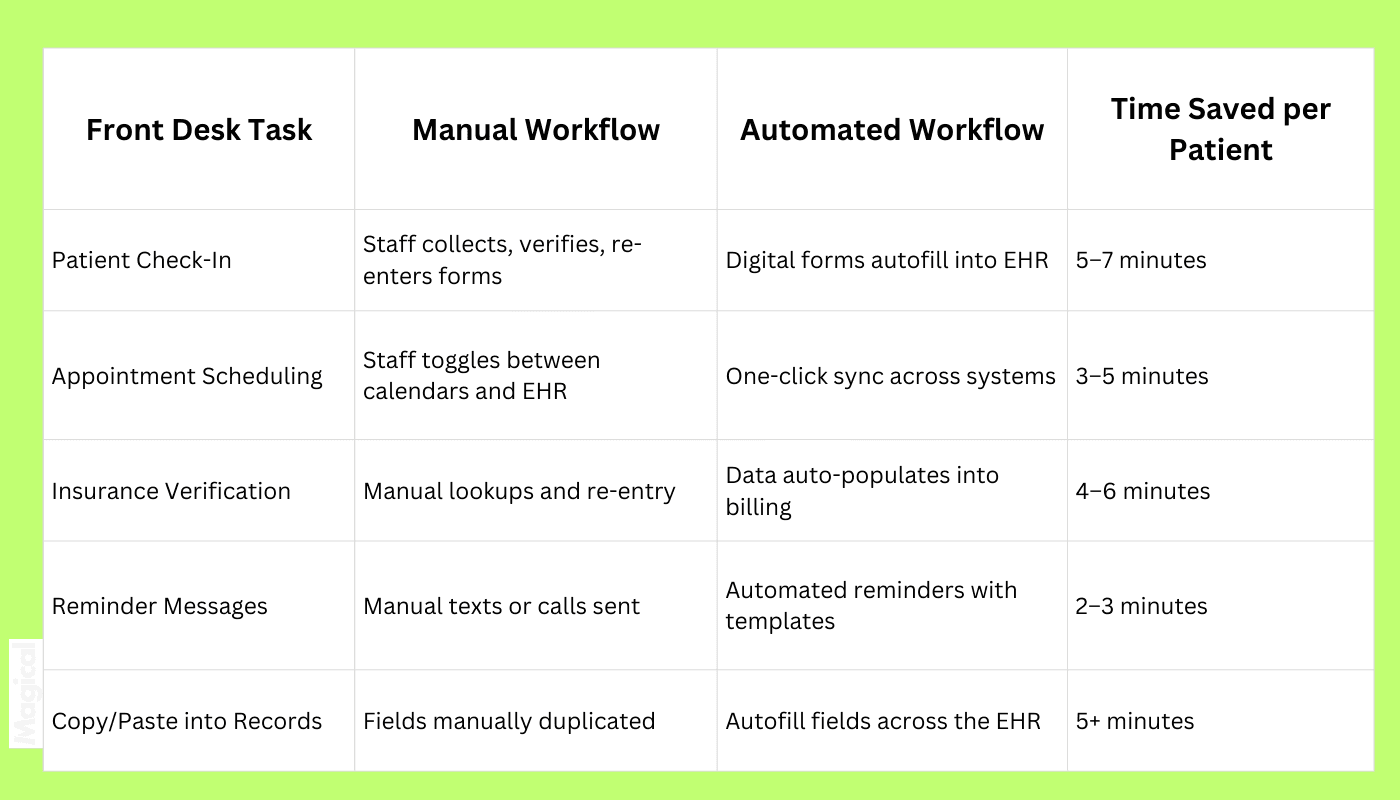
Multiply those savings across dozens of patients each day, and you’re looking at hours back for every team member on the front line.
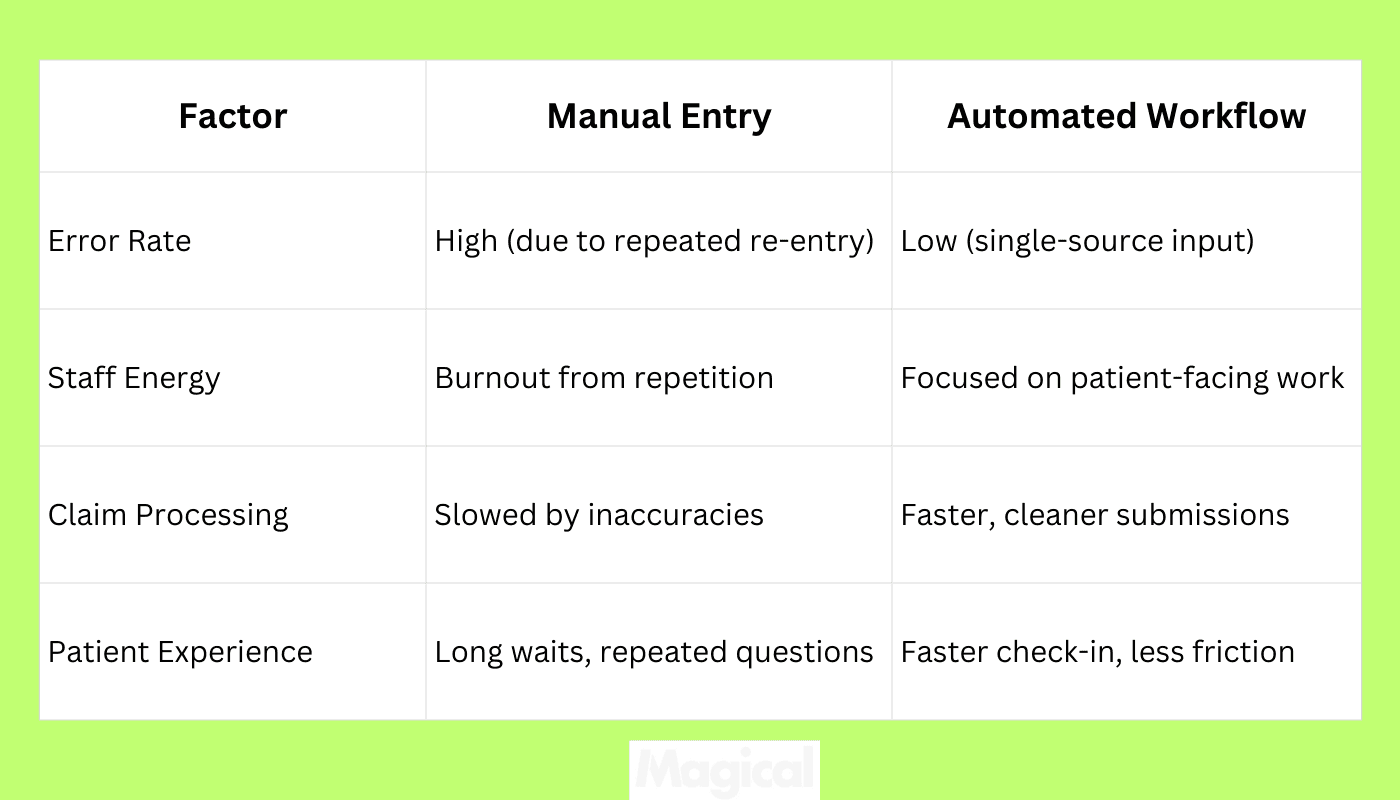
How Automation Reduces Errors and Burnout
There’s so much potential for reducing errors and saving your burned-out team. Here are a couple:
Less Manual Input = Fewer Mistakes
Every duplicate entry is another chance for an error. A mistyped birthdate, a dropped digit in a policy number, or a mismatched code doesn’t just slow things down.
It can delay care and trigger claim denials.
Automation eliminates those extra touches. Data moves once and lands everywhere it needs to go, without relying on human re-entry.
A HealthIT.gov study found that reducing manual documentation directly improves both data integrity and staff efficiency. Cleaner inputs mean smoother workflows, and smoother workflows mean patients get seen faster.
The Human Cost of Repetition
For front desk teams, re-entering data isn’t just tedious. It’s exhausting.
Clicking through the same fields hundreds of times a day drains focus and increases turnover.
That’s what TCPA discovered. By automating rework in their scheduling and patient communications, they cut out hours of repetitive tasks each week.
Staff no longer had to double-check or retype the same details. The result: more energy for patient interactions and fewer mistakes creeping in at the desk.
Front Desk Automation in Action: Real Healthcare Teams Doing More with Less
Let’s take a look at 2 companies that are making an impact with their own organizations using automation:
ZoomCare: Automation at the Point of Care
When patients walk into a ZoomCare clinic, they expect fast, convenient care.
The problem was that front desk staff were slowed down by repetitive entry. Copying the same data into multiple systems just to complete a check-in.
With automation, ZoomCare transformed that bottleneck. Patient records flowed seamlessly into the right fields, without duplicate entry.
Staff got time back, patients moved faster through the queue, and the experience matched the brand promise of on-demand care.
WebPT and the Rise of Workflow Efficiency
WebPT faced a different challenge: scaling efficiency across 7,000+ clinics. The administrative load of intake, documentation, and scheduling created hours of hidden work each week.
By applying automation, WebPT clinics reclaimed over 500 hours. The shift was simple, eliminating retyping and copy/paste in the workflows that bogged teams down.
Less duplication meant fewer errors, faster documentation, and more capacity for patient care.
Choosing the Right Front Desk Automation Software
Not all automation tools are built for healthcare. Some are designed for general office tasks, while others require deep IT involvement before they deliver value.
For front desk teams, the right solution needs to slot into existing workflows, work across multiple platforms, and keep patient data secure. Choosing the wrong fit can create more friction instead of solving it.
Must-Have Features for Healthcare Teams
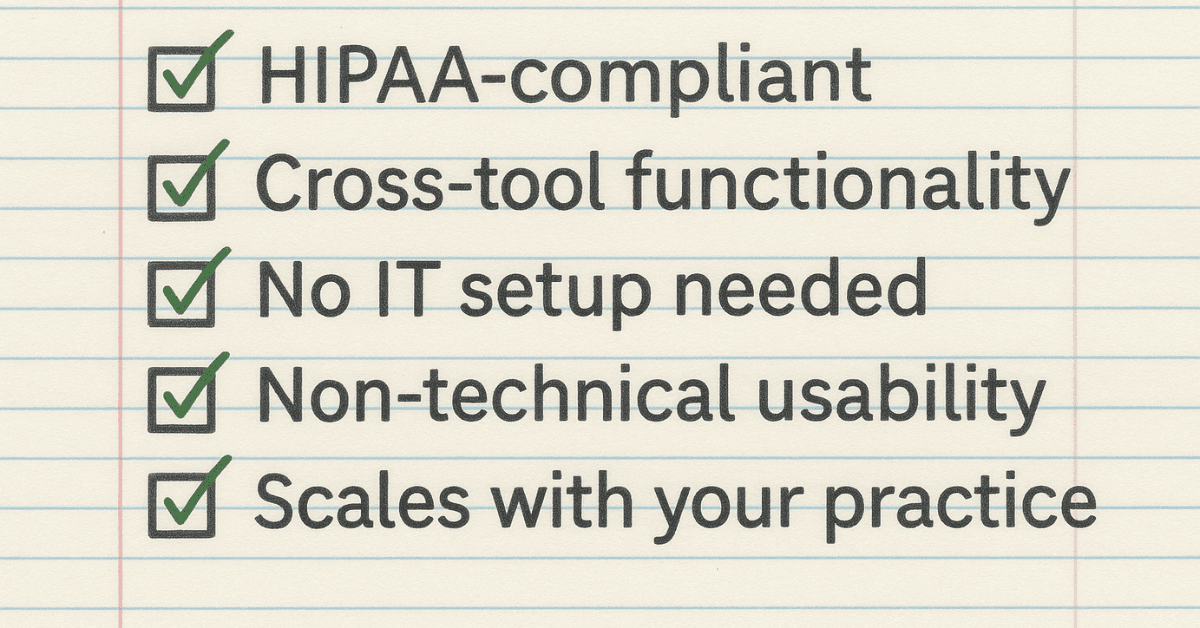
Front desk automation only works if it respects the complexity of healthcare. Look for tools that:
Meet HIPAA and security compliance standards
Work across multiple systems, including EHRs and insurance platforms
Require little to no IT support to deploy
Can be used by non-technical staff without training delays
These features ensure that automation helps, rather than hinders, your existing workflows.
Questions to Ask Before You Commit
Every team has unique needs, but the buying process should focus on one thing: Does the tool actually reduce repetitive work? A few questions to consider:
Can it autofill fields directly in your EHR?
Does it require custom integrations or APIs?
Can staff use it immediately, without IT configuration?
Does it scale across multiple sites or clinics?
If a solution can’t answer “yes” to most of these, it may not be the right choice for healthcare front desks.
From Queue to Calm: What Happens When Front Desk Workflows Just Work
Front desk mornings don’t have to start in chaos. With automation in place, the phones are still ringing and patients are still walking in, but the difference is what staff aren’t doing.
They’re not copying insurance IDs into three separate systems.
They’re not retyping patient addresses.
They’re not clicking through endless EHR tabs just to get the basics entered.
Instead, check-ins move faster.
Appointments are confirmed automatically.
Data fills the right fields in real time.
Staff are free to do what they were hired for:
Welcome patients
Answer questions
And keep the flow moving smoothly
The result is calmer mornings, happier teams, and patients who spend less time waiting and more time receiving care.
Final Thoughts: Ready to Rethink Your Front Desk?
The front desk will always be the first touchpoint for patients. But it doesn’t have to be the busiest, most error-prone part of the clinic.
With automation, the work that once piled up (check-ins, verifications, re-entry) simply moves on its own.
The result is a team that’s focused on care, not clicks.
Download the free Magical Chrome extension or book a demo for your team today! Magical is used at 100,000+ companies and by nearly 1,000,000 users to save 7 hours a week on average.