
Revenue cycle management shouldn’t feel like firefighting.
But for most healthcare teams, it does.
Denied claims.
Missing documentation.
Payer delays.
Endless status checks across five systems.
And when you ask your team where the breakdown is, the answer isn’t unclear. It’s everywhere.
The problem? Too much manual work in a process that should be predictable, repeatable, and fast.
That’s why AI is showing up in RCM conversations.
Not as a buzzword, but as a strategy.
Done right, AI doesn’t just speed things up. It reduces rework, improves accuracy, and gets cash in the door faster.
But not all AI RCM tools are built the same.
Some are black boxes.
Some need months to implement.
Some don’t actually use AI at all.
Let’s cut through the noise.
Let’s get a side-by-side look at the top AI RCM software tools on the market and find out what actually matters when choosing one for your team.
Why Healthcare RCM Needs AI Now More Than Ever
The financial pressure isn’t easing.
Margins are getting thinner.
Administrative tasks are getting heavier.
And billing teams are asked to do more with less.
Less time, less staff, less room for error.
The result? A slow, error-prone revenue cycle where denials pile up, follow-ups slip through, and days in A/R creep higher.
According to Kaufman Hall, hospitals are still struggling with negative or near-zero operating margins, while administrative costs continue to climb.
It’s not sustainable.
And it’s not going to fix itself.
Where AI Makes a Measurable Difference
This isn’t about replacing staff. It’s about giving teams leverage so the same people can get better results, faster.
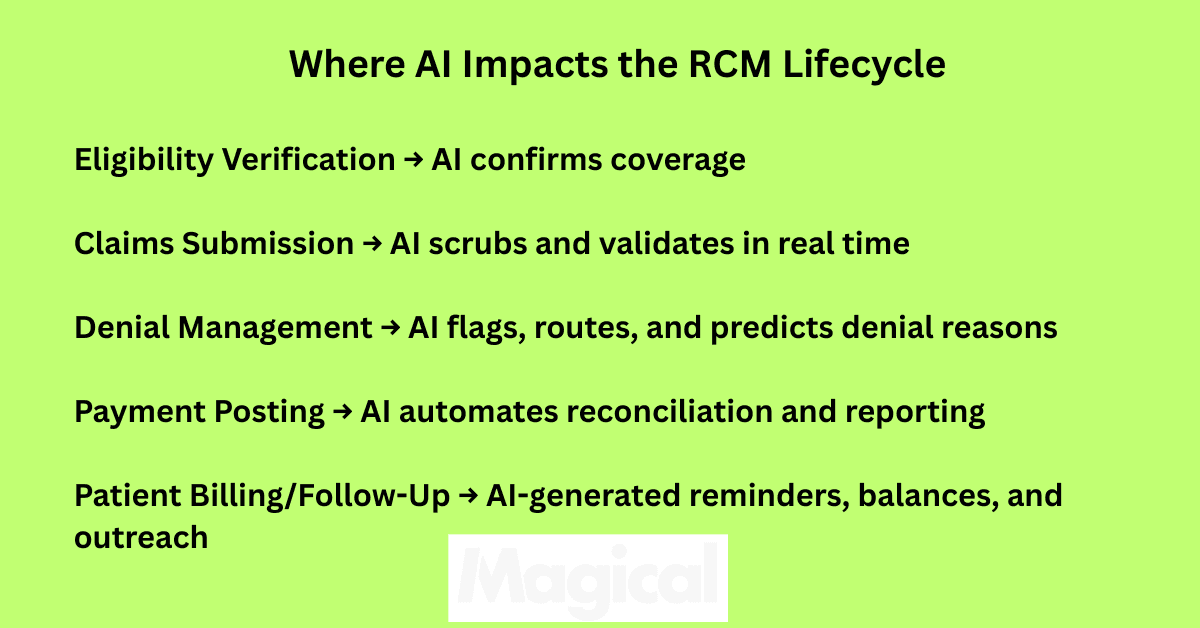
AI in Revenue Cycle Management (RCM) can:
Scrub claims in real time and flag errors before submission
Predict denials based on historical data and payer behavior
Route appeals automatically to the right workflows
Monitor payer portals and extract status updates without human effort
Surface exceptions instead of forcing staff to sift through everything manually
It’s not just about speed. It’s about predictability, accuracy, and cash flow.
But Not All “AI” Tools Actually Use AI
Some platforms still rely on rules-based logic or manual configuration and call it AI.
The result? Expensive tools that behave like glorified macros.
Real AI platforms learn from data. They adapt. They reduce the manual decision-making load on your team.
If you’re evaluating RCM tools and can’t get a straight answer on what the AI actually does, that’s a red flag.
Core Features to Look For in AI-Powered RCM Software
You don’t need a platform with 200 features. You need the ones that eliminate the most manual work, prevent the most revenue loss, and support your team, not slow them down.
Here’s what matters when evaluating AI-powered RCM tools.
Claims Automation That’s More Than Just Templates
Look for platforms that go beyond auto-populating fields.
Real AI claims automation should:
Scrub claims in real time for missing modifiers, incorrect CPT codes, or outdated payer rules
Suggest corrections based on historical claim success
Adapt automatically as payer rules change
The goal is fewer rejections and less rework.
Denial Management with Intelligence, Not Just Reporting
Your team already knows denials are a problem. What they need is a tool that helps solve them.
AI can support denial management by:
Predicting which claims are most likely to be denied and why
Automatically tagging denial reasons and assigning resolution paths
Auto-generating appeal letters using payer-specific templates and past outcomes
If it’s just surfacing reports, it’s not doing enough.
Up-to-Date Payer Rules Engine
Payer policies don’t just change quarterly; they change unexpectedly. Any AI platform worth considering should have:
A dynamic rules engine that stays updated in real time
The ability to apply payer-specific rules to claim validation
Built-in alerts when changes could impact current workflows
Otherwise, you’re building automation on top of outdated assumptions.
AI-Driven Patient Communication (Without Human Error)
Patients are more responsible for their bills than ever. Automated follow-ups and estimates can improve collections, but only if they’re accurate and timely.
Look for features like:
AI-generated payment reminders
Real-time benefit estimations
Natural language messaging that adapts to patient behavior
And make sure it’s all compliant with privacy standards and communication laws.
Workflow Intelligence That Surfaces What Actually Matters
AI shouldn’t flood your dashboard. It should focus your team.
Top platforms offer:
Task prioritization based on denial likelihood or claim value
Performance insights by staff, location, or process
Customizable automation triggers based on internal benchmarks
Smart doesn’t mean complicated. It means less noise, more signal.
AI RCM Software Comparison (2025 Edition)
There’s no shortage of platforms promising to fix your revenue cycle. But the difference between automated and actually useful is massive, especially in healthcare.
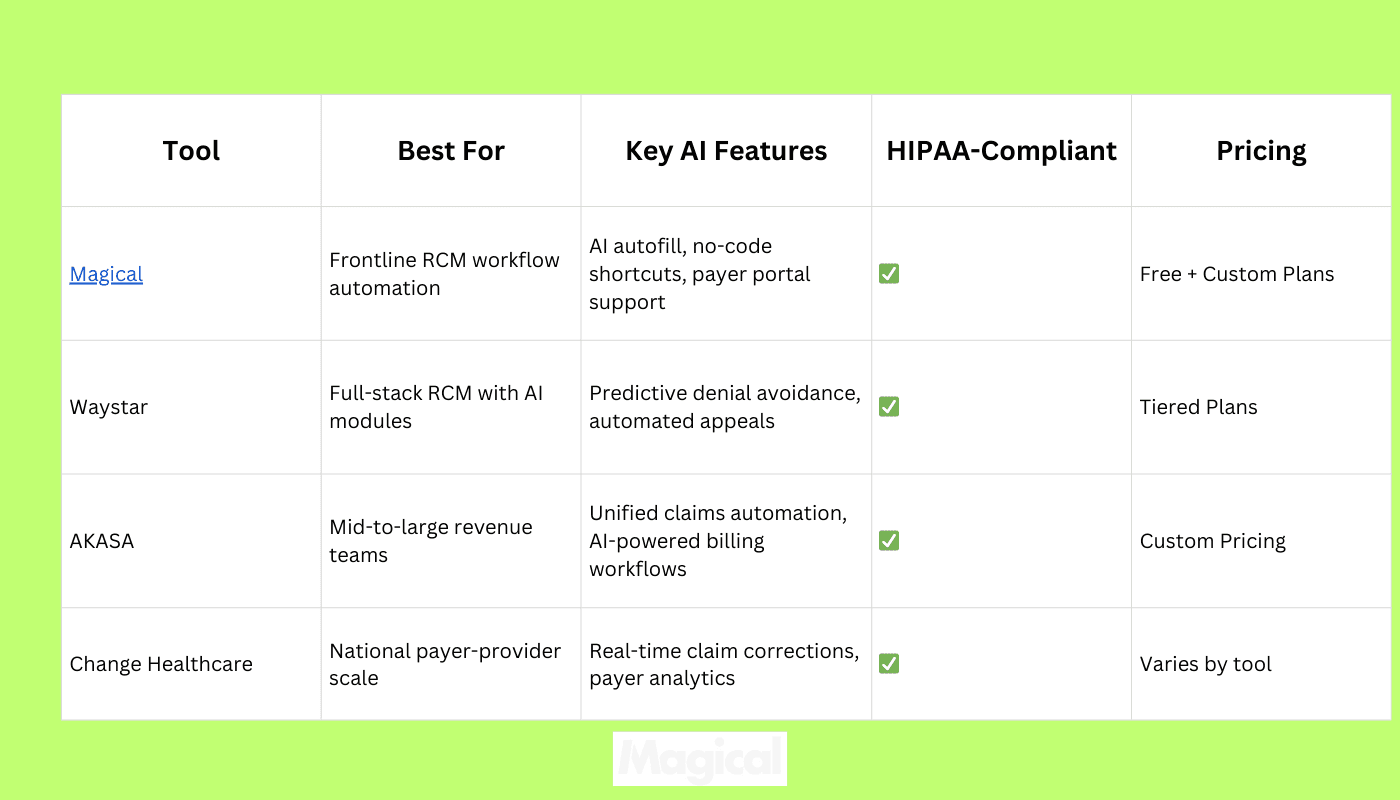
Here’s how five of the leading AI RCM tools stack up, based on what matters: actual AI capabilities, healthcare focus, ease of use, compliance, and ROI potential.
What Makes These Tools Stand Out
Magical: Purpose-built for billing teams doing high-volume, browser-based work. Doesn’t require IT involvement. No-code setup. Runs seamlessly on top of existing payer portals, RCMs, EHRs, and CRMs. Teams start automating in minutes—not months.
Waystar: Offers intelligent modules across claims, patient payments, and denials. Strong analytics, with payer-specific insights.
AKASA: Leverages AI to understand and automate repetitive billing workflows. Works with major EHR systems and adapts to organization-specific processes.
Change Healthcare: Widely used platform with payer network visibility. Offers AI-driven edits and claim monitoring, especially useful for large provider groups.
Choosing the right platform depends on how your team works today and how fast you want results.
For hands-on billing teams already using multiple portals, Magical offers the shortest path to time savings and fewer denials with zero rip-and-replace.
How Magical Supports AI-Powered RCM Without Replacing Your Systems
You don’t need another RCM platform. You need the workflows between your existing systems to stop wasting time.
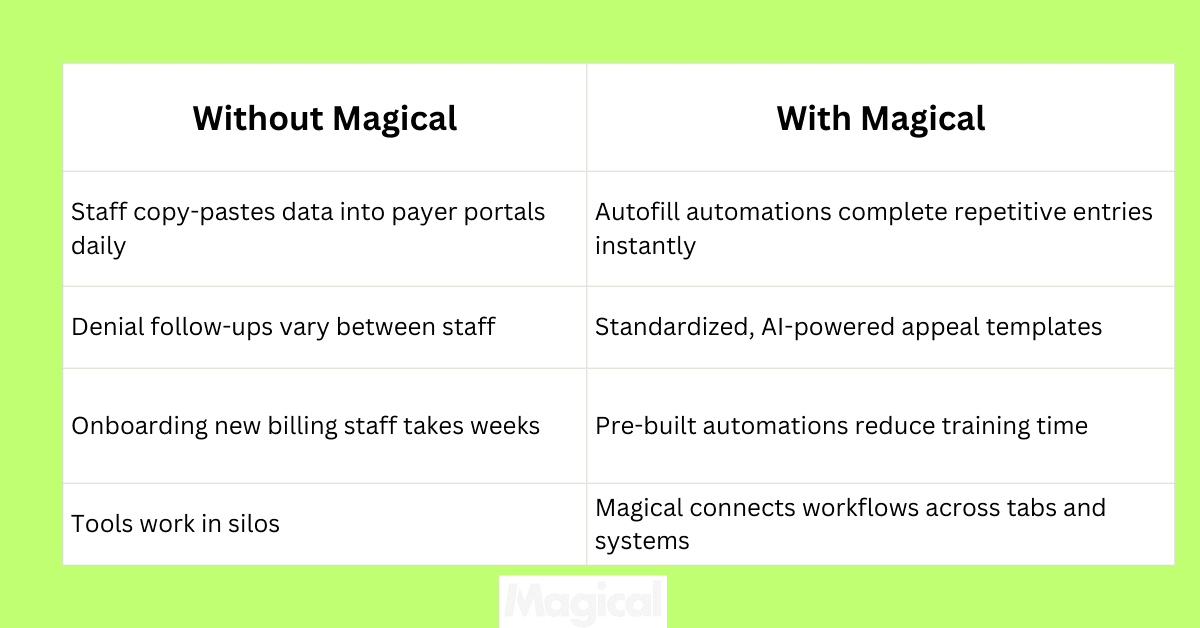
Magical doesn’t replace your billing software, clearinghouse, or EHR. It enhances them by running directly on top of whatever tools your team already uses.
Still logging into payer portals daily? Magical autofills claim details in seconds.
Still copying patient info between spreadsheets and internal tools? Magical builds a bridge.
Still doing denial follow-up manually? Magical creates repeatable, AI-driven templates, built by your own team.
No integrations. No code. No delays. Just automation that fits your process from day one.
Real Healthcare Teams Are Already Using Magical to Get Ahead
WebPT:
Reduced billing admin overhead by automating common tasks across EHR and scheduling tools. Freed up staff time without increasing headcount.
ZoomCare:
Cut repetitive manual steps across insurance verification and billing processes. Frontline teams built their own workflows. No IT support required.
TCPA:
Built secure, HIPAA-compliant workflows for patient outreach, appointment reminders, and claims coordination. Proved automation ROI without system migrations.
Compliance Is Built In, Not Bolted On
HIPAA-ready. Magical protects PHI with encryption, secure workflows, and strict access controls.
Audit-friendly. Track who ran what, when, and where.
Scalable across teams. From a single billing coordinator to a national RCM operation, workflows can grow without friction.
Questions to Ask When Comparing AI RCM Tools
Not every platform labeled “AI” is going to deliver results. And the flashiest interface doesn’t always mean your team will see value.
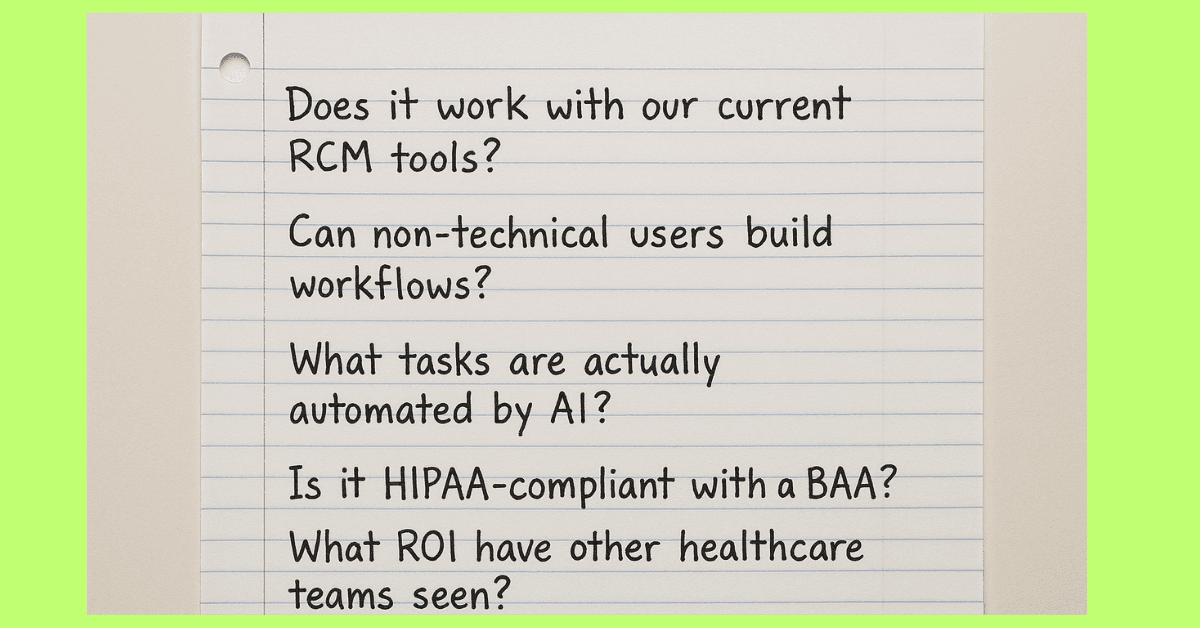
These are the questions that matter when you're deciding where to invest:
Does it work with your current systems?
You shouldn’t have to overhaul your EHR or billing software. Look for a solution that works alongside the tools your team already uses—without a major integration project.
Can your team use it without IT?
The best platforms are built for the people who do the work every day. If a tool requires developers, outside consultants, or months of training, it’s not designed for billing teams.
Is the automation truly AI-driven?
Ask for specifics. Does the platform learn from past denials? Can it adapt to changing payer behavior? Or is it just following static rules?
Is it HIPAA-compliant and audit-ready?
Any tool touching PHI should offer clear security protocols, encryption, and access controls. You should never need to chase compliance documentation.
Will you see ROI quickly?
Time savings, faster reimbursements, and error reduction should be clear within the first few weeks. If a platform can’t provide case studies or timelines, proceed with caution.
Are there real results from similar organizations?
Look for proof from healthcare teams like yours. Not just software demos or general claims.
Actual use cases, time saved, and measurable outcomes.
Final Thoughts: Choose AI That Works for Your Team
AI can do more than just automate tasks. It can create consistency, speed up cash flow, and reduce the pressure on your billing staff.
But only if it fits into the way your team already works.
Start by identifying where manual processes are slowing you down. Whether it’s denials, claim status checks, or data entry.
Then look for tools that solve those problems without adding complexity or relying on IT.
For most teams, the best choice isn’t the most expensive platform or the one with the longest feature list. It’s the one that gets your team back to high-value work, faster.
Tools like Magical let you do that. They're easy to start, secure from day one, and proven to save time on the workflows that matter.
Try It Yourself
Download the free Magical Chrome extension or book a demo for your team. Magical is used at 100,000+ companies and by nearly 1,000,000 users to save 7 hours a week on average.