
The patient was seen three weeks ago.
The documentation was submitted two days later.
The claim? Still stuck in the system, waiting on a “payer-specific formatting clarification.”
The team rechecked the codes.
Everything looked correct…until it didn’t. The insurer had changed the submission requirements again.
New format.
New language.
No heads-up.
So the workflow kicks back to square one.
More copy-pasting.
More rework.
More hours lost to tasks that should be instant.
This is what payer workflows look like for most healthcare organizations in 2025: manual steps, outdated tools, and too many chances to get it wrong.
And every breakdown in that workflow costs time, revenue, and trust.
The reality? You can’t solve payer problems with more people.
You solve them with smarter systems, automated, intelligent, adaptive systems that prevent denials before they happen and keep revenue flowing without the chaos.
That’s what this guide is about:
What’s broken
What’s changed
And how the best teams are automating payer workflows the right way, finally.
Payer Workflows: A Quick Breakdown (and Why They Break So Often)
Before we can fix the problem, we need to map it.
Payer workflows are a complex chain of tasks that move from patient intake to reimbursement. At a glance, they look linear.
In reality, they’re filled with decision points, dependencies, and chances to get stuck.
Here’s a simplified version of a typical payer workflow:
The Core Workflow
Eligibility Verification: Confirm the patient is covered for the services you’re about to provide.
Prior Authorization (if required): Request approval from the payer before the procedure or service is delivered.
Service Documentation: Capture and code what happened during the patient encounter using standardized formats (ICD-10, CPT, etc.).
Claims Submission: Submit documentation to the payer using their preferred format, forms, and channels.
Reimbursement Tracking: Monitor the claim status, address any follow-ups, and receive payment.
Denial Management / Appeals: If the claim is denied, rework the documentation or initiate an appeal process.
Audit Prep: Store and organize documentation to remain defensible in the event of a payer audit or compliance check.
Where It All Falls Apart
Each step is an opportunity for friction, and manual processes only make it worse.
Eligibility data is often incomplete or outdated, leading to downstream claim rejections.
Prior auths get delayed because documentation isn’t formatted correctly or lacks key justifications.
Claims get denied for mismatched codes, missing attachments, or outdated payer templates.
Teams re-enter data across 3–5 platforms, increasing the chance of human error.
No real-time feedback loops exist to show why denials happen until it’s too late.
Even experienced teams can't keep up. Payers don’t follow a single standard.
Their portals change.
Requirements shift with no warning.
Documentation templates vary by insurer, plan, and service type.
The result?
Broken workflows. Exhausted staff. Slowed revenue.
And it’s not just anecdotal.
According to the Council for Affordable Quality Healthcare (CAQH), manual payer processes cost the U.S. healthcare system more than $20 billion annually in unnecessary administrative work.
Why 2025 Is a Pivotal Year for Payer Automation
Healthcare teams have been talking about automation for years. But 2025 is different. It’s no longer a nice-to-have. It’s a business necessity.
Here’s why.
Denials Are Up and Not Slowing Down
Claim denials are rising across the board. According to a recent Crowe RCA analysis, denial rates in U.S. hospitals rose nearly 20% between 2021 and 2024, with outpatient services seeing the sharpest spikes.
Many of these denials are for avoidable errors:
Incorrect or missing documentation
Lack of prior authorization
Formatting mismatches between EHR and payer portals
Automation isn’t just about doing work faster. It’s about stopping preventable revenue loss before it starts.
CMS Rules Are Forcing the Issue
The Centers for Medicare & Medicaid Services (CMS) has issued a final rule requiring certain payers to adopt automated prior authorization APIs and improve data exchange capabilities by 2026.
The intent is clear:
Manual prior auths and paper-based workflows are going away.
Payers must automate.
Providers must adapt or fall behind.
Payer Consolidation Is Creating New Complexities
You’d think fewer payers would make things simpler. It hasn’t.
As larger insurers absorb smaller ones, they bring inconsistent systems, merged policies, and a patchwork of requirements.
A single insurer might now operate across multiple platforms with different rules by region or plan. That means more confusion for admin teams, not less.
Staffing Shortages Leave No Buffer
You can’t hire your way out of this.
Admin teams are already stretched. According to the Medical Group Management Association (MGMA), nearly 60% of practices report staffing shortages are impacting daily operations.
Without automation, every new payer rule or claim rejection adds pressure your team doesn’t have the capacity to absorb.
Visual Opportunity: 2025 = Pressure + Policy + Opportunity
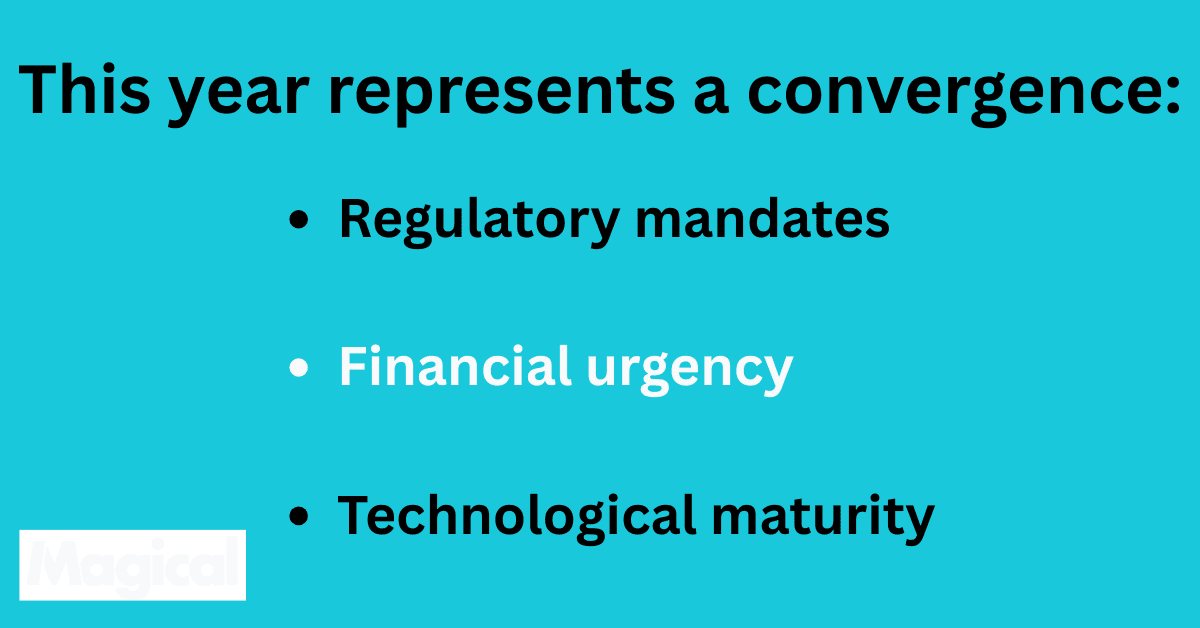
The organizations that win in this environment won’t be the ones who work harder. They’ll be the ones who automate smarter.
What Payer Workflow Automation Actually Looks Like in 2025
Automation used to mean templates, macros, and rigid rules.
If something didn’t follow the script, it broke.
But in 2025, payer workflow automation looks entirely different.
It’s flexible.
It learns.
It adapts.
And most importantly, it works with the messy, unpredictable realities of real-world healthcare admin work.
Here’s what that evolution looks like in practice.
2025 Automation: Not Just Faster, Smarter
Modern payer workflow automation doesn’t just handle repetitive tasks. It:
Understands payer-specific logic and formats
Flags potential issues before claims are submitted
Learns from denial trends
Pulls data from multiple systems and pre-fills everything accurately
Generates documentation and form content based on real-time context
It works like a highly trained admin assistant who already knows every payer’s quirks. And it never gets tired, distracted, or burned out.
Feature Evolution: 2015 → 2025
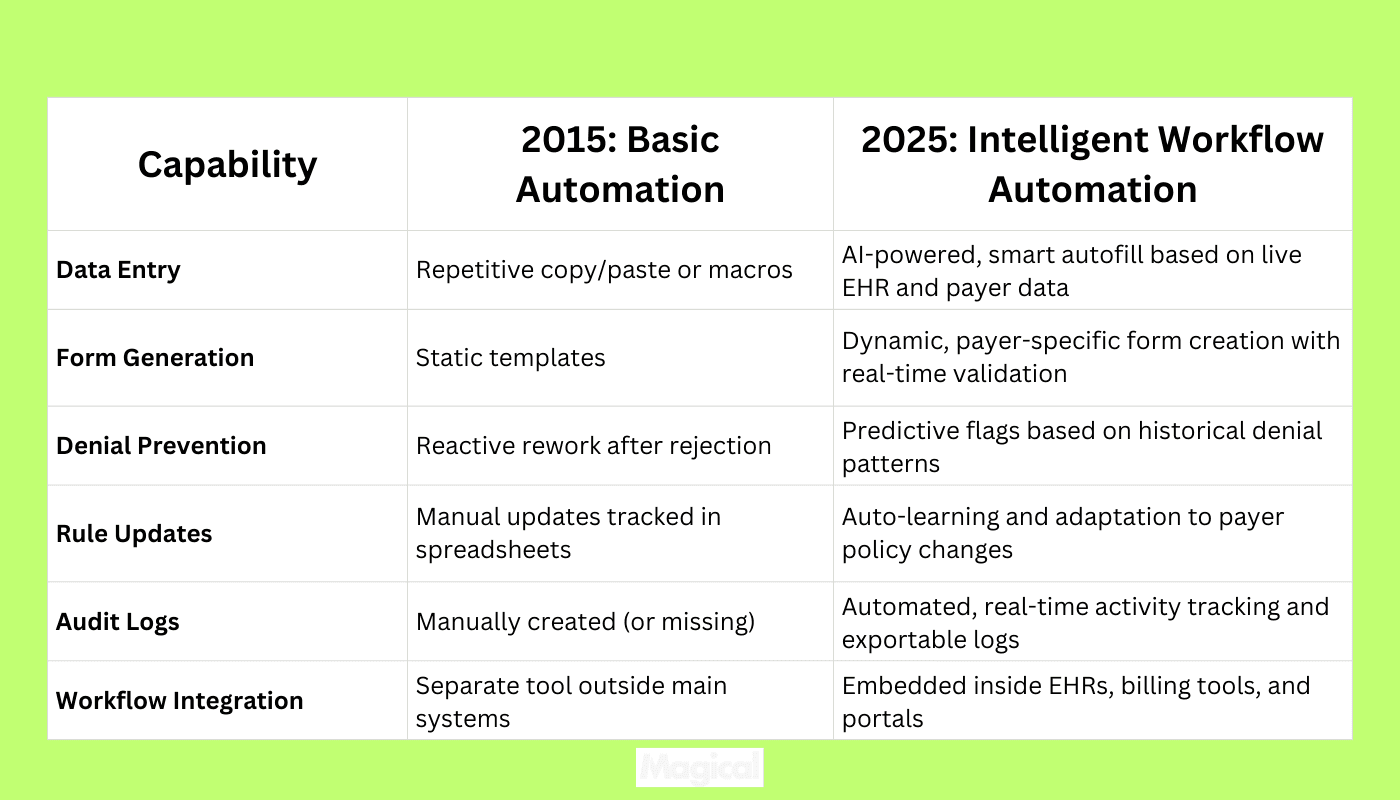
This Is the New Standard
If a system can’t:
Flag errors before submission
Adapt to payer-specific changes
Sync data across your tools
Provide a defensible audit trail
…it’s not automation built for today’s healthcare.
It’s just a faster way to make the same mistakes.
Real-World Results: What Modern Payer Automation Delivers
Automation isn’t valuable because it’s high-tech. It’s valuable because it gets results.
When you automate payer workflows with tools designed for healthcare admin teams, the outcomes are immediate, measurable, and sustainable.
Here’s what that shift actually looks like in the numbers.
Performance Comparison: Manual vs. Automated Payer Workflows
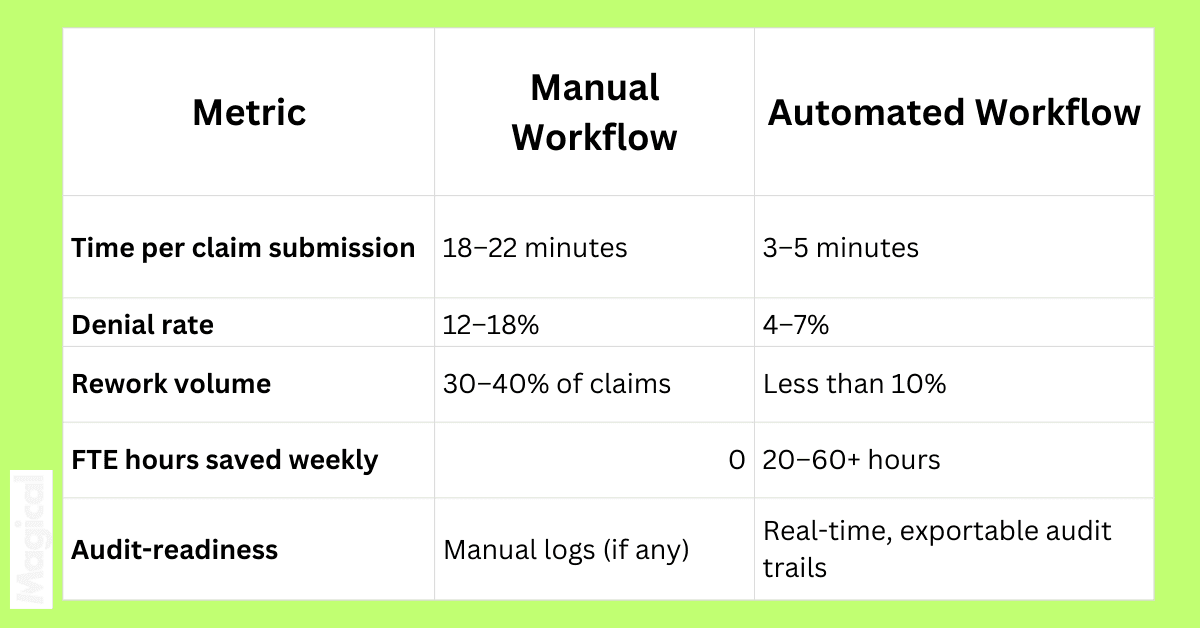
These aren’t projections. They reflect what teams are already seeing on the ground.
TCPA Case Study: 70% Less Time on Payer Compliance
The TCPA Compliance Center faced constant pressure to deliver payer-ready documentation, fast, accurate, and defensible.
Before automation, their team spent hours reformatting forms, cross-checking payer rules, and fixing rejected submissions.
After implementing Magical, they:
Reduced payer documentation time by 70%
Improved consistency across all payer-facing documents
Created automated audit trails for every submission
Result: More time for high-value tasks and fewer rejected claims to chase down.
ZoomCare Case Study: 20+ Hours Saved Every Week
ZoomCare, a network of on-demand healthcare clinics, was growing fast, and their admin workflows couldn’t keep up.
Compliance fields were being filled manually. Claims were delayed by formatting issues. Staff were spending hours on copy-paste tasks.
With Magical’s automation in place, ZoomCare:
Eliminated 20+ hours of manual compliance work per week
Reduced documentation errors and rework volume
Delivered cleaner, faster, with more accurate payer submissions
Result: A smoother, more scalable admin engine.
Automation in 2025 isn’t theoretical. It’s operational.
And it’s already delivering bottom-line impact for healthcare teams across the country.
The Essential Capabilities to Look for in 2025 Automation Tools
If you’re evaluating payer workflow automation in 2025, you’re likely hearing a lot of the same pitch: “AI-driven,” “streamlined,” “intelligent.”
But vague promises don’t reduce denials or speed up documentation.
What matters is whether the tool is built for the actual realities of healthcare admin work.
Below is a clear breakdown of the features that should be non-negotiable in any platform you’re considering.
Feature Comparison Table: Must-Haves in 2025
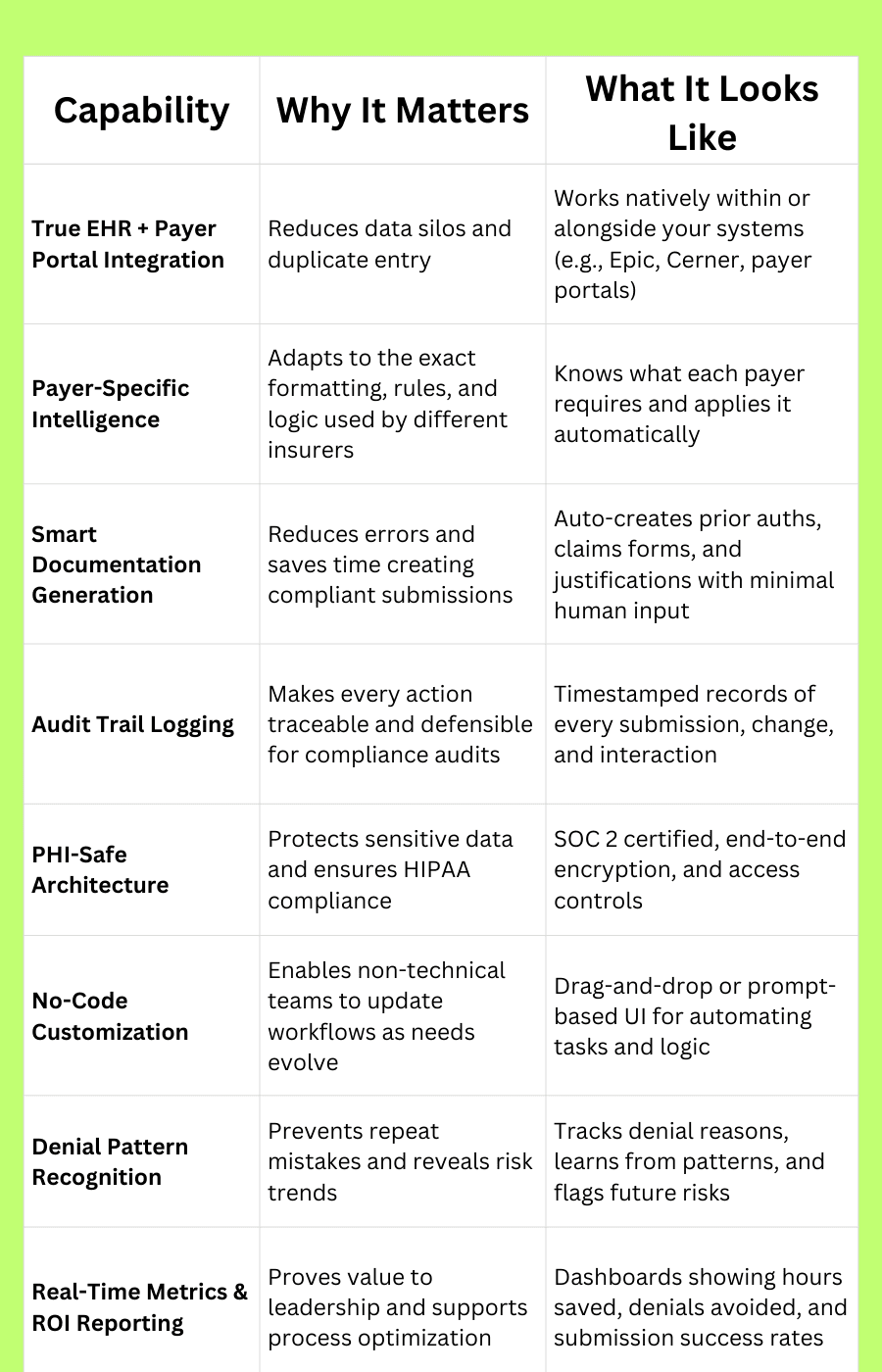
If your automation platform can’t do at least 80% of this today, it won’t be able to keep up with what payers demand tomorrow.
What Sets Magical Apart in the 2025 Landscape
Plenty of platforms promise AI-driven automation. But most still rely on rules-based systems, months-long implementations, or clunky workflows that add complexity instead of removing it.
Magical is different.
It’s designed specifically for healthcare admin teams; the people closest to the work, the bottlenecks, and the pressure to do more with less.
Here’s what makes it stand out.
Fast to Deploy, Easy to Use
Magical doesn’t require IT support, coding experience, or system overhauls. It installs as a Chrome extension, trains in minutes, and integrates seamlessly into the tools your team is already using.
Your staff doesn’t have to log in to another dashboard or learn a new platform. Magical works where they work; filling forms, standardizing documentation, and preventing errors in real time.
No-Code AI Workforce, Built for Admin Teams
You don’t need engineers to automate a workflow. With Magical, your team can:
Create custom automations with drag-and-drop tools or natural-language prompts
Train the AI to handle payer-specific rules
Build and deploy automations in a single afternoon, not weeks
This is automation that empowers the frontline team, not just leadership or IT.
Compliance-Ready, Always On
Magical is built to handle sensitive healthcare data without risk. It’s:
SOC 2 certified
HIPAA compliant
Encrypted end-to-end, with full access control and audit tracking
And because Magical automatically logs every action, your compliance trail is always complete, without anyone on your team needing to remember to do it manually.
Proven Outcomes for Real Teams
WebPT scaled its operations without hiring more admin staff.
ZoomCare saved 20+ hours a week in manual compliance work.
TCPA reduced documentation time by 70% while improving accuracy.
These aren’t best-case scenarios. They’re real results from healthcare teams using Magical right now.
If your team is still manually entering data into payer portals, chasing down rejected claims, or trying to format PDFs to fit outdated rules, Magical was built for you.
The 5 Most Common Mistakes Teams Make When Automating
Not all automation helps. Some of it slows you down, adds complexity, or creates new problems your team didn’t have before.
Here are the five most common mistakes healthcare admin teams make when trying to automate payer workflows, and how to avoid them.
1. Choosing Tools That Don’t Integrate with Existing Systems
A platform that forces your team to switch tabs, export files, or jump through new interfaces will end up unused.
Fix it: Choose tools like Magical that work inside the tools your team already lives in; EHRs, Chrome browsers, payer portals.
2. Thinking Automation = Replacement
Automation isn’t about removing people. It’s about removing friction. Expecting a tool to replace your entire rev cycle team is unrealistic and sets adoption up to fail.
Fix it: Automate the repetitive admin tasks first. Let your team focus on judgment, nuance, and exception handling.
3. Overlooking Security and Compliance
Not every “AI tool” is built for PHI. Some platforms lack the infrastructure to handle healthcare-grade data security.
Fix it: Verify HIPAA compliance, SOC 2 certification, and data encryption policies before rolling anything out.
4. Underestimating Change Management
Even the best automation fails if it disrupts workflow too much or requires a long training period.
Fix it: Start with one high-friction process (like prior auth or documentation formatting) and expand from there. Wins build momentum.
5. Automating the Wrong Things First
Trying to automate every workflow at once is overwhelming and unnecessary.
Fix it: Focus on the payer tasks that eat the most time, cause the most denials, or generate the most rework. That’s where ROI lives.
Automation isn’t a magic fix. But when implemented strategically, it turns chaos into consistency and makes teams feel supported, not replaced.
How to Implement Payer Workflow Automation Without Breaking Your Ops
You don’t need a six-month transformation plan to start seeing results.
In fact, the most successful healthcare teams take a phased, focused approach, automating one high-friction process, proving the value, and expanding from there.
Here’s a practical 5-step framework to get started with payer workflow automation the right way.
Step 1: Identify Your Top 3 Admin Bottlenecks
Focus on the repetitive, high-effort, low-reward tasks first.
Common candidates:
Prior authorization documentation
Eligibility verification and data entry
Payer-specific claims formatting
Rework on denied claims
Manual audit trail creation
Ask your team: Where are we losing the most time, and where are errors most common?
Step 2: Map the Manual Workflow
Before you automate anything, document what’s happening now.
Outline each step of the current workflow, from data entry to submission to denial resolution. Include:
Systems used
Touchpoints
Repeat steps
Failure points
This becomes your baseline and shows you where automation will drive the biggest impact.
Step 3: Choose a Tool That Works With What You Have
The best tool is the one your team actually uses.
Look for:
Chrome-based or EHR-embedded automation
No-code customization
PHI-safe, HIPAA-compliant infrastructure
Outcome-based reporting
And make sure the platform offers support for your specific payer workflows, not just generic task automation.
Step 4: Pilot With a Small Team or Region
Roll out automation to one team, region, or payer process. Keep it contained so you can measure results, get feedback, and build momentum.
Track:
Time saved
Errors reduced
Denial rates
Team satisfaction
When the results are clear, scale becomes easy and your team will ask for it.
Step 5: Measure Outcomes and Optimize
Don’t just track activity, track impact.
With Magical, you get clear reporting on:
Hours saved
Tasks completed
Denials prevented
Documentation accuracy
Use this data to refine workflows, expand automation, and justify further investment to leadership.
The Future of Payer Workflows: Autonomous, Adaptive, and Always-On
What if payer workflows didn’t have to be workflows at all?
What if they just…happened?
That’s the future we’re moving toward: where AI doesn’t just follow instructions. It anticipates problems, handles the details, and keeps things moving without human intervention.
In 2025, the most advanced tools already show us what’s possible.
From Reactive to Predictive
Instead of waiting for denials and fixing them later, AI is now capable of flagging risky submissions before they go out the door.
Based on payer history, policy updates, and system patterns, it can alert teams:
"This claim will likely get denied unless X is included."
That kind of foresight turns weeks of rework into a quick fix before the revenue hit.
From Static Rules to Dynamic Intelligence
Legacy tools use rules: if this, then that.
Modern platforms like Magical use machine learning and natural language processing to learn payer behavior, evolve with policy shifts, and apply that logic instantly to new submissions.
As a result, workflows aren’t just automated. They’re adaptive.
From Admin Burden to AI Collaboration
In the very near future, payer automation will look more like collaboration than control.
AI will draft payer documentation for you
It will pre-fill complex fields in seconds
It will surface trends before they become problems
And it will do all of this quietly in the background, while your team focuses on patients, not portals
This Isn’t a Tech Dream. It’s Already Happening.
Magical is building this reality right now. It’s used by over 100,000 organizations and nearly 1,000,000 users, saving teams an average of 7 hours per week.
And because it’s built to learn, Magical only gets faster, smarter, and more aligned with your unique workflows over time.
Final Thoughts: In 2025, the Best Workflows Are the Ones You Don’t Notice
Manual payer workflows are slowing teams down, burning staff out, and draining revenue.
The old way of fixing this (more people, more checklists, more oversight) doesn’t work anymore.
The solution? Automation that’s intelligent, integrated, and outcome-focused.
The best AI software in 2025 does more than reduce admin work. It prevents problems, adapts to change, and gives time back to the people doing the work.
Download the free Magical Chrome extension or book a demo for your team.
Magical is used at 100,000+ companies and by nearly 1,000,000 users to save 7 hours a week on average.