The claim was coded right.
The patient was covered.
The service was necessary.
Still denied, because the diagnosis code didn’t match the LCD.
If you’ve ever spent hours chasing Medicare denials, you already know: Local Coverage Determinations (LCDs) are where clean claims go to die — quietly, frequently, and at massive scale.
You didn’t violate a rule.
You just didn’t match your MAC’s version of what’s “medically necessary” or missed a diagnosis code update that went live last week.
And while your claim scrubber might catch the issue, it doesn’t fix it.
It doesn’t check the LCD database.
It doesn’t swap in the correct ICD-10.
It doesn’t resubmit or document the change.
That’s why smart RCM teams are moving beyond awareness. They’re automating LCD compliance, and they’re doing it without risking documentation gaps, audit flags, or system overload.
This blog is your blueprint for exactly how that works.
Why LCDs Are Still a Top Source of Medicare Denials in 2025
You’d think by now, with all the billing tech out there, that Local Coverage Determinations wouldn’t still be tripping up Medicare claims.
But they are, constantly.
Here’s why:
LCDs Change Frequently and Without Warning
Every MAC (Medicare Administrative Contractor) publishes and updates its own LCDs. These aren’t annual changes. They can happen mid-quarter, mid-month, even mid-week.
CMS published over 230 LCD updates across all MACs in 2024 alone (CMS.gov), affecting everything from lab panels to imaging studies.
If your team misses just one:
A CPT–ICD pairing that no longer aligns
A new documentation requirement
A frequency limitation adjustment
...that claim is dead on arrival.
They’re Region-Specific — and That Creates Complexity
What’s allowed in California under Noridian may be denied in Florida under First Coast.
MACs don’t always agree. That’s by design. They’re allowed to interpret Medicare policy based on local practice trends and utilization data.
That means:
National coverage doesn’t equal local coverage
You can’t rely on a universal rule set
Each claim must be validated against the right LCD for that region, every time
A 2025 MGMA report found that more than 40% of denied Part B claims tied to medical necessity were due to mismatches with local coverage policies, not national ones.
Most Teams Still Handle LCD Checks Manually
Even with claim scrubbers in place, most RCM teams are still:
Downloading PDFs from MAC websites
Searching for relevant CPT/ICD pairings
Updating spreadsheets with coverage rules
Manually reviewing scrubber alerts with zero context
It’s slow, error-prone, and nearly impossible to scale.
That’s why denial rates persist, not because staff are careless, but because LCD compliance has been left out of most automation stacks.
Why LCD Denials Still Happen
Different causes. Same result — denied.
Denials Add Up Fast — and They’re Hard to Catch
Most LCD-related denials come in as:
CO-50: Not medically necessary
PR-96: Non-covered charges
CO-109: Claim not covered by this payer
They look generic on the remittance. Unless someone connects the dots and checks the LCD, the claim might be:
Marked as patient responsibility
Sent to secondary
Written off incorrectly
Reworked weeks later — if at all
According to Becker’s Hospital Review, hospitals lose an estimated $150,000 to $500,000 annually in missed revenue tied directly to LCD misalignment.
LCDs Are a Moving Target You Can’t Manually Track
They’re always changing. They vary by region. They hide inside generic denial codes.
And they aren’t covered by most EHR workflows out of the box.
That’s why the best RCM teams are no longer just monitoring LCDs; they’re automating the entire compliance process, so these denials never happen in the first place.
What LCD Automation Looks Like in the Medicare Revenue Cycle
Automation doesn’t mean giving up control. It means your team stops doing the same LCD rework 50 times a week and starts letting purpose-built agents do it faster, more accurately, and with built-in audit trails.
In 2025, high-performing RCM teams are layering automation into three critical phases of LCD compliance:
Pre-Submission: Detecting LCD Mismatches in Real Time
This is where most teams stop. Your claim scrubber flags a CPT–ICD mismatch based on regional LCD logic.
That’s a good start, but without automation, it triggers a manual review process:
Staff opens MAC LCD database
Searches for correct ICD-10
Cross-checks against clinical documentation
Updates claim and resubmits
It works, but it’s slow. And if your team misses the flag, that claim is getting denied.
With automation:
The AI agent reads the scrubber flag
Pulls the relevant LCD (from the correct MAC)
Locates a valid ICD-10 code from existing documentation
Updates the claim before submission
Logs the action and prepares it for audit
Submission: Getting Claims Out the Door — Correctly
Scrubbers don’t handle claim submission. Most EHRs and RCM platforms still require staff to:
Log in to a clearinghouse or MAC portal
Re-enter claim data
Attach supporting documentation
Apply correct modifier or diagnosis changes
Submit the revised claim
Manually track it for follow-up
With automation:
Once the claim is LCD-compliant, your agent:
Navigates to the MAC portal
Enters the corrected claim details
Attaches necessary documentation (e.g., encounter notes, labs)
Submits
Updates internal logs and dashboards
Teams using automation for Medicare submission report up to 60% faster claim turnaround, with far fewer submission errors.
Post-Submission: Capturing Denials and Preventing Repeat Errors
Even with automation, not every LCD denial is preventable, especially when the LCD changed mid-billing cycle.
That’s why automation is also used to:
Capture denial codes that relate to LCDs
Identify repeat patterns (e.g., certain CPTs getting flagged weekly)
Trigger alerts for provider documentation or coding updates
Route rework to the correct team or agent automatically
This creates a feedback loop. The system gets smarter over time, and LCD compliance becomes proactive, not reactive.
End-to-End LCD Automation in Action
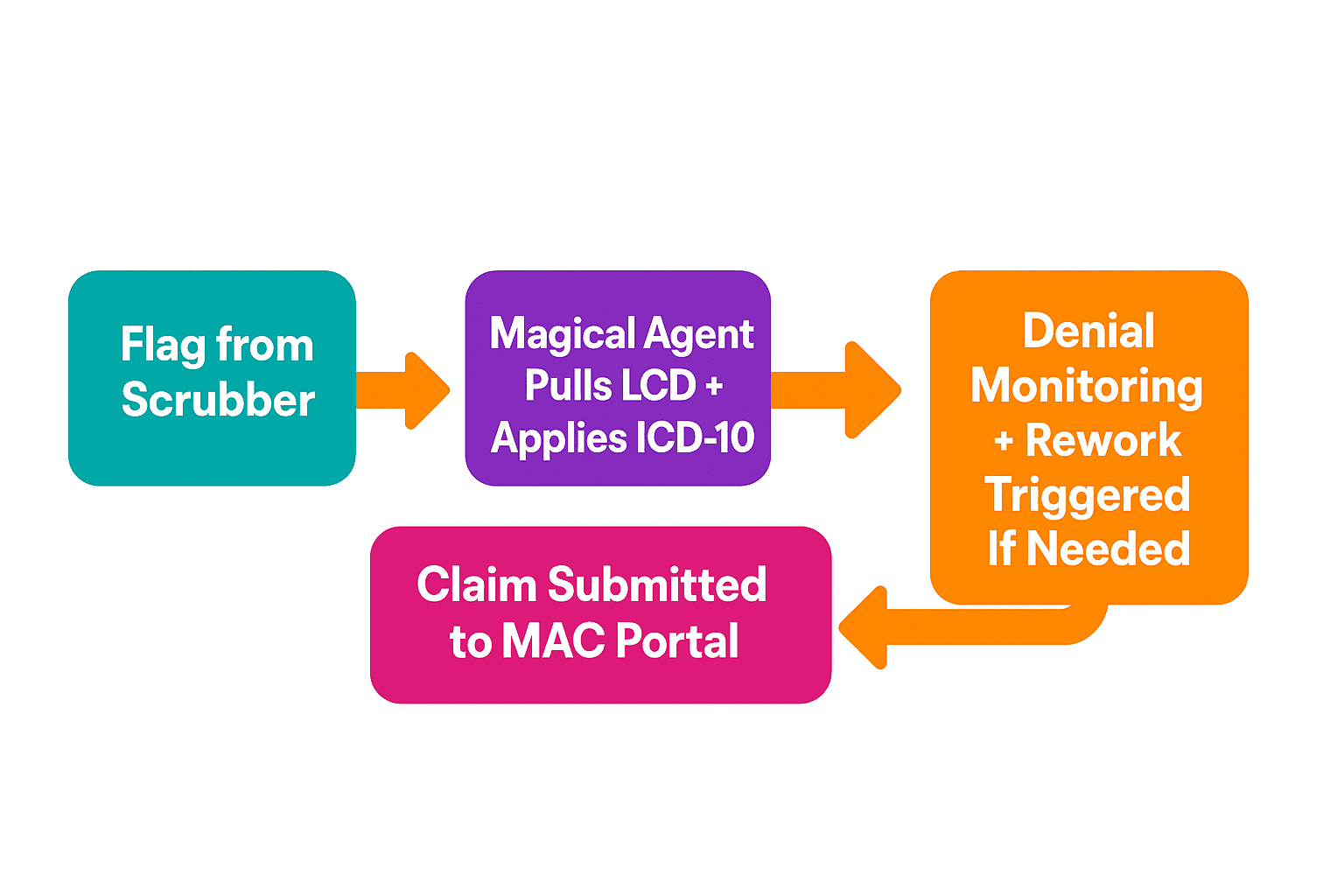
From alert to action — no toggling, no spreadsheets, no guesswork.
What Makes This Work: Context-Aware Automation, Not Static Rules
Most LCD logic is buried inside PDFs or inconsistent MAC databases. Traditional rules-based automation tools can’t navigate that mess.
That’s why teams are using platforms like Magical, where AI agents:
Understand LCD logic by region
Pull from payer portals, not static lists
Read clinical documentation to support ICD choices
Operate across EHRs, clearinghouses, and MAC portals
Document every step with full traceability
This isn’t robotic process automation (RPA).
It’s purpose-built AI that knows how to fix the issue before it becomes a denial.
Final Thoughts: LCD Compliance Shouldn’t Be Manual Work Anymore
Your team didn’t go into healthcare to download PDFs from MAC websites. They’re not here to chase diagnosis codes, resubmit claims by hand, or memorize LCD rules for five different regions.
They’re here to get people paid.
To keep revenue flowing.
To make the billing side of care delivery frictionless, accurate, and fast.
And LCDs — as important as they are — have turned into a manual mess.
But they don’t have to be.
Modern RCM Teams Automate LCD Logic Because It Saves More Than Time
They automate to:
Protect revenue from unnecessary denials
Reduce compliance risk with consistent LCD validation
Improve accuracy across regions and payers
Free their staff to focus on higher-impact work
Move claims faster, with fewer touches
Because when LCD compliance is handled automatically, it stops being a recurring fire, and starts being just another part of a clean, scalable billing system.
Try Magical And Take LCD Rework Off Your Team’s Plate
Magical helps billing teams in healthcare automate the LCD workflows your scrubber doesn’t finish. From pulling coverage rules to applying valid diagnosis codes, resubmitting claims, and logging every step for audit-readiness.
Install the free Magical Chrome extension and let your AI agents:
Match claims to the right LCD in real time
Fix CPT–ICD mismatches using documentation
Submit to MAC portals with no toggling
Prevent the next denial before it ever happens
Because LCDs aren’t going away.
But the manual work they create? That can be automated.