
The claim was coded correctly.
The service was medically necessary.
But Medicare denied it anyway.
Sound familiar?
You’re not alone. Every day, billing and coding teams across the country get blindsided by denials.
Not because the care wasn’t covered, but because it wasn’t covered in that region.
Enter Local Coverage Determinations (LCDs): Medicare’s often-overlooked, frequently changing, and highly regional coverage policies that quietly decide whether your claim gets paid or flagged.
The problem?
LCDs vary across Medicare Administrative Contractors (MACs)
They change constantly
And most billing workflows aren’t built to handle them
If your documentation doesn’t align exactly with the LCD in your region—or if you’re unaware a service even has an LCD—you’re facing one thing: denied.
Let’s unpack what LCDs are, why they matter, and how top RCM teams are navigating them in 2025 without burning out their staff or slowing down reimbursement.
We need to clear the fog on one of Medicare’s most denial-prone policies and finally explain LCDs the way your billing team needs to hear it.
What Is a Local Coverage Determination (LCD) in Healthcare Billing?
At its core, a Local Coverage Determination (LCD) is a Medicare policy issued by a Medicare Administrative Contractor (MAC) that outlines:
Which services are covered
Under what clinical conditions
And which CPT/HCPCS codes require specific ICD-10 diagnosis codes for payment
Translation? If you bill Medicare, LCDs are the playbook for getting paid. Ignore them—or misalign your documentation—and you’re walking straight into a denial.
LCDs Are Regional & That’s What Makes Them Tricky
Unlike National Coverage Determinations (NCDs), which apply across all states and contractors, LCDs are region-specific.
Each Medicare Administrative Contractor (MAC) serves a geographic region and publishes its own LCDs based on:
Local provider practice patterns
Regional utilization trends
MAC-specific interpretations of national guidelines
There are 7 primary MACs in the U.S., including Noridian, Novitas, Palmetto GBA, and NGS, each covering distinct states and jurisdictions.
That means a procedure that’s covered in California (under Noridian) may be denied in Texas (under Novitas), even with identical coding and clinical documentation.
What’s Inside an LCD?
Each LCD is a published policy document that includes:
A list of covered CPT/HCPCS codes
The ICD-10 diagnosis codes that must be linked for coverage
Documentation requirements (e.g., imaging, lab results, clinical notes)
Frequency limits and conditions of coverage
Any non-covered services or exclusions
Quick example:
CPT 93000 (Electrocardiogram)
Covered only for specific ICD-10 codes (e.g., chest pain, arrhythmias)
Must be supported by documentation of clinical necessity per LCD policy
A missed ICD-10 match? A missing note? Automatic denial.
And unless your scrubber or biller catches it pre-submission, that claim goes unpaid, and AR days stack up.
Why LCDs Matter for Medicare Billing in 2025
Payers are getting stricter, and MACs are updating LCDs more frequently to crack down on overutilization and improper billing.
In 2024 alone, CMS reported over 200 LCD revisions across MACs—some with major coverage changes for labs, telehealth, imaging, and orthopedic services.
And because LCDs can be updated at any time, teams that aren’t proactively monitoring those changes are at risk of:
Billing services that are no longer covered
Missing new documentation rules
Submitting claims that will never be reimbursed
LCD vs. NCD: Know the Difference
Coverage Type | Governing Body | Applies To | Changes Frequently? | Requires Monitoring? |
LCD | Local MAC (e.g., Noridian, Palmetto) | Specific regions | ✅ Yes | ✅ Yes |
NCD | CMS (national level) | All U.S. providers | 🚫 Less often | ✅ Yes |
Tip: Even when an NCD exists, a local MAC may still publish an LCD with additional documentation or billing rules.
What’s in an LCD?
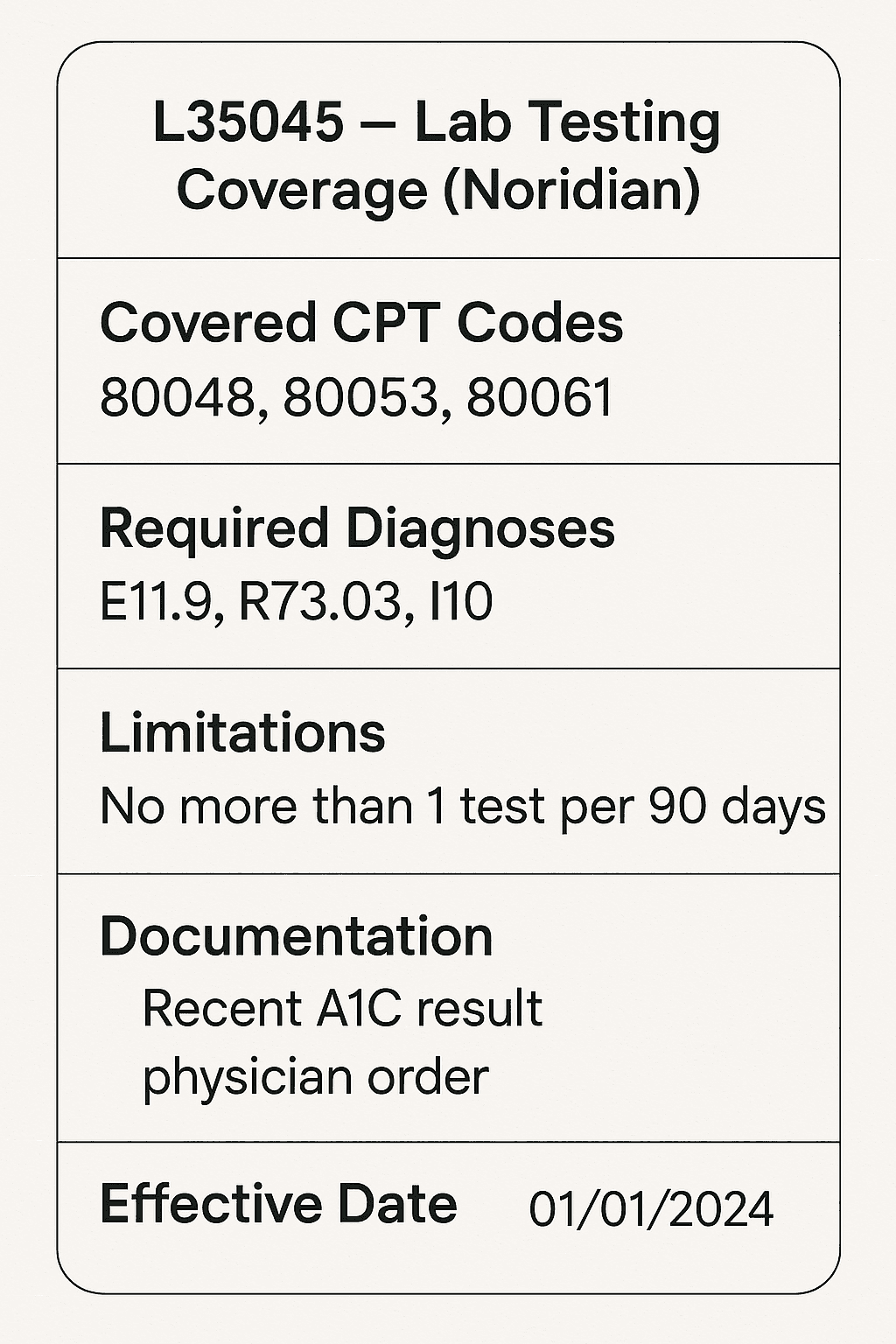
Disclaimer: Each LCD is MAC-specific and subject to change. Always verify through your contractor’s official site.
LCDs Decide Whether Medicare Will Pay Your Claim
They’re not guidelines. They’re not optional. They are policy, and if your coding and documentation don’t match, you don’t get paid.
That’s why understanding LCDs and building workflows that check against them pre-submission is non-negotiable in modern RCM.
What Happens When You Ignore an LCD?
In a perfect world, every claim you submit matches Medicare’s local policies down to the code.
In reality? That single missed ICD match, outdated CPT, or overlooked documentation requirement buried deep in an LCD means one thing:
Denied.
And here’s the problem—it’s rarely just one claim.
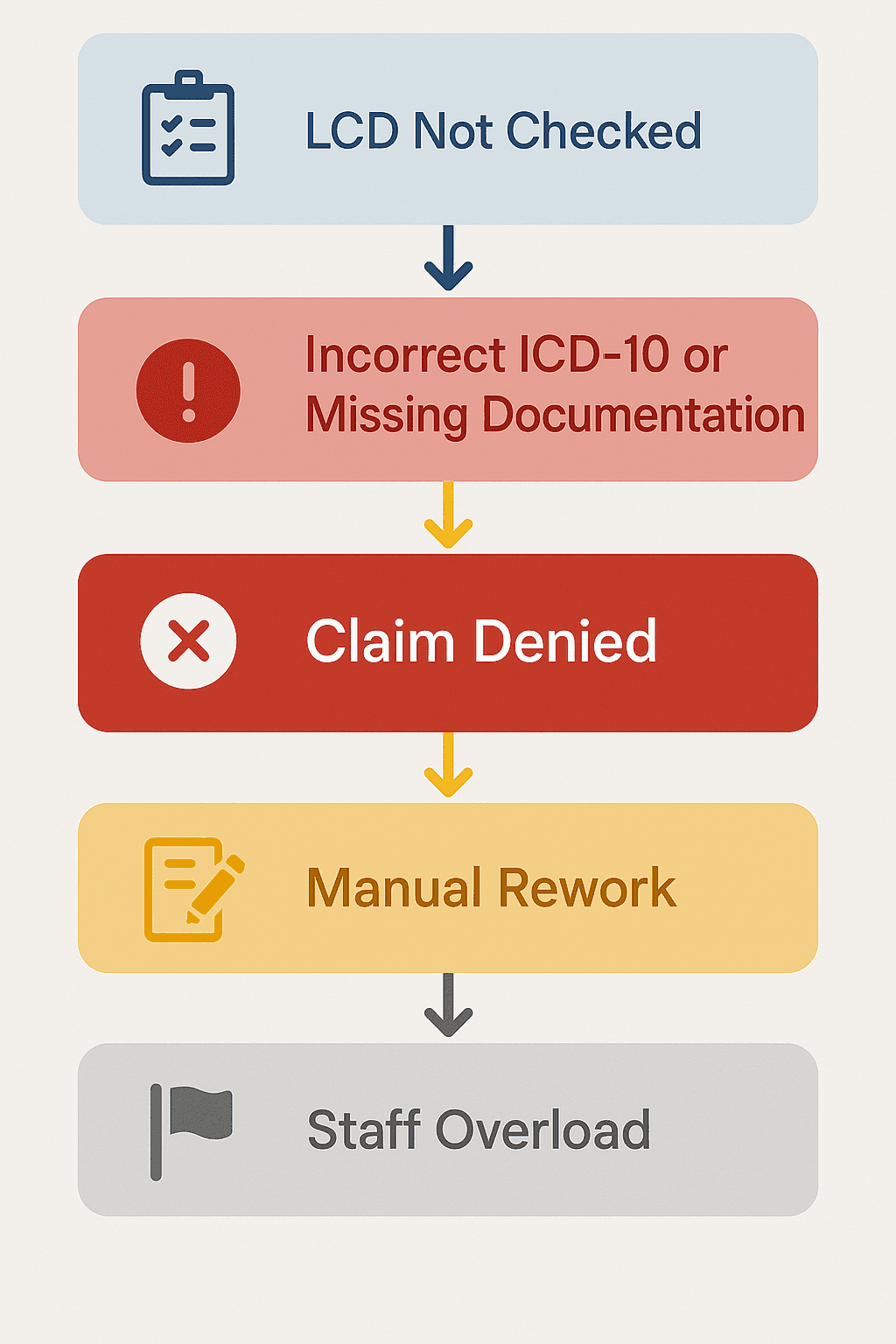
The Claim Gets Denied, Fast
When a submitted claim doesn’t meet LCD requirements:
It’s flagged automatically in the MAC system
Denied for lack of medical necessity or incomplete documentation
Kicked back to your clearinghouse or payer portal with a remittance denial code (e.g., CO-50, PR-96)
You may not even know it’s LCD-related until someone on your team deciphers the code and connects the dots.
Modifier and diagnosis mismatches are among the top denial reasons for Medicare claims, and many are tied directly to LCD coverage logic (MGMA 2024).
Your Team Has to Rework the Claim Manually
Once denied, a staff member has to:
Identify the associated LCD
Review the exact billing error (e.g., missing ICD-10, incomplete documentation)
Correct the claim based on LCD requirements
Resubmit the claim through the MAC’s portal or clearinghouse
Track the status and update internal logs
That’s 20–30 minutes of rework, and that’s assuming your team catches it quickly and doesn’t miss the resubmission window.
Multiply that by dozens of claims per week and you’ve got:
Higher labor costs
Delayed cash flow
Burned-out billing teams
You Risk Recurring Denials Across Entire Service Lines
Ignoring LCDs doesn’t just affect one-off claims. It can trigger mass denials across categories like:
Routine lab panels
Diagnostic imaging
Telehealth visits
Orthopedic injections
Mental health assessments
If you submit hundreds of claims under the wrong diagnosis code, without checking the current LCD, you’ll be dealing with a backlog of unpaid services.
One Midwest billing company reported over $75,000 in delayed payments due to changes in LCDs for lab screenings in 2023. They weren’t flagged by their scrubber and weren’t caught until weeks later.
Your Organization May Be Flagged for Medical Necessity Audits
Repeat denials linked to LCD mismatches send a clear message to your MAC: This provider isn’t following coverage policy.
That can lead to:
Pre-payment reviews
Increased documentation requests (ADRs)
Post-payment audits by CMS or a Recovery Audit Contractor (RAC)
Potential recoupment of previously paid claims
The LCD Domino Effect
Why It’s Not Enough to Just “Know” the LCDs
LCD policies are complex and fluid. Teams that try to manage them by
Checking PDFs manually
Bookmarking contractor websites
Updating static spreadsheets
...are always a step behind.
To prevent LCD-related denials at scale, RCM teams are now:
Embedding LCD checks into their claim scrubbers
Using AI tools to match diagnosis + procedure logic in real time
Automating resubmission workflows when LCD flags arise
We’ll dig into exactly how to do that next.
How to Stay Compliant with LCDs, Without Overloading Your Team
It’s one thing to understand LCDs.
It’s another to keep up with them—daily—while juggling claims, denials, resubmissions, and shifting payer policies.
Manually managing LCD compliance doesn’t scale. Not when MACs update policies mid-quarter, and not when every claim requires perfect CPT–ICD alignment backed by documentation.
The good news? RCM teams are finally getting smarter about how they operationalize LCDs.
Here’s how they’re doing it in 2025 without piling on more headcount or overtime.
Monitor LCD Changes Through Official MAC Channels
Every Medicare Administrative Contractor maintains a public-facing LCD library and publishes:
Policy updates
Draft LCDs
Coverage decisions
Implementation timelines
Examples:
Noridian LCD Database
Novitas LCD Search
Palmetto GBA LCD Look-Up
Assign a staff member or coder to review LCD updates weekly from your regional MAC and subscribe to update notifications if available.
According to CMS, LCD revisions are published every 1–2 weeks across jurisdictions, with many directly affecting claim eligibility.
Use Claim Scrubbers That Cross-Check Against LCD Rules
Modern claim scrubbers (like Waystar, Optum, or FinThrive) include LCD validation logic, which can:
Cross-reference submitted CPT/HCPCS codes with valid ICD-10 codes for your MAC region
Flag mismatches before the claim is submitted
Catch missing documentation fields required by the LCD
This is a strong first line of defense, but it only works if your scrubber is updated and configured correctly for your jurisdiction.
In a recent RevCycle Intelligence report, RCM teams using LCD-aware claim scrubbers reduced medical necessity denials by up to 31% year-over-year.
Automate the LCD Compliance Workflows Between Systems
Even if your scrubber flags an LCD issue, someone on your team still has to:
Open the claim in your EHR or billing software
Find and insert the correct ICD-10 code
Upload any supporting documentation (e.g., labs, encounter notes)
Resubmit the claim via your MAC’s portal or clearinghouse
Update your claim status log or billing tracker
That’s 15–30 minutes of manual work, just to meet an LCD rule.
That’s where Magical comes in.
How RCM Teams Use Magical to Automate LCD Compliance Workflows
Magical doesn’t replace your scrubber—it takes over after your scrubber flags the problem.
Real use case: LCD mismatch for a diagnostic lab panel
Before: Scrubber flags incorrect ICD-10
→ Staff opens EHR, finds right diagnosis, updates claim, resubmits
→ Logs change in spreadsheetWith Magical:
→ Agent reads the scrubber alert
→ Locates the correct diagnosis based on lab result
→ Enters ICD-10 into EHR or billing form
→ Navigates to MAC portal and submits
→ Logs action, timestamp, and status in internal tool
Result: Claim resubmitted in 1–2 minutes instead of 15.
No toggle. No errors. No burnout.
Scalable LCD Compliance Stack
Layer | Tool/Strategy | Purpose |
Monitoring | MAC LCD alerts + email subscriptions | Stay up to date on policy changes |
Validation | LCD-aware claim scrubber | Catch mismatches before submission |
Automation | Magical AI agents | Fix LCD mismatches and resubmit instantly |
When all three layers work together, LCD denials drop, and claims get paid faster.
Manual LCD Compliance ≠ Scalable
To stay compliant and get paid in today’s Medicare landscape, your team needs more than PDFs and Google Sheets.
They need real-time insight, pre-submission validation, and automated execution.
That’s how teams are going from reactive rework to proactive reimbursement—without adding another FTE.
Final Thoughts: LCDs Are Quiet Revenue Killers. Magical Makes Them Loud, Clear, and Automated.
Local Coverage Determinations don’t show up in red text. They don’t wave a warning flag.
But when they’re missed, they quietly wreck your revenue.
They deny claims that should have been paid.
They trigger audits over routine services.
They eat up your team’s time with preventable rework.
And they do all of it without anyone realizing it, until it’s too late.
That’s why the best billing teams in 2025 are done managing LCDs the old way.
Modern RCM Teams Don’t Just Monitor LCDs. They Automate Them
Because LCD policies change constantly…
Because your MAC’s rules are different than your neighbor’s…
Because scrubbers can flag the issue, but can’t fix it…
You need automation.
You need AI agents that:
Catch LCD issues flagged by your scrubber
Locate the right ICD-10 or documentation
Resubmit claims to the MAC instantly
Log everything for audit-readiness
Do it all in under 2 minutes—across systems, portals, and formats
That’s what Magical does.
It bridges the gap between policy awareness and payment.
Try Magical Free and Automate the LCD Work That’s Slowing You Down
Magical is used by nearly 1 million users and over 100,000 companies, including teams in healthcare, finance, and insurance.
Install the free Magical Chrome extension and start automating the claim rework your team shouldn’t still be doing.
When LCDs are this complex and this critical, your team needs more than awareness.
They need automation that does the work.