
The claims look simple.
Basic services. Routine visits. Standard codes.
You’ve submitted them hundreds of times before.
So why are they still eating up your team’s time?
Because with Medicare, even your most routine claims demand:
Exact CPT/ICD-10 pairings
Modifier logic aligned to LCDs and NCDs
Documentation that meets constantly shifting MAC expectations
It’s not the complex cases slowing you down. It’s the repeatable, high-volume workflows that should be frictionless… but aren’t.
Every flagged claim still triggers a manual review.
Every submission still happens in real time, across multiple systems.
And every step introduces risk: compliance gaps, delays, denials, audits.
Here’s the good news: those steps are automatable.
We’re not just talking about “AI in healthcare.”
We’re showing how real RCM teams are automating Medicare claim scrubbing and submission, without violating compliance protocols or payer rules.
Let’s break it down.
Why Medicare Routine Claims Are Anything But Simple
“Routine” doesn’t mean “low risk.”
If anything, routine Medicare claims—labs, follow-up visits, diagnostics, and screenings—carry some of the highest compliance pressure in RCM.
Why? Because they happen hundreds or thousands of times per week, and each one has to hit a moving target:
Local Coverage Determination (LCD) rules
Modifier logic
Diagnosis–procedure code alignment
Submission formatting that varies by MAC
Documentation requirements that shift quarter to quarter
When you're submitting that volume of claims to Medicare, any small error scales quickly into:
Denials
Resubmissions
Manual rework
Delayed reimbursement
MAC audits
The Volume Problem: Routine Claims Make Up 80–90% of Medicare Submissions
Let’s look at the data:
According to CMS Medicare Claims Data, over 90% of Part B claims processed in 2023 were for routine services like labs, screenings, and E/M visits.
And most of them include:
CPT codes that look familiar (e.g., 36415, 99213, 80053)
Modifiers that must reflect medical necessity (e.g., 25, 91)
ICD-10 codes that need to match the MAC’s LCD precisely
The Medical Group Management Association (MGMA) found that routine coding issues—modifier misuse, LCD mismatches, and missing documentation—accounted for 47% of Medicare denials in multispecialty clinics.
The Risk Problem: More Volume = More Scrutiny
MACs are watching. CMS is tracking. And Medicare billing audits increasingly target high-frequency CPTs billed without:
Justifying ICD-10 codes
Appropriate modifier use
Evidence of medical necessity
The result?
Repetitive denials that block cash flow
Prepayment reviews for entire service lines
Staff exhaustion from doing the same fix 50+ times a week
In 2024, OIG audit data highlighted routine tests billed under modifier 91 as a high-risk area for improper payments across multiple MACs.
The Workflow Problem: Manual Scrubbing and Submission Is Still the Norm
Here’s what “routine” looks like inside most billing departments:
Claim is generated in the EHR
Staff manually validates CPT + ICD-10 pairing
Adds modifier (maybe)
Scrubber flags LCD mismatch
Someone finds the LCD, updates diagnosis
Claim is manually resubmitted via MAC portal
Team logs change in a spreadsheet or ticketing tool
Repeat. Repeat. Repeat.
Each “simple” claim takes 5–10 minutes, and introduces a dozen places for human error.
Visual Opportunity: The Real Workflow for a Routine Claim
Step | Manual Workflow | With Automation (Magical) |
LCD flag from scrubber | Staff reads PDF | Agent checks MAC’s LCD logic |
Find appropriate ICD-10 code | Coder looks it up | Agent selects based on context |
Modifier application | Staff toggles between tools | Agent enters modifier in form |
Resubmission | Manually via portal | Agent navigates and submits |
Internal log update | Spreadsheet/manual note | Agent auto-logs change |
Routine doesn’t mean easy. It means it should be automated.
Routine = Risk, Delay, and Burnout
Medicare routine claims aren’t simple—they’re where most of your time, denials, and audit risk live.
And as volumes increase and compliance gets tighter, manual workflows simply won’t scale.
Scrub First, Submit Fast: How to Layer Automation on Top of Claim Scrubbers
Scrubbers are essential, but incomplete. They tell you when something’s wrong with a Medicare claim.
But they don’t fix it.
They don’t move across systems.
They don’t resubmit the claim.
And they definitely don’t log the update for audit readiness.
Your scrubber is your alarm. Automation is your response team.
To truly scale Medicare routine claim management, smart RCM teams are layering automation on top of their scrubber alerts, so the right agent takes action the moment a flag appears.
How Scrubbers Work (and Where They Stop)
Most modern claim scrubbers (Waystar, Optum, FinThrive, Experian) are configured to:
Cross-check CPT/ICD-10 codes for LCD/NCD alignment
Flag modifier misuse (e.g., 25, 91, 59)
Detect medically unnecessary services (per payer policy)
Catch frequency violations and missing documentation
But here’s where they stop:
Action | Scrubber Handles It? |
Detect LCD mismatch | ✅ Yes |
Identify missing modifier | ✅ Yes |
Insert correct modifier | ❌ No |
Update ICD-10 code in EHR | ❌ No |
Resubmit to MAC portal | ❌ No |
Log change for audit trail | ❌ No |
A 2024 Kaufman Hall survey found that over 55% of claim denials related to Medicare LCDs were flagged pre-submission, but never corrected due to staff bottlenecks.
The Automation Layer: From Alert to Action in Seconds
This is where Magical’s AI agents come in.
Your scrubber flags the issue.
Magical takes it from there.
Here’s what that looks like in real workflows:
Scenario 1: Modifier 91 Missing on a Repeat Lab Test
Scrubber flags the omission
Magical locates the original test entry
Applies Modifier 91 to repeat CPT code
Navigates to MAC submission portal
Submits corrected claim
Logs action in internal billing dashboard
Total time saved: 8–10 minutes per claim
Scenario 2: CPT–ICD Mismatch for LCD L37079 (Noridian)
Scrubber flags denial risk for routine screening
Magical pulls updated ICD-10 from documentation
Replaces incorrect code in claim form
Resubmits directly via clearinghouse
Notifies billing lead + logs timestamped correction
No PDF hunting. No toggling. No delay.
Scenario 3: High-Volume Batch of Lab Claims Flagged for Missing Justification
Magical scans all flagged claims
Identifies missing A1C or encounter note
Matches documentation to claim
Bundles and submits corrected batch to MAC
Logs correction path + notes for audit readiness
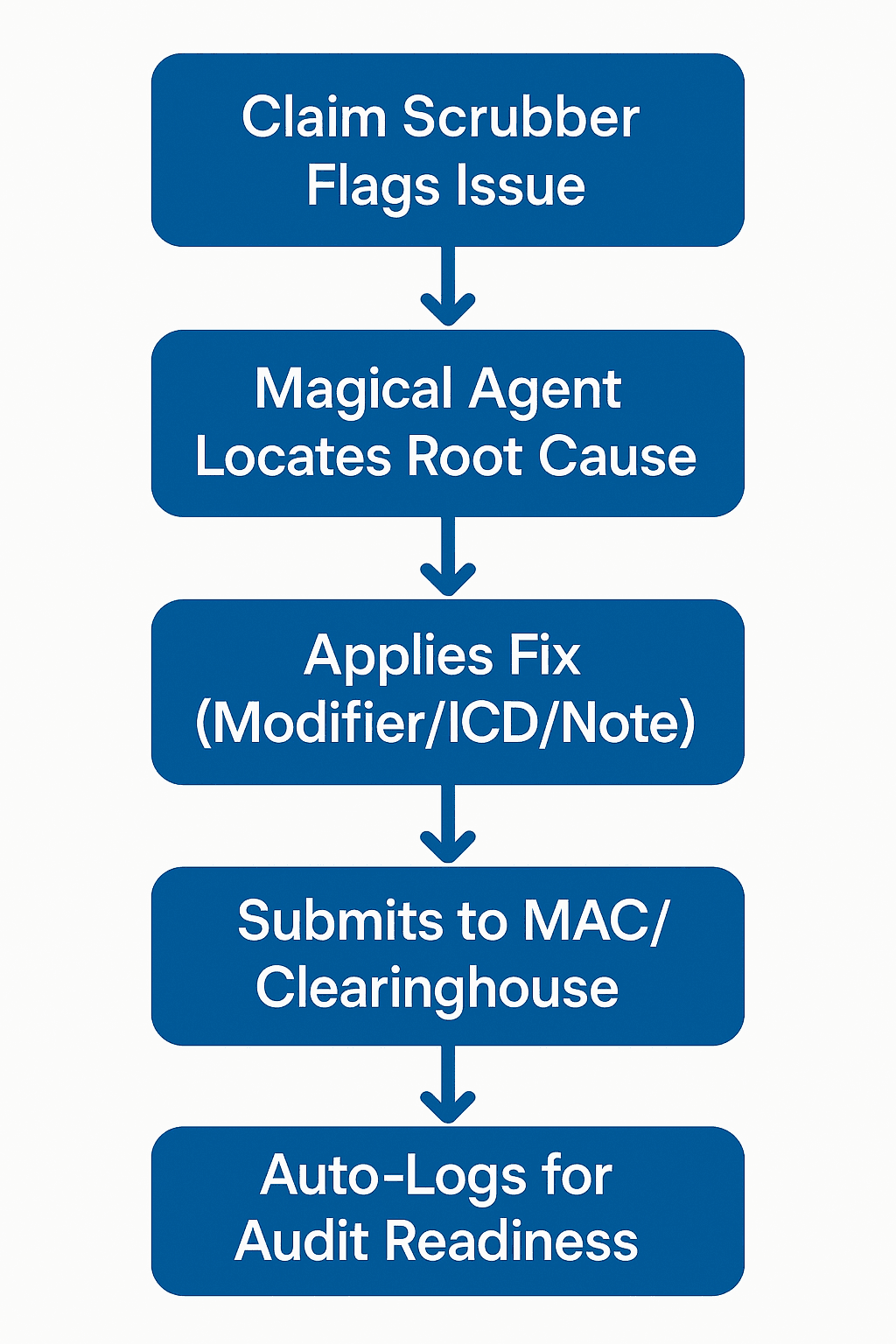
Claim scrubber ≠ claim solution. Magical closes the loop.
Why Magical Works: Focused AI, Not Generic Automation
Magical isn’t a macro tool or rules-based workflow hack.
It’s powered by AI agents that:
Understand payer logic
React to structured and unstructured data (PDFs, portals, EHR fields)
Execute across systems (EHRs, billing tools, payer portals)
Work 24/7 without needing to “remember” which LCD applies where
That’s how billing teams are finally closing the loop between claim scrubber alerts and paid, audit-proof claims, without more staff or more time.
Final Thoughts: Clean, Compliant, and Scalable: The Future of Medicare Claim Management
You don’t need a bigger billing team. You need a smarter system.
A system that flags errors early. Fixes them fast. Submits with confidence.
And logs every step for audit readiness.
That’s what modern RCM teams are building—especially when it comes to high-volume, high-risk Medicare claims.
Because they’ve learned the hard way that routine doesn’t mean easy—it means:
Easy to miss
Easy to repeat
Easy to break… at scale
So instead of throwing more people at the problem, they’re using scrubbers for precision and AI agents for execution.
Why This Matters Now
Medicare policies are changing faster than ever. MACs are tightening LCD enforcement.
Denials are trending up.
And billing teams are already stretched thin.
According to the AAPC, over 61% of coders and billers report increased workloads tied to modifier use, LCD documentation, and repeat claim resubmissions.
That’s why the organizations winning in 2025 are those who’ve embraced a hybrid approach:
Use scrubbers to catch it
Use Magical to fix it
That’s how they’re turning what used to be 10-minute claim tasks into fully automated flows, without sacrificing accuracy or compliance.
Try Magical Free & Stop Wasting Time on Routine Claim Rework
Magical isn’t just an automation platform.
It’s the bridge between flagged and fixed—built for high-volume Medicare workflows and trusted by over 100,000 companies and 1 million users.
Install the free Magical Chrome extension and let your AI agents:
Handle routine scrubber flags
Fix modifier, ICD, and LCD issues
Submit directly through MAC portals
Log changes for audit-proof billing
Because your team has better things to do than reworking claims that should’ve been paid the first time.